Copy user roles
Org Admins who manage permissions at the project level can copy users roles to one or more projects.
Unavailable on these instances
This is a time saver for organizations who need to consistently manage permissions across their projects. Available to all users who have permission to configure user roles.
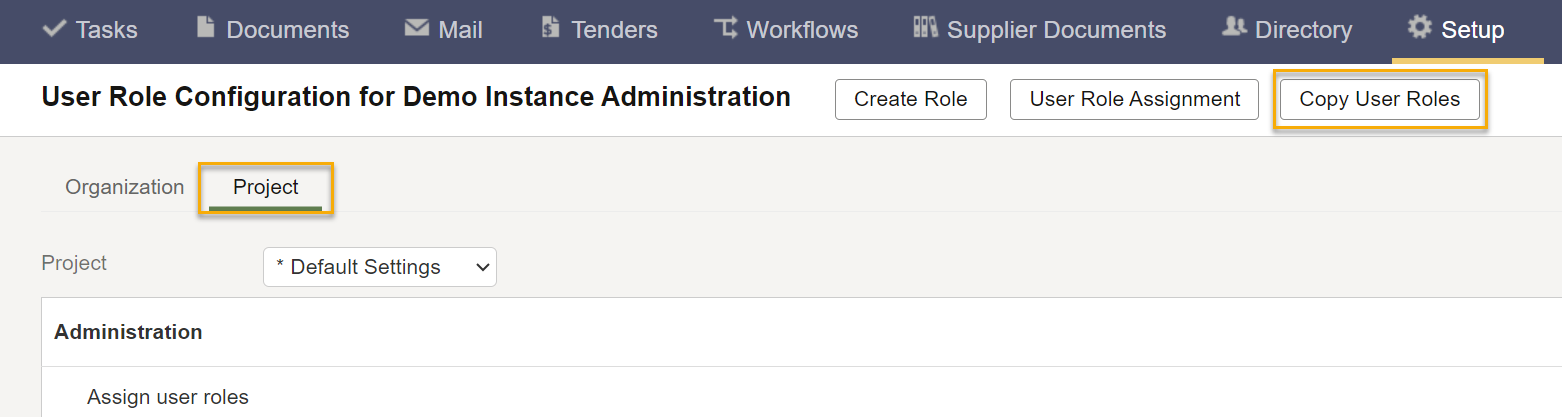
- Click Setup and select User Role Configuration.
- Click the Project tab.
- Click Copy User Roles.
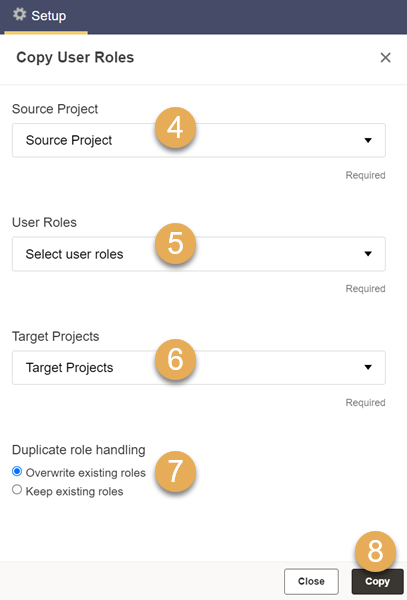
- Select the project you want to copy the project-level roles from.
- Choose the user roles to be copied.
- Select the project(s) to copy the roles to.
- If a role name already exists on the destination project(s), choose if the copied roles should overwrite the existing roles, or not.
- Overwrite existing roles: All roles will be copied and overwritten in the destination project(s).
- Keep existing roles: If a role name already exists on the destination project(s), that role will not be copied.
- Click Copy.