
サポートセントラル



2026年4月
本リリースでは、ワークフローのカスタマイズ可能なスタンプ、提出の準備が完了しているテスト計画の検索、入札案内への閲覧専用アクセス、プロジェクト活動報告の柔軟な日付設定など、さまざまな機能強化をお届けします。

本リリースの主な対象者:
- ワークフローのスタンプオプションを拡充したい審査担当者。
- 提出可能なテスト計画を探す必要があるテスト計画マネージャ。
- 入札案内への閲覧専用アクセスを提供したい発注者。
- 特定期間にわたる使用状況を追跡したいデータアナリスト。
- 不要なレビュー結果を整理したい管理者。
文書
最新情報
新しい強化版アップロード
【4/23 更新】2026年3月リリースより。
- 本リリースでは、すべてのユーザーが自動的に新しい強化版アップロード機能に移行します。
- 「強化版アップロード機能」では、柔軟なアップロード・テンプレートと、直感的に操作できる洗練されたアップロードフローを提供します。今回の更新は、将来的に複数のファイル形式を1つの文書として登録することを可能にする、アップロード機能のさらなる強化の基盤となります。
- より高度な機能の実装を可能にするために、今後数カ月の間にこれまで提供してきた従来のアップロード機能はすべて提供を終了する予定です。
- これまで使用していた機能の提供が終了するまでの間は、以前の方法(機能)に戻ることが可能です。
- 強化版アップロード機能の詳細はこちらをご覧ください。

一つで全フロー対応の万能テンプレート
【4/23 更新】2026年3月リリースより。
- 各アップロードプロセスごとに別々のテンプレートを維持する必要はなくなりました。
- 新しい強化版アップロードを使用すると、利用可能な、どのアップロードフローにも使用できます。例えば、一括処理プロセス からテンプレートをダウンロードしたら、「メタデータのみ更新」プロセスでも使用できます。
- 適用範囲:「文書を追加または更新」、「プレースホルダーを追加または更新」、「一括処理」、「メタデータの更新のみ」
- 各アップロードプロセスのルール(バリデーション)はこれまでと変わりません。例えば、プレースホルダーを作成する際は、「ファイル」の列は無視されますが、文書を更新する際は、必須となります。
- 新しい強化版アップロードでのみご利用可能です。
プロジェクト用のアップロードテンプレートを選択
【4/23 更新】2026年3月リリースより。
- 貴重なフィードバックにお応えして、プロジェクト管理者は、プロジェクトで使用するアップロードテンプレートを設定できるようになりました。
- デフォルトでは、文書タイプにプロジェクトフィールドを使用しているプロジェクトは、各文書タイプごとにタブが設けられた複数シートのテンプレートが使用されます。その他のプロジェクトでは、利用可能なすべての文書項目とプロジェクトフィールドが一つのシート内に設けられた単一シートのテンプレートが使用されます。
- 新しい プロジェクト環境設定 により、他の設定に関係なく、プロジェクトのテンプレートを選択できます。文書タイプにプロジェクトフィールドを使用している場合でも、単一シートのテンプレートに切り替えて、利用可能なすべての項目を一箇所で確認することができます。
- どちらのテンプレートでも、単一選択フィールド用のドロップダウンや、ファイルをアップロードした際にはファイル名が自動入力される機能など、面倒な手間が省ける機能が備わっています。
- アップロードと一括処理設定内のメタデータテンプレートは、新しい強化版アップロードにのみ適用されます。

機能強化・修正
強化版アップロード機能でZipファイルを解凍
- 新しくなった強化版アップロードでは、Zipファイルの展開をサポートします。
- アップロードプロファイル でZipファイルを展開するように設定されている場合、アップロードされたZipファイルは一時保存ファイルエリアに個別のファイルとして展開されて保存されます。
- Zipファイルを展開保存したくない場合は、アップロードプロファイルで設定を解除すると、Zipファイルのまま単一の文書として登録できます。
- Zipファイルをアップロードするための専用画面はありません。
- この動作は、新しくなった一括処理機能にも適用されます。
ワークフロー
最新情報
カスタム・ダイナミック・スタンプ
- 【4/23 更新】本機能の提供は延期されました。今後のリリースで提供予定です。
フィールド
最新情報
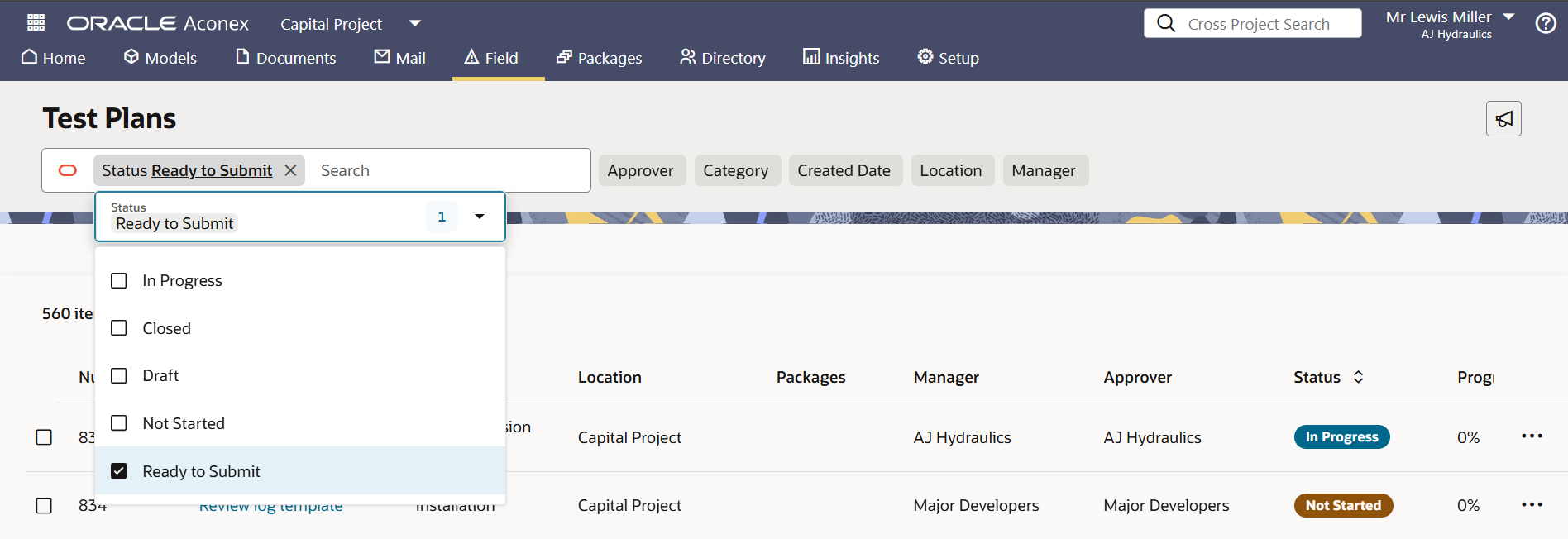
提出可能なテスト計画を見つける
- 新しい「提出準備完了」ステータスにより、点検作業が完了して 提出の準備が完了しているテスト計画を見つけやすくなりました。
- テスト計画のすべての作業が終わると、テスト計画のステータスが自動的に「提出準備完了」に変更されます。
- 「提出準備完了」のテスト計画の作業が再開されると、テスト計画のステータスは、「進行中」に変わります。
- 承認者がテスト計画の内容に納得できない場合は、「差し戻し(Request Resubmit)」を選択できます。テストプランのステータスは「提出準備完了」に戻ります。
- マネージャが提出を取り下げた場合、ステータスは「提出準備完了」ステータスに戻ります。
- テスト計画が再開されると、ステータスは(「進行中」ではなく)「提出準備完了」に変更します。
- Oracle Aconex モバイルでもご利用可能です。
機能強化・修正
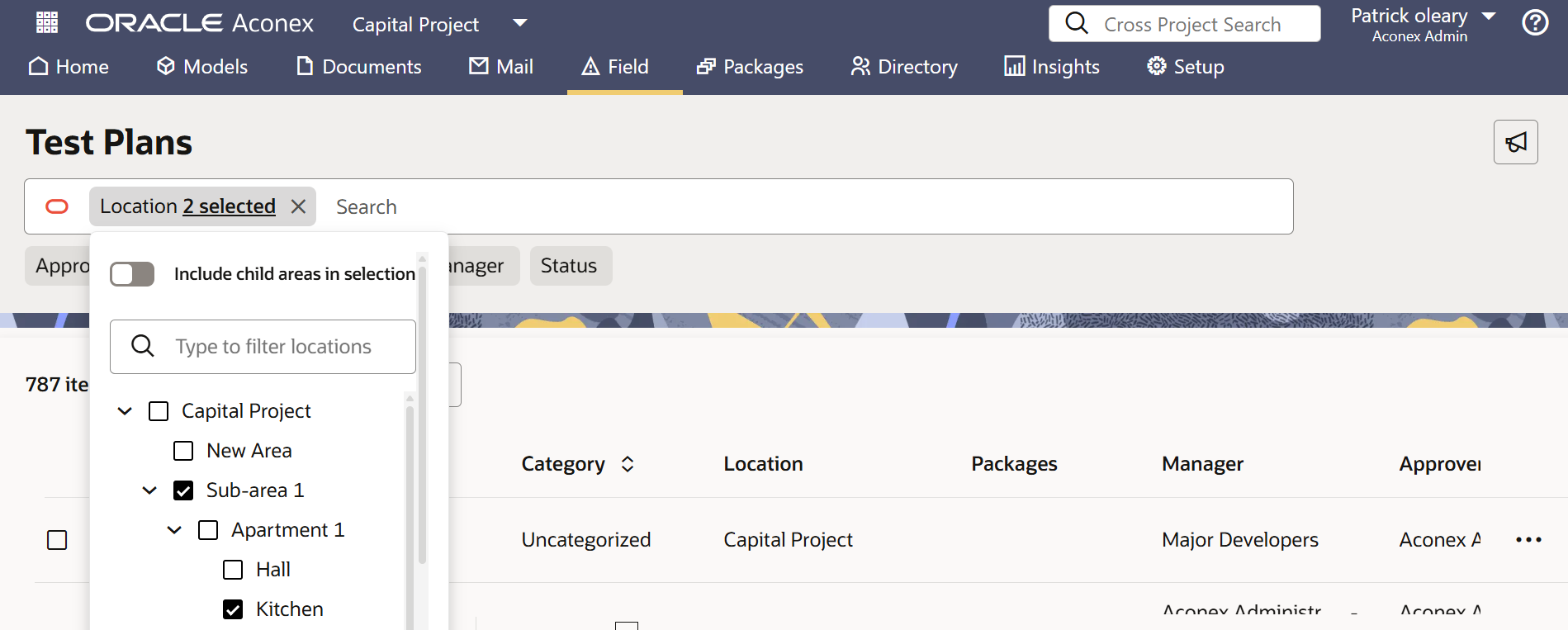
テスト計画を複数のロケーションで絞り込む
- テスト計画を絞り込む際に、複数のロケーションを選択できるようになりました。
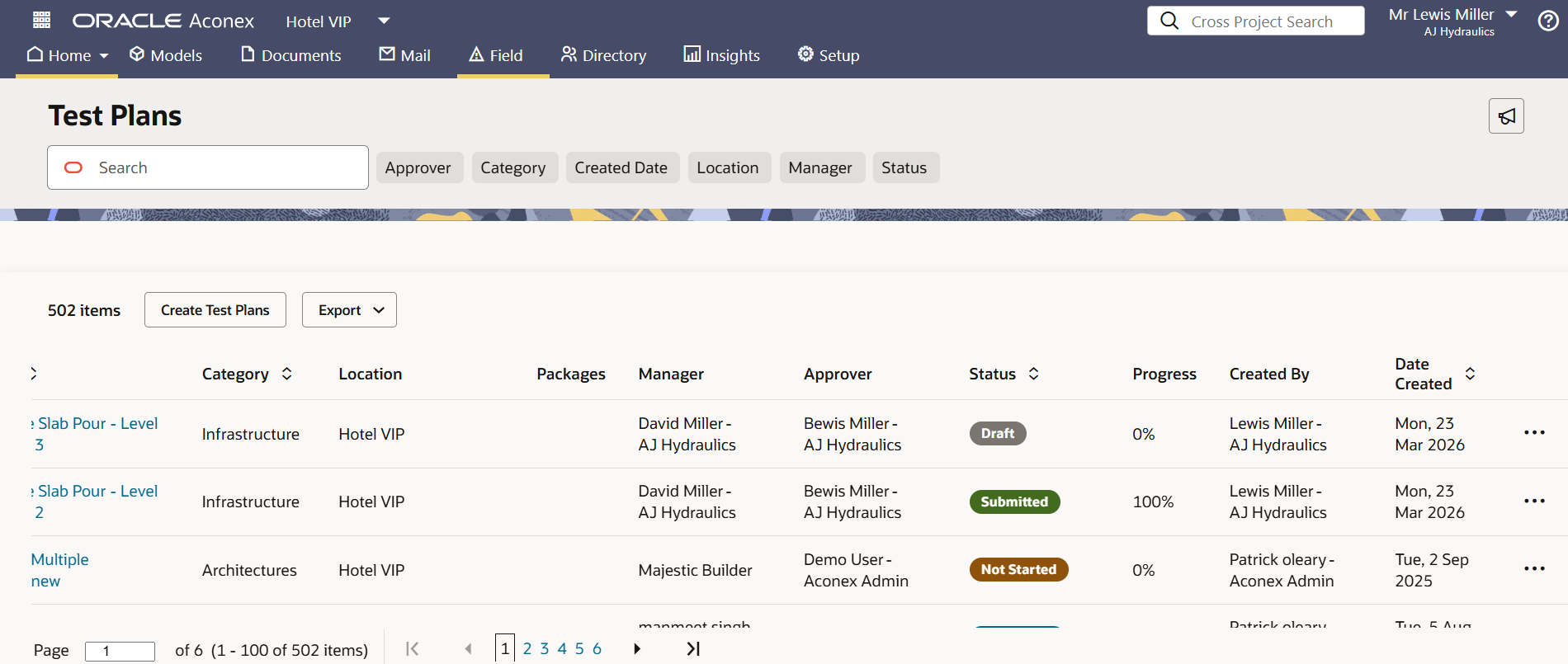
テスト計画リストに詳細情報を追加
- 各テスト計画の承認者と作成者が表示されるようになりました。これにより、変更 権限を持つユーザーを把握できます
パンチリストレポートの強化
- PDFにエクスポートされたパンチリストに最大25枚の高解像度の写真が提供されるようになり、重要な詳細情報を確認できます。
- さらに、画面に表示される内容に合わせてレイアウトを更新し、レポートを 読みやすくしました。
課題エクスポートの画像説明
- 課題をPDFにエクスポートする際に、画像の説明を表示できるようになりました。これにより、各画像の背景情報を提供することができます。
入札
最新情報
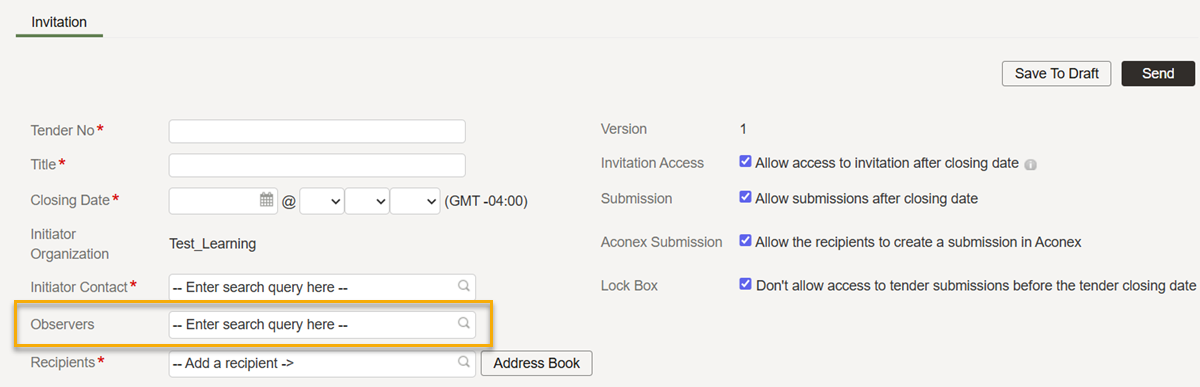
入札案内の閲覧専用アクセス
- 入札案内 の作成・更新中に、閲覧専用アクセスを提供するオブザーバーを追加できるようになりました。
- オブザーバーは、入札の閲覧と文書のZipダウンロードが可能ですが、入札案内に返答(応札)することはできません。
- これにより、特定のユーザーや組織に入札案内の閲覧のみを許可し、変更や応札はできないように設定できます。
インサイト
機能強化・修正
特定期間の使用状況分析
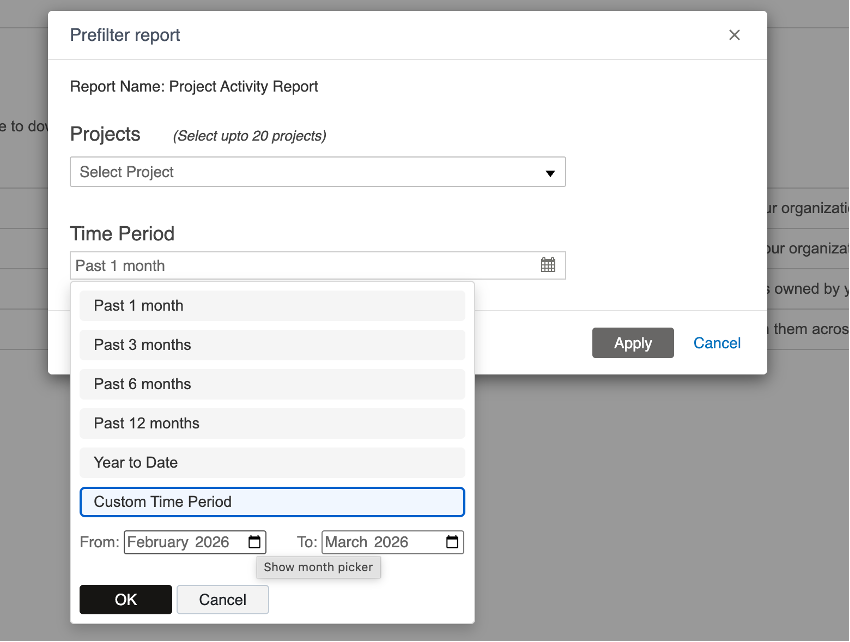
- プロジェクトの活動報告 で、最大24カ月までの期間を指定できるようになりました。
- これにより、長期間または特定のプロジェクトフェーズにおける使用状況を把握(追跡)することができます。
コスト
最新情報
申請額を下回る金額を承認する場合は、説明を要求する
現状の支払い請求書(出来高請求書)では、承認者は理由を提供することなく、請求額より低い額で承認することができます。
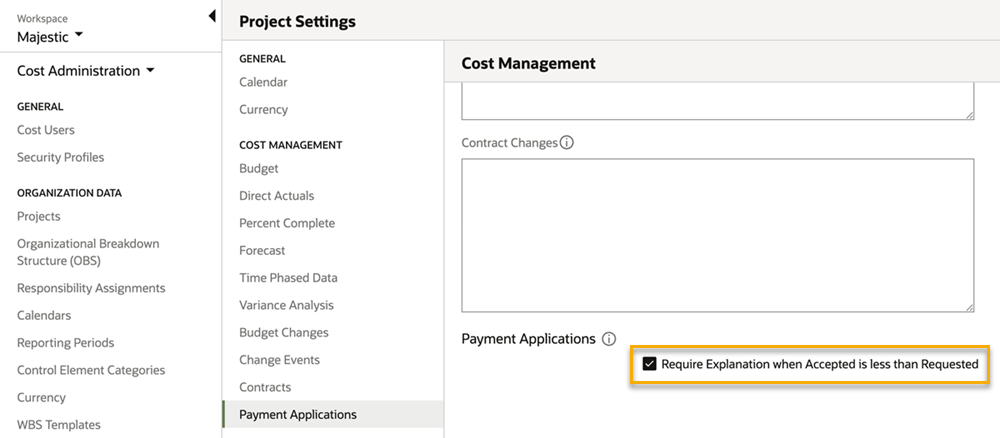
- 新しい設定を有効化すると、承認者は請求額を下回る額で承認する理由を提供する必要があります。
- 「Require Explanation when Accepted is less than Requested(査定額(承諾済額)が申請額を下回る場合は、説明(理由)を要求する)」設定は、組織・プロジェクトの両レベルで利用可能です。
機能強化・修正
タグ変更の追跡
- タグ関連の操作が、Cost イベントログに記録されるようになりました。内部ユーザーと共有ワークスペースユーザーの両方が実行したタグの変更が対象となります。
- これにより、誰がいつタグを変更したのかを把握できます。
文書プロセス
機能強化・修正
文書検索条件の明確化
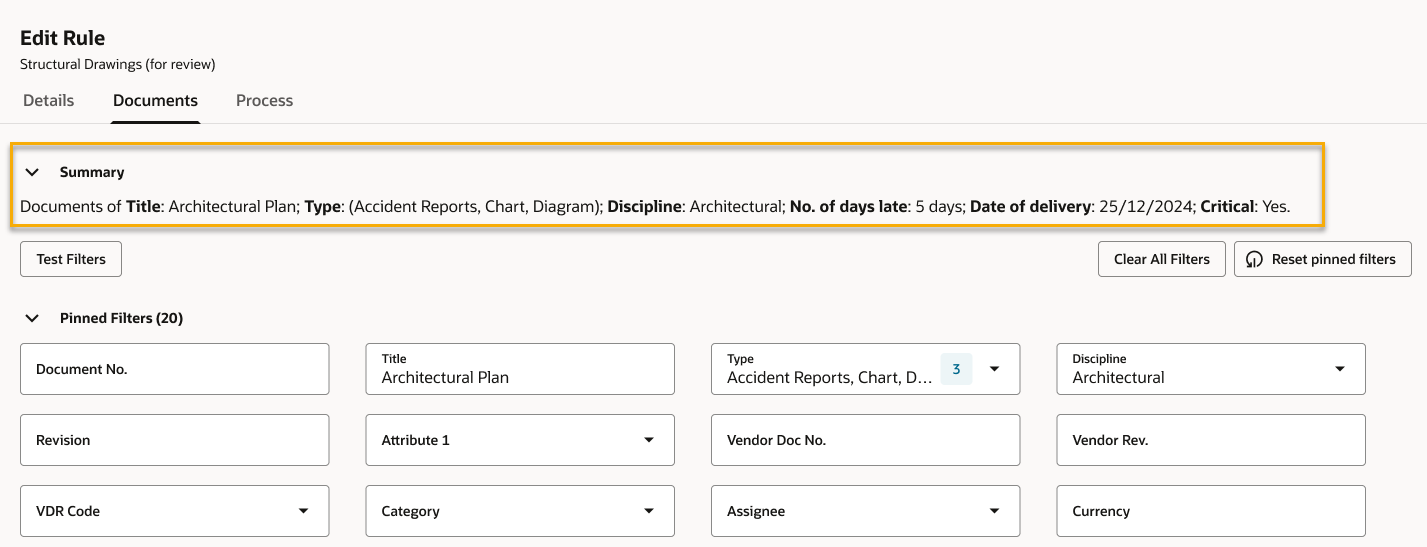
- レビュールールの文書の絞り込み条件が、特に複数使用されている場合に分かりにくいというご意見をいただきました。
- 新しいフィルターサマリー欄で、ルールに選択されている絞り込み条件を一目で確認できるようになりました。
- これにより、正確かつ迅速に変更を行うことができます。
レビューアの進捗を一目で確認
- リードレビューアは、レビューの進捗状況を確認しやすくなりました。
- 新しく追加された「レビューアの進捗」欄に、進行中/完了済のステップ数が表示されます。各ステップを開いて確認する必要がなくなりました。

レビュー結果セットを削除
- プロジェクト管理者は、 レビュールールまたはパッケージレビューのテンプレートで使用されていない結果セット を削除できるようになりました。
- これにより、結果セット一覧をスッキリ見やすく保つことができます。
送付状からレビューを開始
- 送付状から文書プロセスを開始できるようになり、作業時間を短縮できます。
課題終了日を表示
- 課題一覧の「Closed Date 」欄で、各課題が終了した日付を確認できます。
パッケージ
機能強化・修正
以前のパッケージ番号にロールバック
- 誤ってパッケージ番号を変更してしまった場合でも、編集画面から元の番号に戻せるようになりました。その他のメタデータはすべてそのまま保持されます。
- 従来の動作に変更はありません。使用済の番号を新規パッケージに使用することはできませんが、削除済みのパッケージ番号は、再度使用できます。
送付状履歴の詳細拡充
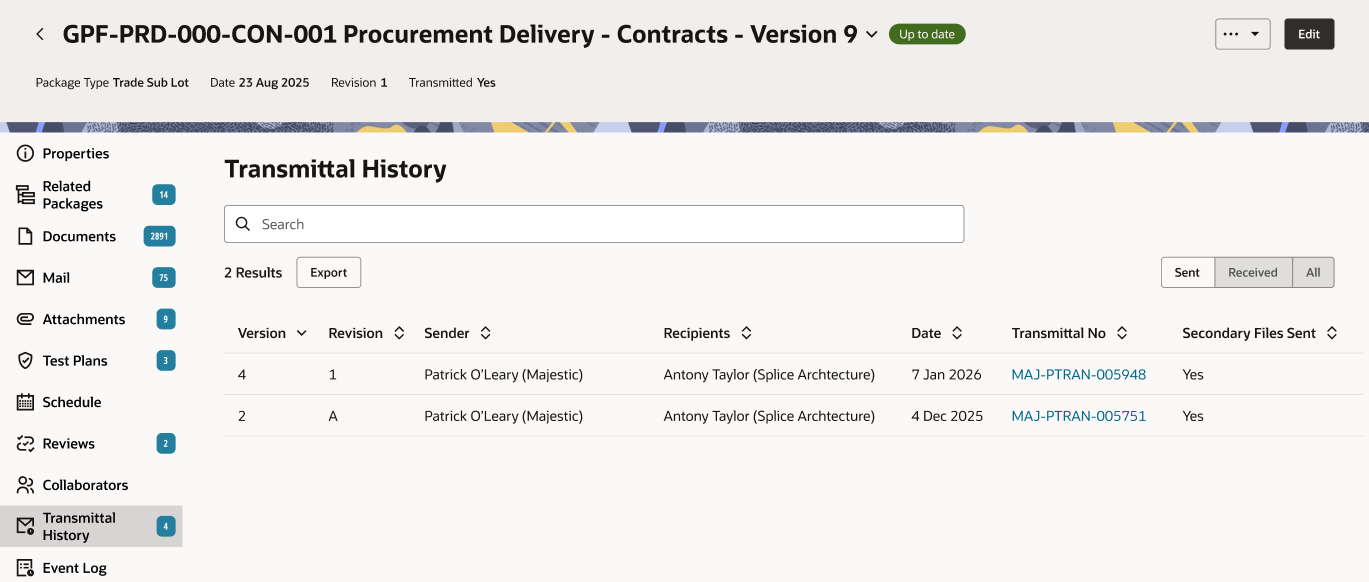
- パッケージ送付状履歴に受信した送付状が含まれるようになり、パッケージを「送信済」、「受信済」、「すべて」で絞り込めるようになりました。
- 送付状履歴をExcelにエクスポートすると、「送信済」、「受信済」、「すべて」の詳細がそれぞれ別のワークシートに表示されます。
- さらに、送付状履歴画面を他の画面に合わせてモダンなデザインに刷新しました。
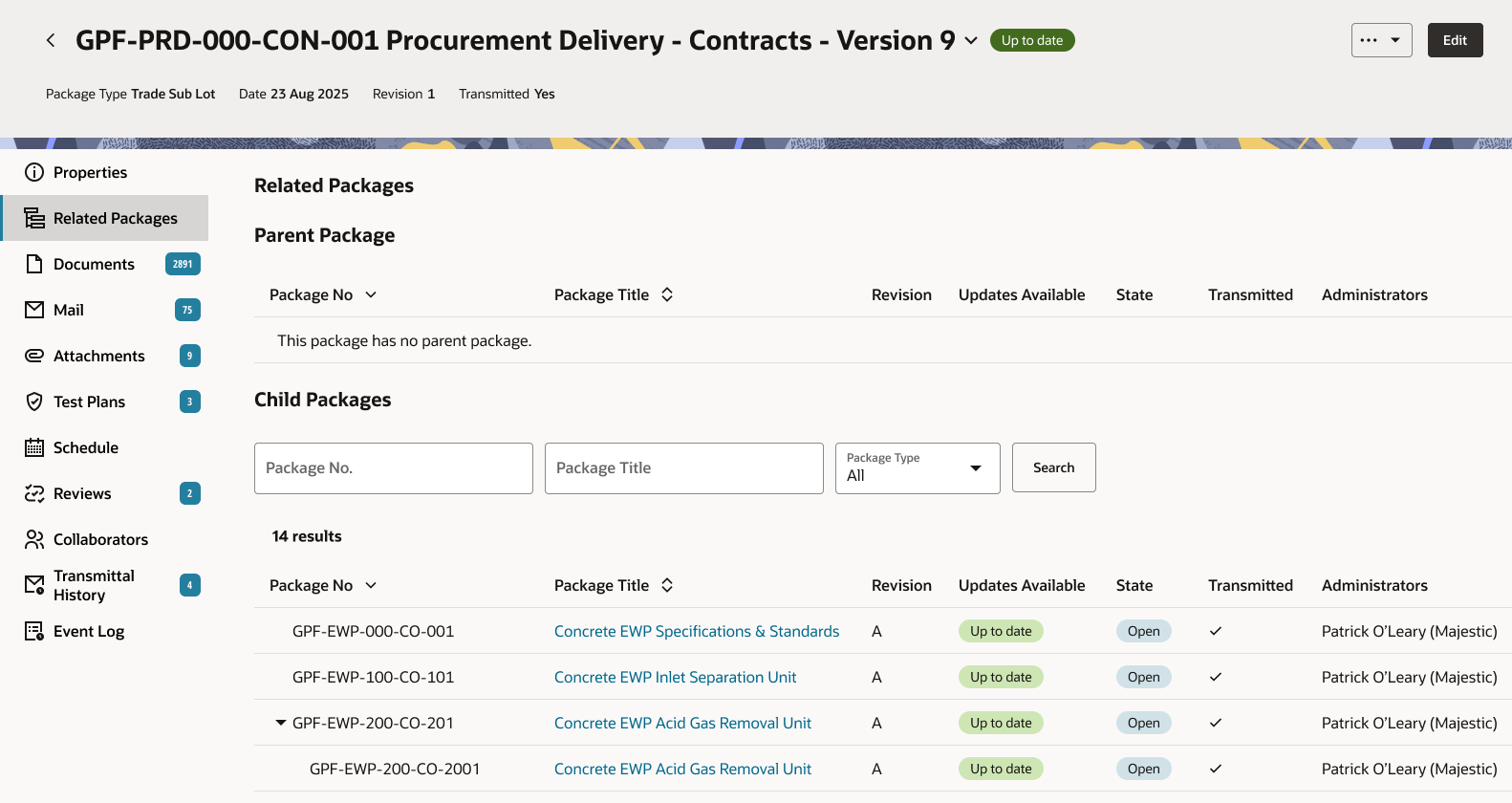
関連パッケージ画面が一新されました
- 他の画面に合わせて、関連パッケージ画面をモダンなデザインに刷新しました。
モバイル
機能強化・修正
Lobby アカウントでサインイン
- モバイルアプリへのアクセスは、Lobbyアカウントでのみ可能になりました。
- Aconexアカウントを使用してアクセスしようとすると、メッセージが表示されて、Lobbyアカウントを使用するように求められます。
- 本手順は、Lobbyアカウントでのログインが必須となるAconex Webアプリの仕様に準拠しています。
- これまで同様、AU2や早期アクセス環境にアクセスする場合は、「他のサインイン方法を表示」をタップしてください。
画像添付に説明を追加
- Webアプリケーションの仕様に準拠し、課題に添付するすべてのファイル(画像を含む)に「説明」を追加できるようになりました。
- また、用途を明確にするために、ラベル名を「コメント」から「説明」に更新しました。
テスト計画のアクティビティー用の写真を複数キャプチャ
- Android端末でも、テスト計画のアクティビティーに対して、一度に最大15件の写真・動画を取り込めるようになりました。これにより、先行して提供されていたiOS版と仕様が統一されます。
パンチリストの課題を検索
- 「リスト先」フィルタで「なし」を指定すると、パンチリストに追加されていない課題が検索されます。その後、各課題を適切なパンチリストへと移動させることができます。
Lobby
機能強化・修正
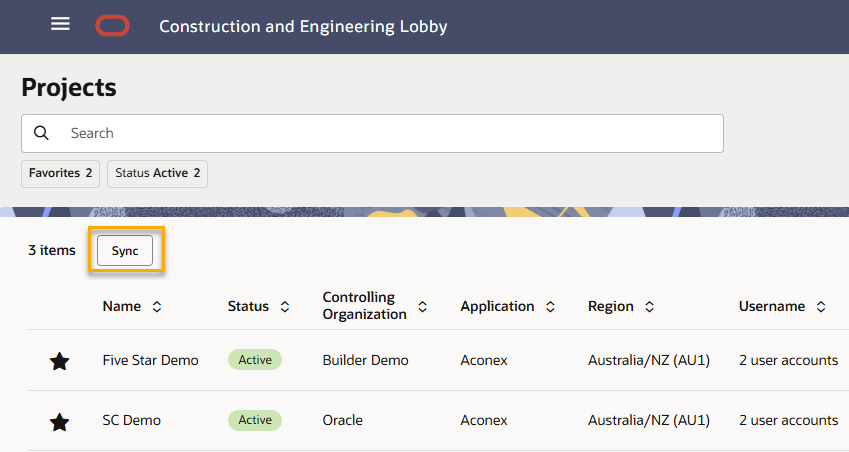
データを常に同期
- ブラウザの更新ボタンと区別しやすいように、プロジェクト一覧などのLobbyデータを再読み込みするボタンの名称を「Sync(同期)」に変更しました。

各更新内容は、4月18日より30日間にわたり順次展開されます。

本更新内容は、すべてのインスタンスでご利用いただけます。
リリース予定日
各インスタンスへの機能の展開は、下記リリース予定日から30日間かけて段階的に行われます。すべての更新内容がすぐに反映されるわけではありませんのでご注意ください。同一期間内に全インスタンスに対して一斉に展開されることは保証できません。 Oracle Aconex モバイル向けのアップデートは、通常その月の第4週目にリリースされます。
本ページの情報は、完全かつ正確性を保つように努めておりますが、新しいプロセスをプロジェクトに導入する前に、各機能の利用可否を十分に検証・確認することをお勧めします。なお、本情報は公開時点での内容に基づいており、予告なく変更される場合があります。 リリースプロセスに関する詳細はこちら
+ スケジュールを表示
| ASIA1: 4月 23日 | EU1: 4月 18日 |
| ASIA2: 4月 22日 | KSA1: 4月 24日 |
| AU1: 4月 30日 | MEA: 4月 24日 |
| AU2: 4月 22日 | UK1: 4月 27日 |
| CA1: 4月 19日 | US1: 4月 25日 |