
View and manage deliverables in Document Processes

As a process owner track your deliverables, perform a QA check, add reviewers, skip steps, or terminate reviews.

With multiple documents in review, you'll need to monitor progress of your reviews and manage any roadblocks.


As the Process Owner you can:

View deliverables

See all current and completed document reviews in the deliverables register.
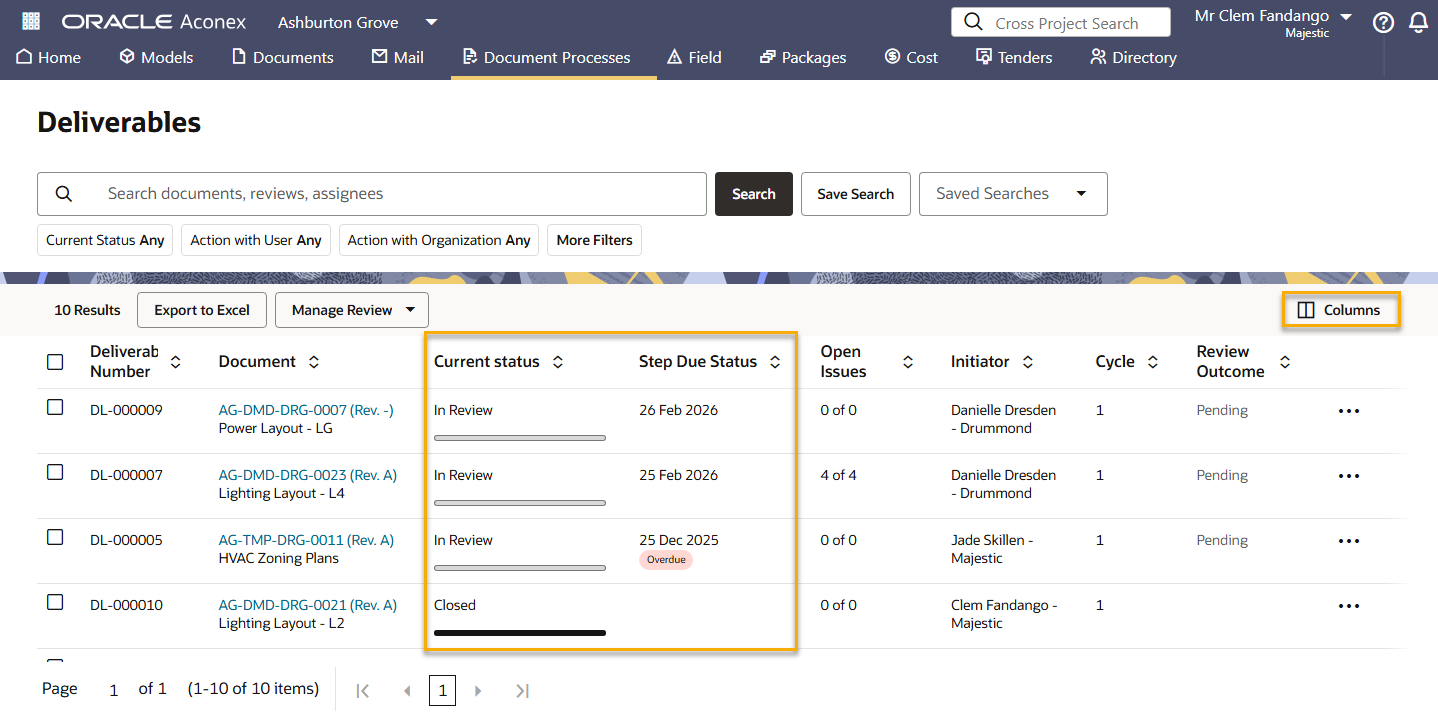
  1. From the main navigation menu, click Document Processes and select Deliverables.
  2. Click Columns to display the information you need to manage your reviews. You can select from both document and project fields for a complete picture of information.

    The default columns in the Deliverables Register are:
  • Document (where you'll see the document's number, title and revision)
  • Current Status
  • Action with (displays the Organisation and Members)
  • Current status (In Review, Review Completed, Review Terminated)
  • Cycle (how many times the document has been reviewed)
  • Initiator (who started the review)
  • Open Issues (number of submitted issues)
  • Originators (who created the document)
  • Review Name (name of the review process. Subsequent cycles of the same document review may have different names.)
  • Review Outcome (shows as Pending until a review is given by the Lead Reviewer)
  • Step Due Status (the due date of the current step of the review)
  1. The Current Status column has a progress bar so you can see review progress at a glance. You can also filter by Current Status to only see documents in review. 
  2. Click the Step Due Status column heading to sort by ascending order. Click it again for descending order.