
Central de Asistencia



Julio de 2026
Este mes encontrará una nueva pantalla de inicio para Mobile, aumento del límite para los Paquetes y los Procesos de documentos, un nuevo diseño para los Planes de prueba y mucho más.

Esta versión es para:
- Los controladores de documentos que trabajan con varios tipos de archivo por documento.
- Todos los usuarios de la aplicación móvil.
- Equipos de calidad que trabajan con numerosos planes de prueba.
- Cualquier usuario que tenga tareas en su pantalla de inicio con más de dos años de antigüedad.
- Los gestores de paquetes que necesiten añadir miles de documentos.
- Los inspectores que envían informes de incidentes o punchlists.
- Revisores que hayan añadido un archivo complementario por error.
- Administradores de proyectos que necesitan solicitar la eliminación de un proyecto.
- Observadores de concursos que necesiten recibir notificaciones sobre actualizaciones de una invitación.
Documentos
Novedades
Próximamente: utilice Renditions (archivos secundarios en formatos alternativos) para gestionar múltiples formatos de archivo
-
La función Renditions le permite adjuntar archivos secundarios a un documento, lo que permite mantener diferentes formatos de archivo juntos en un único registro.
-
Por ejemplo, un plano puede tener un PDF como archivo principal para su revisión, con el archivo CAD nativo adjunto como archivo secundario.
-
Esto le ahorra tiempo, ya que evita tener que registrar sus archivos nativos como documentos independientes, lo que facilita su búsqueda y gestión.
-
Si su proyecto utiliza integraciones de API, revíselas y actualícelas antes de habilitar Renditions. Es posible que las integraciones actuales no sean compatibles con los archivos secundarios y que fallen o se comporten de forma inesperada si no se actualizan.
-
Renditions estará disponible en agosto. Le informamos con antelación para que disponga de tiempo para preparar a sus equipos para los próximos cambios. Consulte las consideraciones clave para asegurarse de que se adapta a los procesos e integraciones de su proyecto.
Arreglos y mejoras
Ediciones más claras y mayor rapidez en el ingreso de datos
- Gracias a sus comentarios, hemos optimizado la nueva función de carga mejorada.
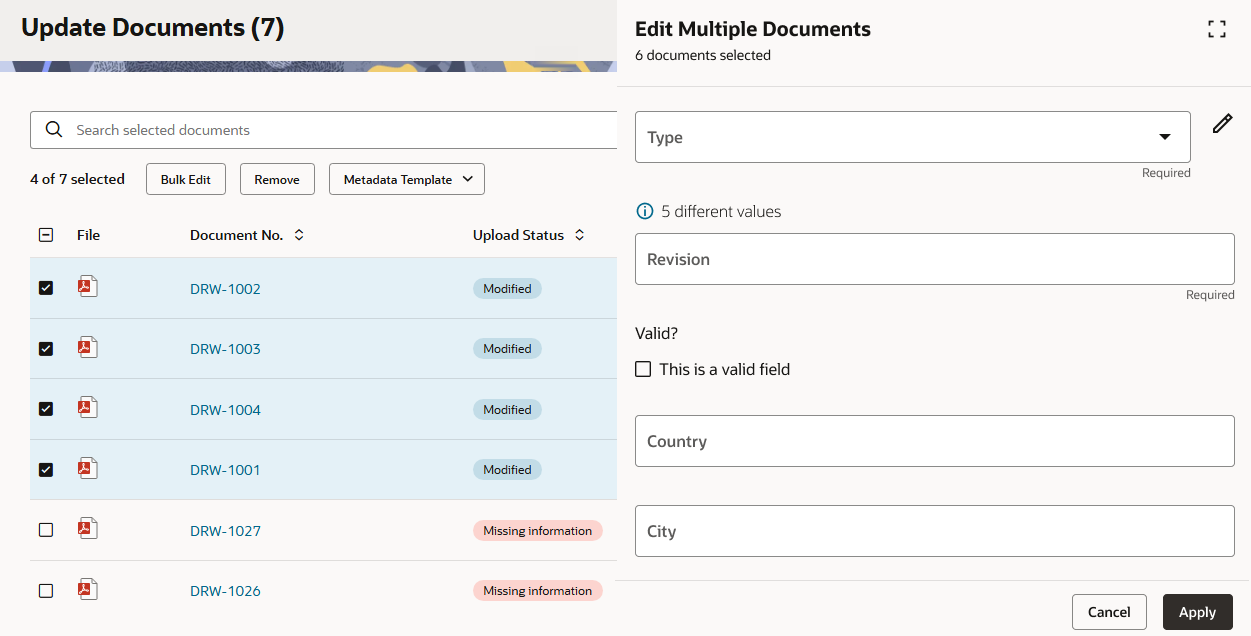
- En la pantalla de Edición en masa, todos los campos obligatorios ahora muestran la etiqueta Obligatorio en lugar de un recuadro rojo, lo cual resultaba confuso para algunos usuarios. También hemos agregado nuevos botones Aplicar y Cancelar para ofrecer opciones claras a la hora de continuar con la edición.
- Los selectores de fecha cuentan con un nuevo botón Hoy que le permite seleccionar rápidamente la fecha actual. Si elige una fecha incorrecta, ahora puede seleccionarla y borrarla para volver a intentarlo.
- Los valores de las listas de selección ahora son más visibles, sin que sea necesario desplazarse para verlos.
Mobile
Novedades
Su nueva pantalla de inicio en la aplicación móvil
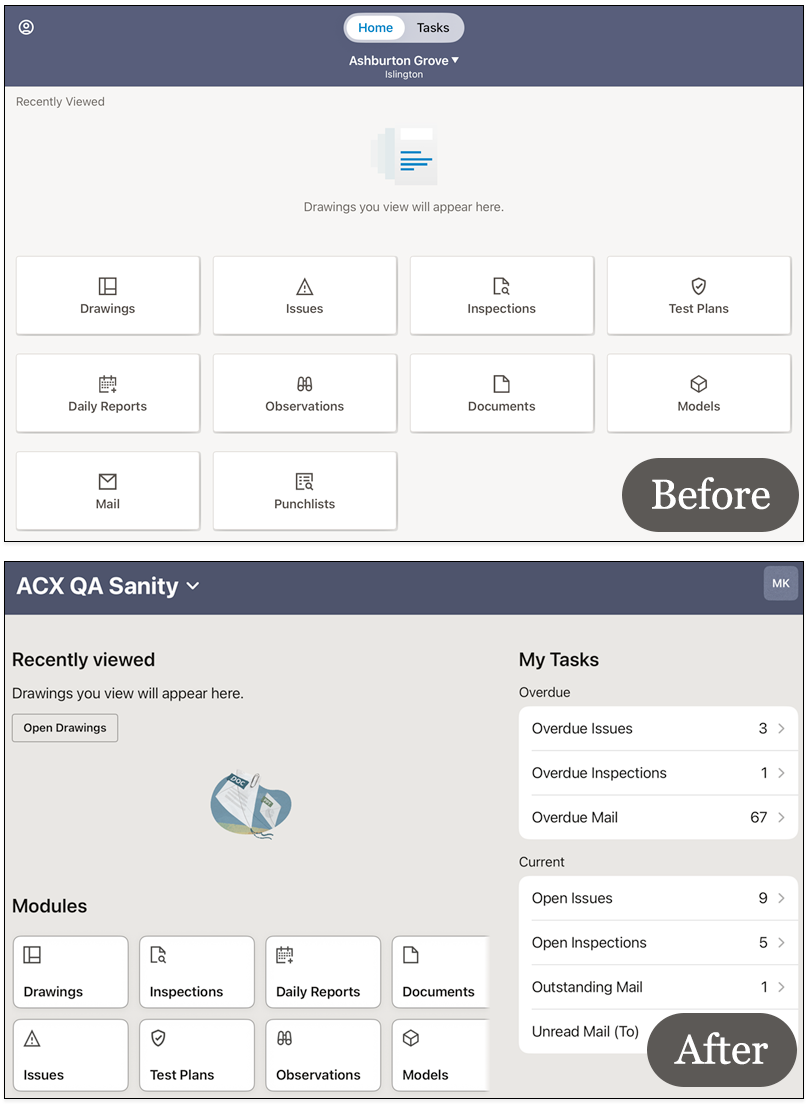
- Hemos renovado la pantalla de inicio de la versión móvil para que pueda ver sus tareas y acceder a los módulos desde un único lugar.
- Sus tareas se ven de inmediato; ya no es necesario que pulse en la pestaña de tareas para verlas.
- Deslice el dedo por los mosaicos de los módulos para acceder a la información de su proyecto.
- Esta actualización se implementará primero en los dispositivos iOS. Los dispositivos Android tendrán la nueva pantalla de inicio en los próximos meses.
Añadir anotaciones más rápidamente
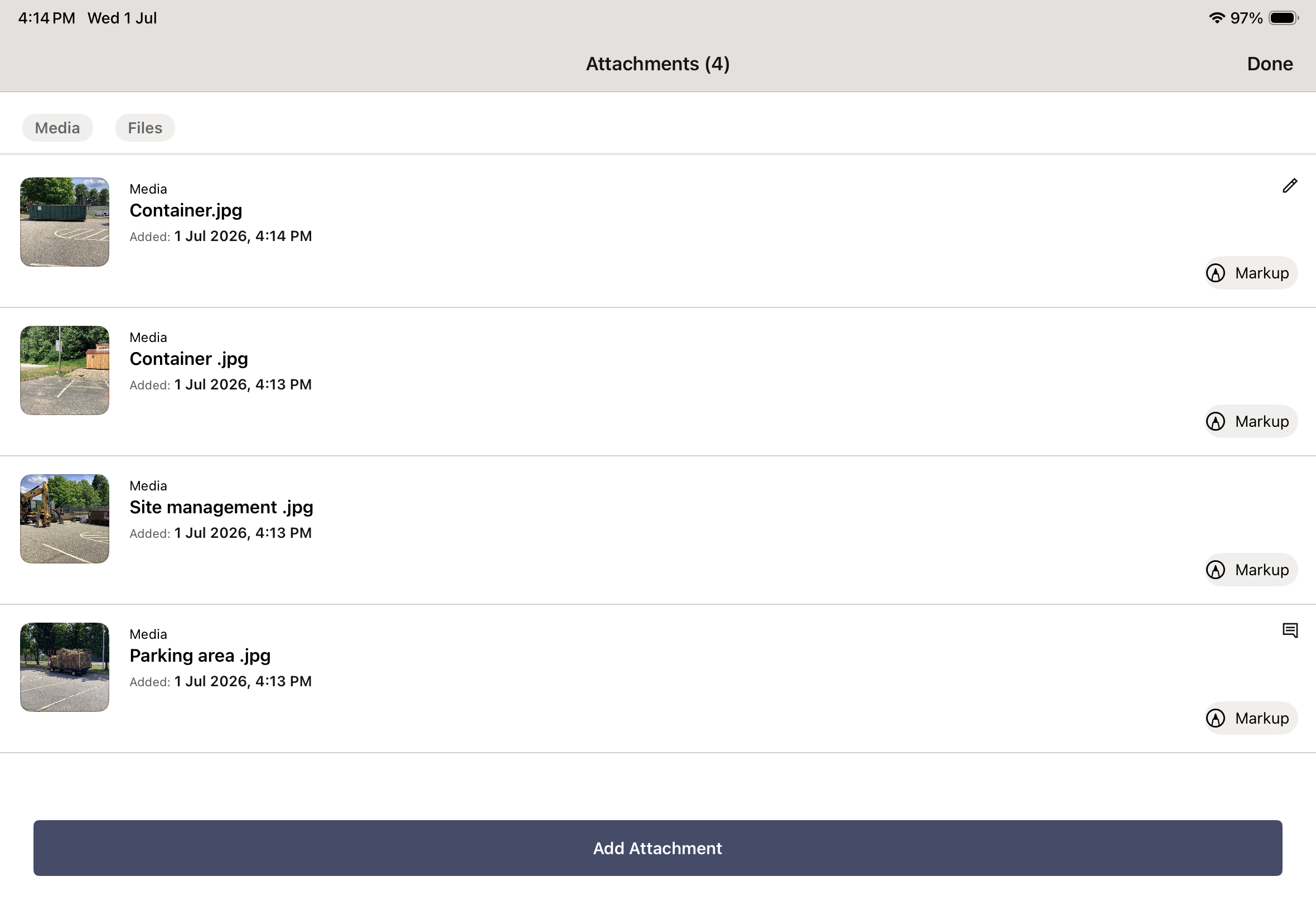
- Tras adjuntar una foto o un archivo a un incidente, encontrará una nueva opción de anotación junto a cada uno de ellos.
- Puede añadir anotaciones a las fotos y archivos recién adjuntos antes de que se sincronicen. Tras la sincronización, las anotaciones estarán disponibles para las fotos, pero no para otros tipos de archivo.
Capturar varias fotos relacionadas con un incidente
- Al recopilar pruebas para un incidente puede tomar hasta 15 fotos en una sola sesión de la cámara.
- Toque una miniatura para revisar una imagen y vuelva a tomarla si es necesario.
- El número total de fotos tomadas se muestra entre paréntesis.
Inicio
Novedades
Organizar tareas antiguas
- Estamos optimizando la pantalla de inicio para prepararnos para las nuevas funciones que llegarán a finales de este año.
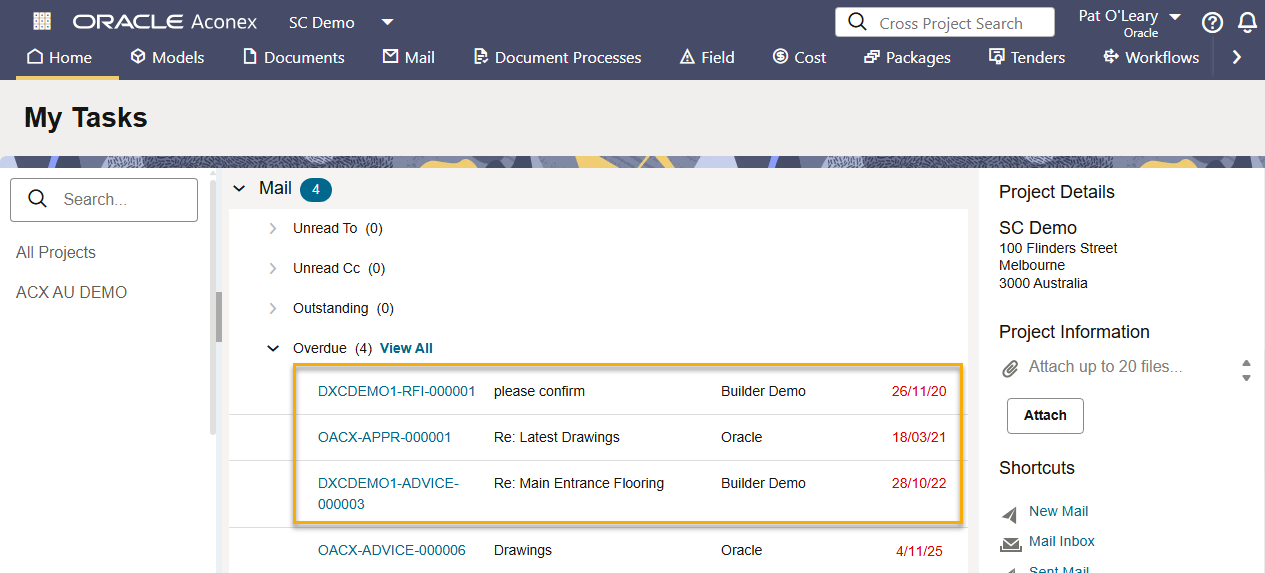
- Para ello, dejaremos de mostrar las tareas creadas hace más de dos años. Los datos en sí no cambiarán; simplemente no serán visibles en su pantalla de inicio. Podrá seguir accediendo a sus tareas antiguas directamente desde el módulo correspondiente. Por ejemplo, todos los correos atrasados seguirán estando disponibles en su bandeja de entrada.
- Comenzaremos el proceso de optimización en agosto de 2026. Esto se aplica tanto a la web como a la aplicación móvil.
Field
Novedades
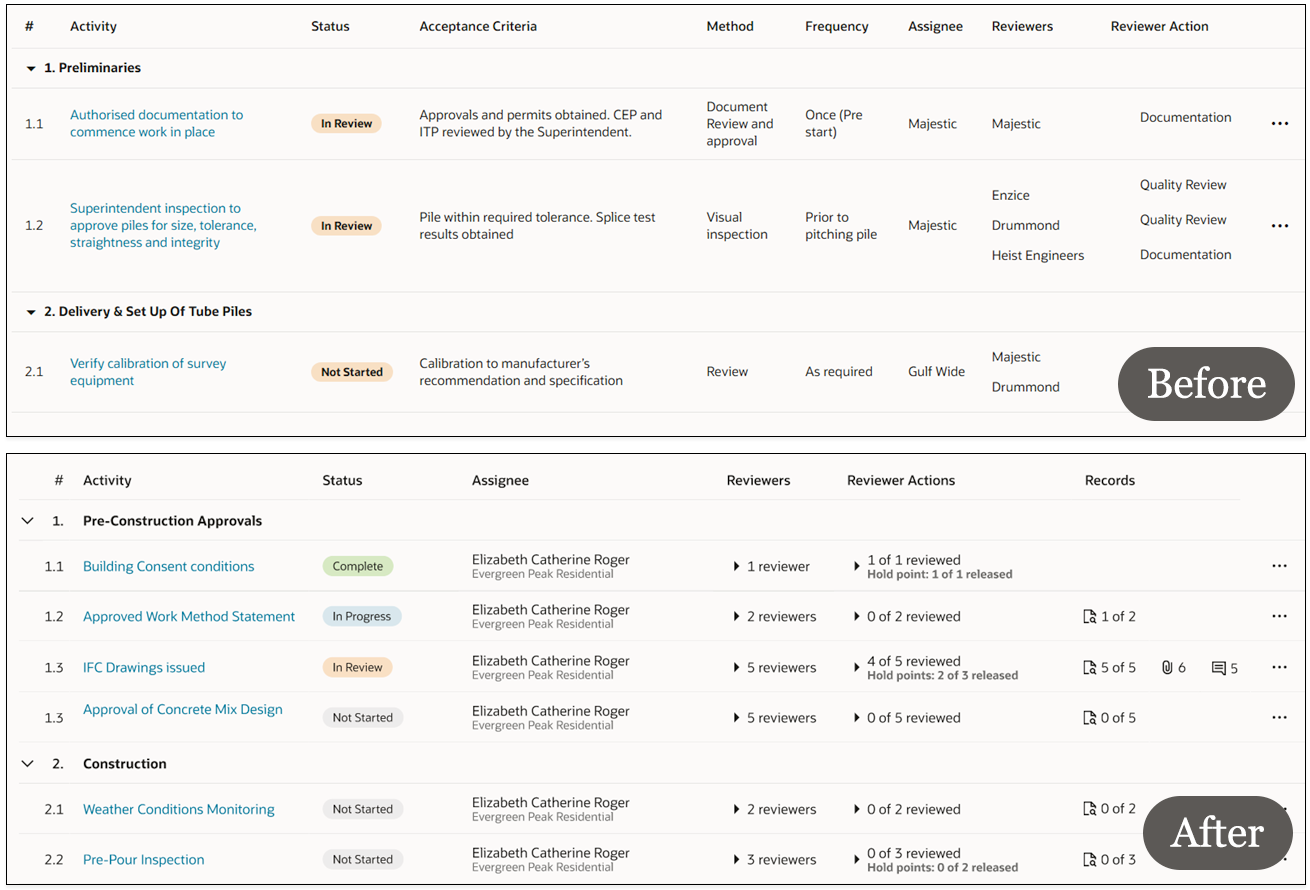
Un nuevo diseño para los planes de prueba
- Hemos actualizado la pantalla de detalles del plan de pruebas para que resulte más clara y fácil de consultar.
- Los detalles del revisor ahora se ocultan de forma predeterminada, por lo que cada actividad cabe perfectamente en una sola línea. Expanda la fila para ver todos los detalles del revisor.
- Una nueva columna Registros le permite ver cuántas inspecciones y archivos adjuntos se han agregado a cada actividad. Haga clic en los indicadores para ver los registros.
- Se han eliminado de la vista principal las columnas que se utilizan con menos frecuencia, lo que le brinda más espacio para enfocarse en sus actividades. Los criterios de aceptación, el método y la frecuencia están a solo un clic de distancia cuando abre una actividad.
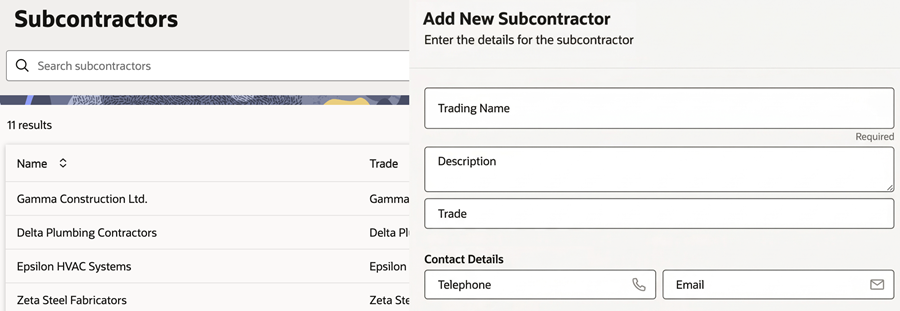
Agregar subcontratistas para las Observaciones
- Los administradores de Inspectores ya pueden agregar subcontratistas directamente en la aplicación web mediante un formulario o importándolos desde Excel.
- Anteriormente, los subcontratistas solo podían agregarse a través de la API.
- Esto facilita la creación y la administración de su lista de subcontratistas de las Observaciones.
Arreglos y mejoras
Enviar informes de incidentes detallados
- Hemos actualizado el diseño de los informes en PDF enviados por correo tanto para los incidentes como para las punchlists.
- Gracias a una nueva imagen, el informe ahora se ajusta a todos los detalles que se ven en pantalla, lo que facilita su lectura.
- También se incluyen los metadatos de las imágenes para que cuente con el contexto de cada imagen.
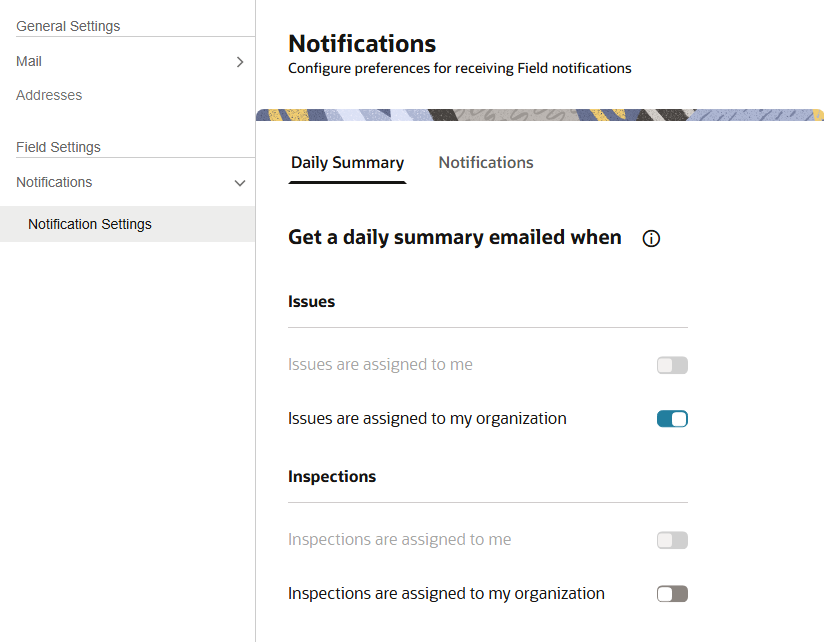
Configuración de notificaciones más clara
- Hemos reorganizado la configuración de notificaciones en dos pestañas.
- En la pestaña Resumen diario encontrará la configuración para incidentes e inspecciones.
- La pestaña Notificaciones contiene su configuración para los planes de prueba.
- Sus preferencias actuales no se modifican y se muestran con nuevos controles de activación/desactivación.
Priorizar los incidentes pendientes
- Hemos agregado una nueva opción de clasificación para que pueda encontrar primero los incidentes vencidos.
Paquetes
What's new
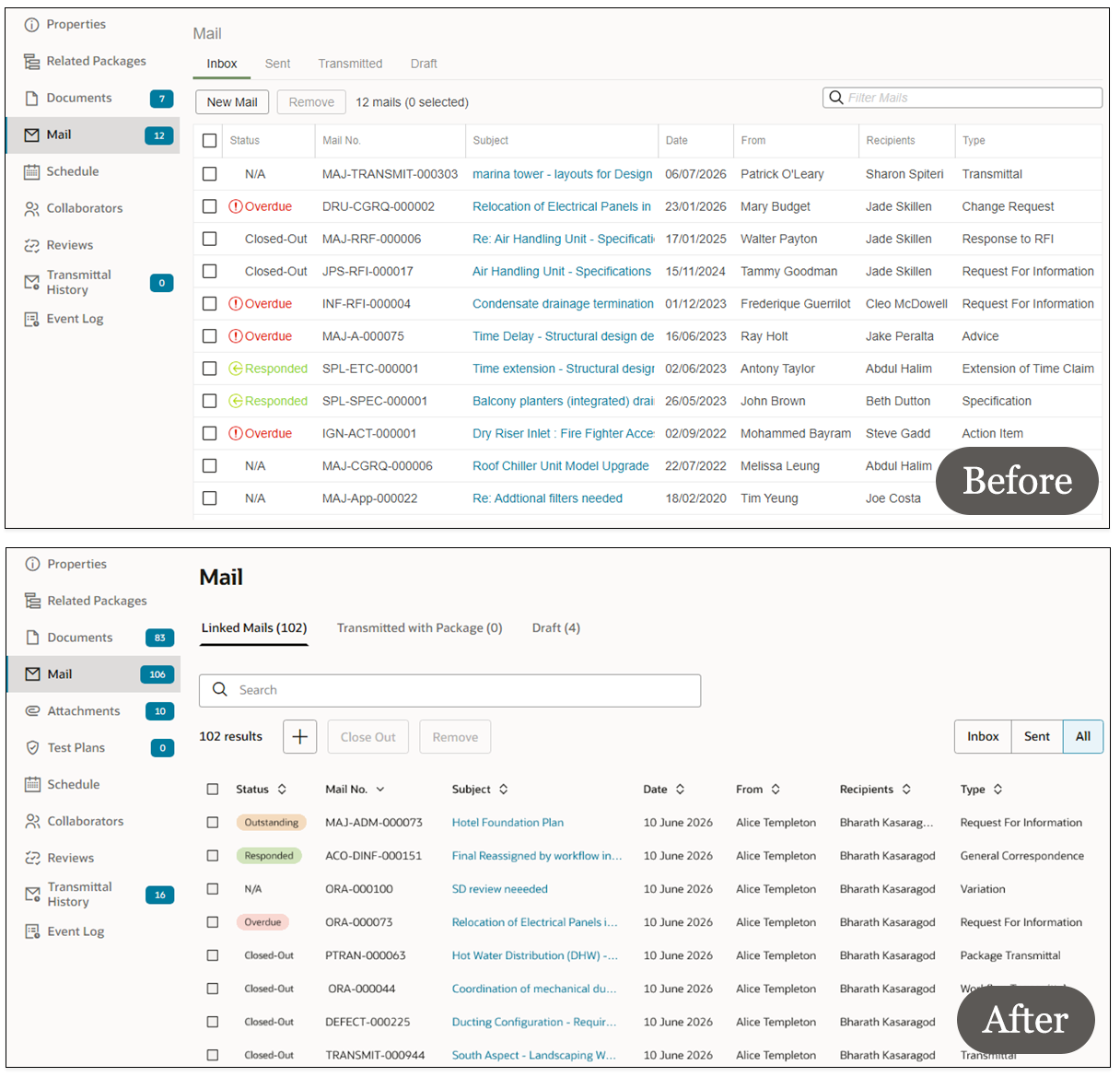
Nuevo diseño para el correo de paquetes
-
El correo de paquetes tiene un aspecto renovado para que las pestañas sean más claras y le ayuden a encontrar los mensajes rápidamente.
-
Las pestañas Recibidos y Enviados se han combinado en una nueva pestaña denominada Correos vinculados. Puede filtrar los correos que se muestran aquí por Recibidos, Enviados o Todos.
-
La pestaña Transmitidos ha pasado a denominarse Transmitidos con paquete.
-
Puede ordenar los mensajes por cualquier columna haciendo clic en su título.
Añada más documentos a un paquete
-
Seleccione hasta 3000 documentos y añádalos a un máximo de 10 paquetes de una sola vez. Anteriormente, solo se podían añadir un máximo de 50 documentos.
-
Esto le ayuda a preparar paquetes más grandes con mayor rapidez.
Arreglos y mejoras
Buscar paquetes por fecha
- Las nuevas opciones de búsqueda y filtrado le ayudan a encontrar paquetes por la fecha en que se crearon, modificaron, cerraron o transmitieron.
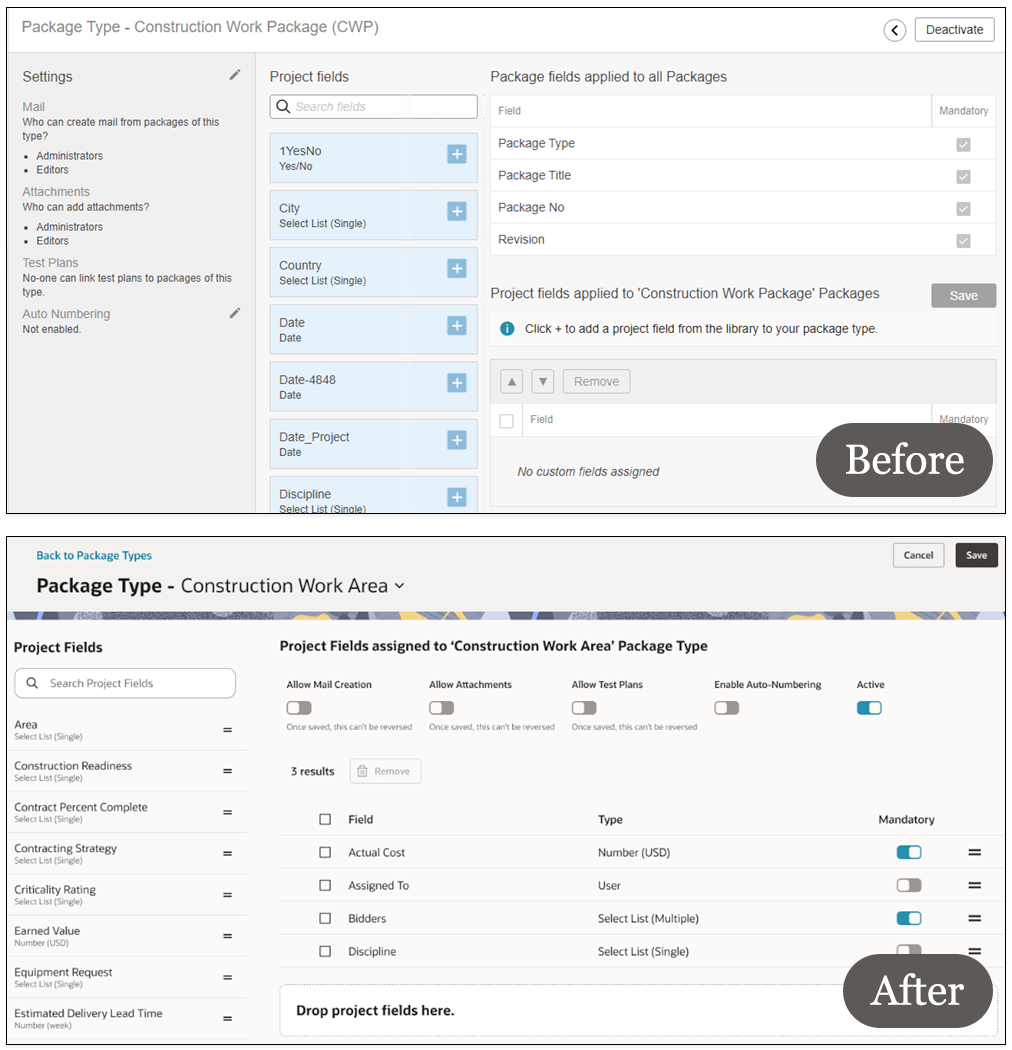
Un nuevo aspecto para la configuración de los paquetes
- La configuración de los paquetes tiene un diseño más limpio y renovado, lo que facilita configurar los paquetes y agregar campos de proyecto.
Flujos de trabajo
Novedades
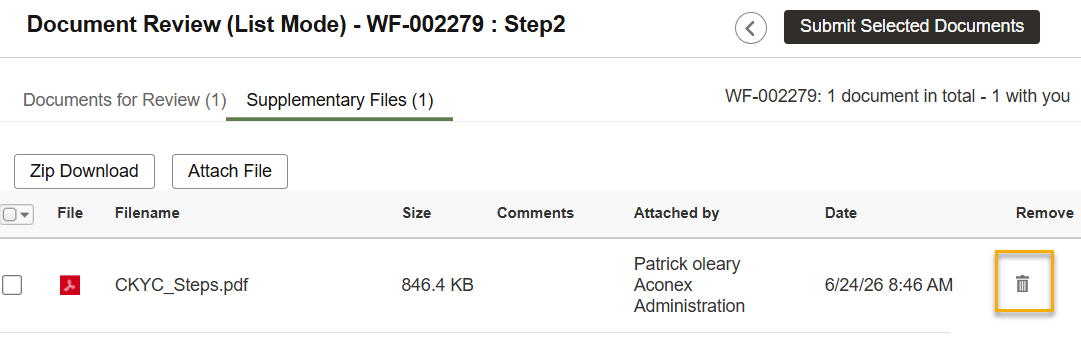
Eliminar los archivos complementarios
- Gracias a sus comentarios, ahora puede eliminar los archivos complementarios que haya agregado por error antes de enviar su revisión.
Configuración
Novedades
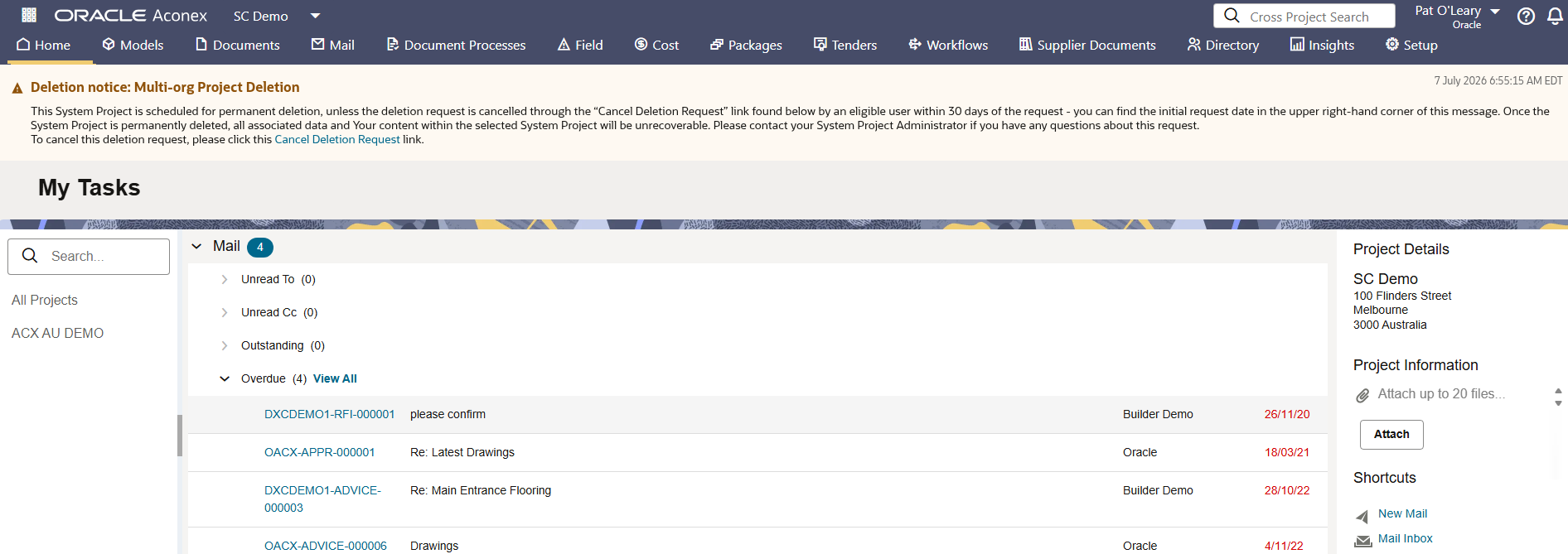
Solicitud de eliminación de cualquier proyecto
-
Las organizaciones dueñas de un proyecto pueden ahora solicitar la eliminación de cualquier proyecto desde la pantalla Mis proyectos, incluso si otras org.
-
Se envía un correo de Aviso de eliminación de proyecto a todos los usuarios que participan en el proyecto (incluidas las organizaciones archivadas), para que tengan la oportunidad de cancelar la solicitud.
-
Mientras la eliminación esté pendiente, no se podrá invitar a nadie al proyecto ni se podrán modificar los niveles de acceso de ninguna organización.
-
En el proyecto se muestra un banner para todos los usuarios con un enlace en el que se puede hacer clic para cancelar el proceso. Si se hace clic en él, la eliminación se cancelará y se enviará un correo al dueño del proyecto para informarle de quién ha cancelado el proceso.
-
El proyecto se eliminará al cabo de 30 días, a menos que se reciba una solicitud de cancelación por parte de cualquier usuario
Lobby
Arreglos y mejoras
Actualice su estado de administrador del Lobby
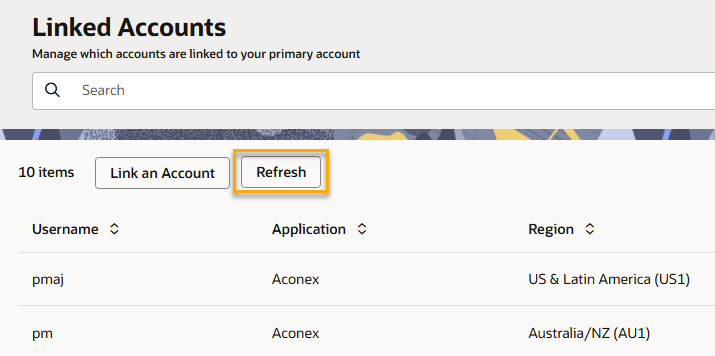
- Si recientemente se ha convertido en administrador de la organización, pero aún no cuenta con derechos de administrador del Lobby, ahora puede actualizar su acceso con un solo clic.
- Utilice el botón Actualizar en la pantalla Cuentas vinculadas para sincronizar su estado de administrador. Si es administrador de la organización, los derechos de administrador del Lobby se le otorgarán automáticamente después de la actualización.
- Ya no es necesario desvincular y volver a vincular su cuenta para actualizar su estado de administrador.
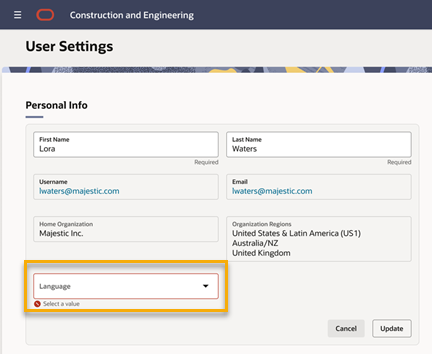
Seleccione su idioma preferido
- Ahora puede elegir su idioma preferido para el Lobby. Algunas notificaciones por correo electrónico también se enviarán en el idioma que haya elegido.
- Si no elige un idioma, Lobby seguirá utilizando la configuración de su navegador, y las notificaciones por correo electrónico seguirán siendo en inglés.
- Al crear nuevos usuarios, los administradores de la organización también pueden configurar el idioma preferido de cada usuario.
Concursos
Arreglos y mejoras
Notificaciones por correo electrónico para los Observadores
- Ahora, los observadores reciben una notificación por correo electrónico cuando se produce una actualización en los concursos que están observando.
- Esto garantiza que se mantengan al tanto del avance del concurso.
- Se envían notificaciones por la creación del concuros, las adendas, las solicitudes de información (RFI), las presentaciones de ofertas y los rechazos.
Procesos de documentos
Arreglos y mejoras
Ampliar la matriz
-
Ahora puede crear hasta 1000 reglas en la matriz de revisión. Anteriormente, el límite era de 500 reglas.
-
Hemos aumentado el número de columnas de revisión de 50 a 200, lo que le permite añadir más grupos de revisores.
Comprender la fuenta de los campos
-
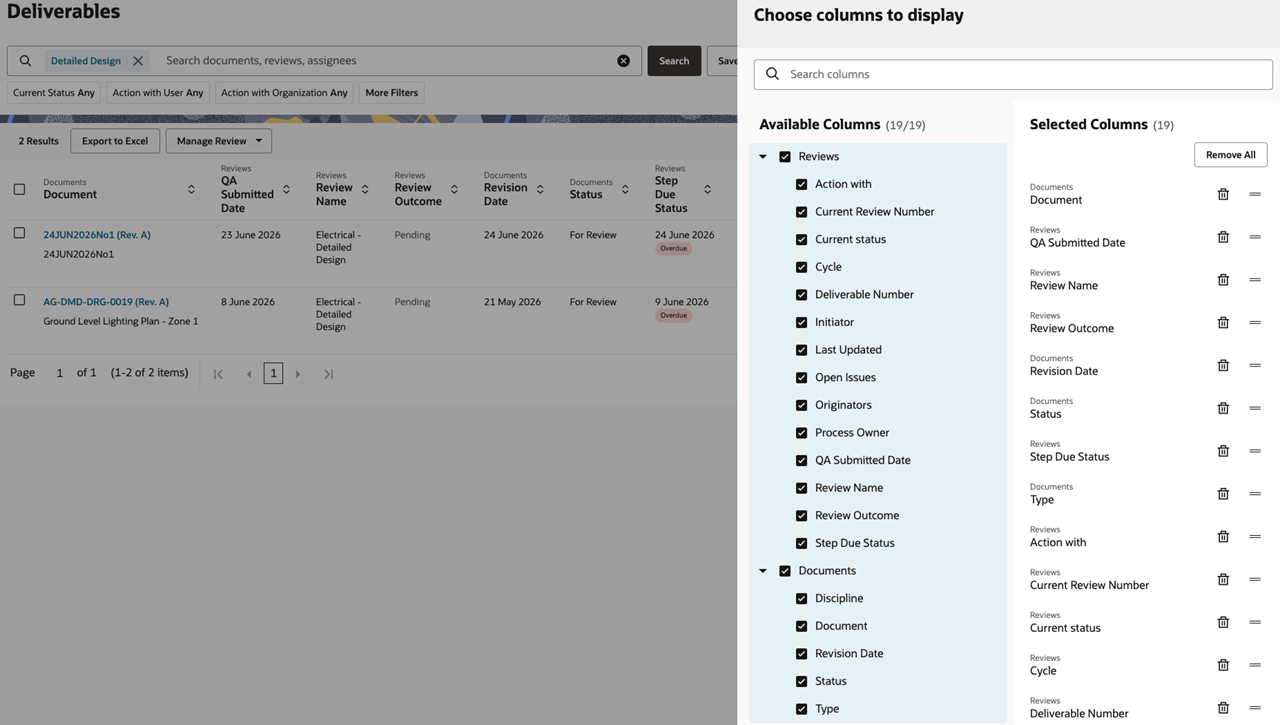
Al realizar búsquedas en Procesos de documentos, a menudo verá una combinación de campos procedentes de diferentes fuentes. Hemos facilitado la identificación del módulo o la fuente a la que pertenece cada campo.
-
Por ejemplo, el nombre de la fuente Documentos aparecerá ahora encima de Número de documento, y Revisiones aparecerá encima de Estado actual.
-
Estas nuevas etiquetas son visibles en los encabezados de las columnas, en los filtros y en el selector de columnas.
-
Esto le ayuda a identificar de dónde procede un campo y evita la confusión entre campos con nombres similares.
Correo
Arreglos y mejoras
Un look moderno para las notificaciones por correo electrónico
-
Hemos actualizado las fuentes y los colores de las notificaciones por correo electrónico (cuando su preferencia está configurada en solo notificaciones), lo que facilita tanto su consulta como la toma de medidas.
Envío a un grupo de correo compartido
- Hemos solucionado un problema que impedía que algunos campos de correo reconocieran los nombres de los grupos de correo compartidos.
API
Novedades
Recordatorio: asegúrese de que sus integraciones de API sean compatibles con registros de 64 bits
-
En agosto, actualizaremos los campos de la base de datos de Aconex a 64 bits en todas las instancias de Aconex. Si su organización se integra con las API de Aconex, deberá revisar sus integraciones y asegurarse de que sean compatibles con los tipos de datos de 64 bits.
-
La instancia EA1 ya se ha actualizado a 64 bits y está lista para las pruebas de integración. Más información acerca de cómo revisar sus integraciones de API.
Arreglos y mejoras
Administrar los certificados públicos de OAuth
- Ahora puede cargar y administrar sus propios certificados públicos para los clientes OAuth utilizados en integraciones no interactivas.
- Al crear un nuevo cliente OAuth, cargue su certificado público como parte de la configuración. En el caso de las integraciones no interactivas actuales, puede reemplazar el certificado usted mismo cuando sea necesario.
- Ya no es necesario enviar una solicitud de servicio (SR) para hacerlo.

Publicaremos gradualmente cada actualización durante un periodo de 30 días a partir del 25 de julio.

Estas actualizaciones estarán disponibles para todas las instancias.
Calendario de fechas de actualización
Las funcionalidades se implementan gradualmente en cada instancia durante un periodo de 30 días, a partir de las fechas indicadas a continuación. Es posible que no vea todas las actualizaciones de inmediato. No podemos garantizar una implementación global de las funcionalidades en todas las instancias dentro del mismo plazo. Oracle Aconex Mobile se actualiza en la cuarta semana del mes.
Aunque nos esforzamos por mantener esta información completa y precisa, le recomendamos que pruebe y confirme minuciosamente la disponibilidad de las funcionalidades antes de implementar nuevos procesos en su proyecto. Esta información es precisa en el momento de su publicación y está sujeta a cambios sin previo aviso. Más información sobre nuestro proceso de actualización.
+ Ver calendario
| ASIA1: Jul 23 | EU1: Jul 18 |
| ASIA2: Jul 22 | KSA1: Jul 24 |
| AU1: Jul 30 | MEA: Jul 24 |
| AU2: Jul 22 | UK1: Jul 27 |
| CA1: Jul 19 | US1: Jul 25 |