Support Central
If you consider a project as closed and you would like to delete it from the system, the required capability must be enabled by ORACLE.
For this reason please start a service ticket under the "Contact us" section above. Please note that we will need the exact project name. This is the name of the project in conjectPM.
After the capability has been enabled by ORACLE please do the following steps:
 Important Note: If you finish the project all data will be permanently deleted from the platform and cannot be restored. For this reason, we strongly recommend to order an archive before you finish the project. After you've received the archive you can do the following steps to delete the project.
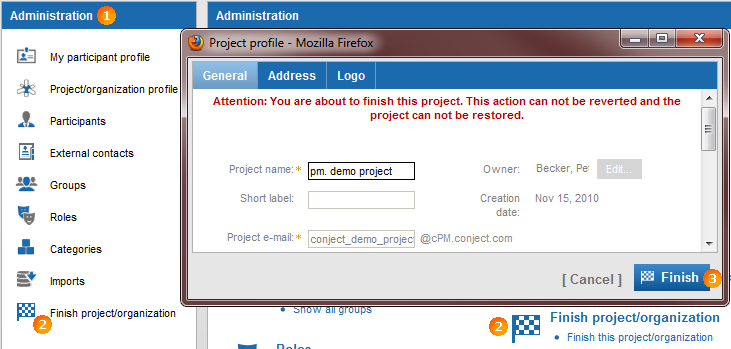
- Go to the "Administration" application (Gear symbol).
- Select the menu item "Finish project/organization".
- Finish the project permanently with a click on "Finish".
If you do not see the function "Finish project/organization" in the administration application after ORACLE has been enabled this function (this could happen for older projects), then you must activate the capability in any role you are a member in. In case you cannot edit roles please contact a project administrator.
You find the corresponding capability "Finish project/organization"on the "Capabilities" tab at "Administration" and "Project/Organization". Please note that changes of roles get active only if you leave the project and then re-enter it again.