Share Field issues and comments with other organizations

Allow other organizations to view issues and public comments your organization captured.

You can choose to share all your issues and public comments with other organizations on the project. Issues are shared as read-only so they cannot be modified by the recipient organization. If you want other organizations to update an issue you need to assign it to them.

Visibility of issue comments

Comments are private between organizations. For example, if the Builder assigns a defect to their Subcontractor, they can see comments made directly with each other on that defect. If the Builder shares all their defects with the Client, the Client cannot see any of the comments made directly between the Builder and the Subcontractor.  

If you want a comment to be visible to all organizations involved with the issue, you can add a public comment. Then, when you share public comments with additional organizations, they can see all public comments that have been added to your issues. 

So in the above example, if the Subcontractor raises a public comment on the Builder's issue, the Builder can share all public comments with the Client to allow them to see the Subcontractor's public comment.

Share issues and comments

  1. From the main navigation menu, click Setup and select Project Settings.
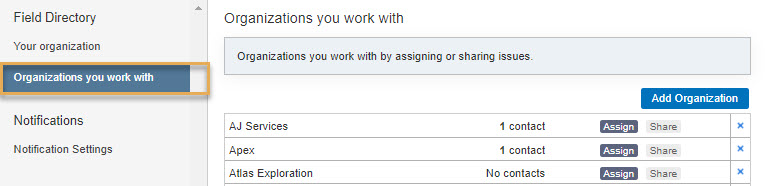
  2. Under Field Settings, click Field Directory, then click Organizations you work with. 
  1. From here you can either add an organization or click the name of an organization you have previously added.
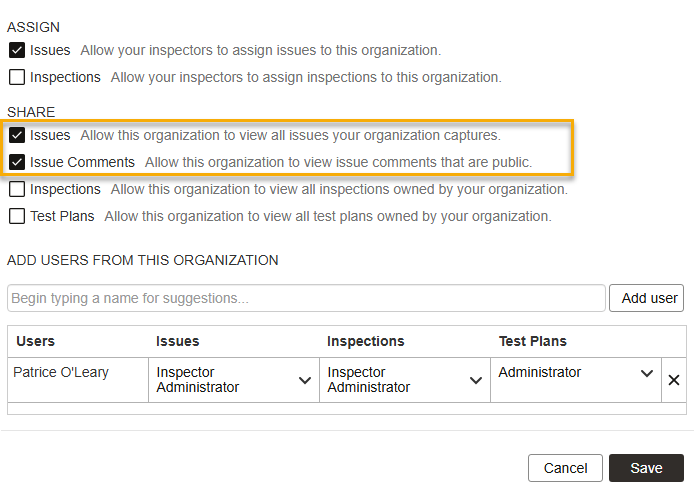
  2. Select the required Share options:
  • Issues: if you want to allow this organization to view all issues captured by your organization.
  • Issue Comments: if you want to allow this organization to see all public comments that have been added to your issues.
  1. Click Save