
Support Central




August 2026
This month you'll find secondary files for documents, file comparison in Document Processes, a faster way to send a complete package hierarchy, and exports for Test Plans.

This release is for:
- Document Controllers who work with multiple file types per document.
- Those who provided valuable feedback on the new enhanced upload.
- Reviewers who need to compare versions of a document.
- Package managers who need to send an entire hierarchy to another organization.
- Quality teams who need to export test plans for handover.
Documents
What's new
Manage multiple file formats with Renditions
-
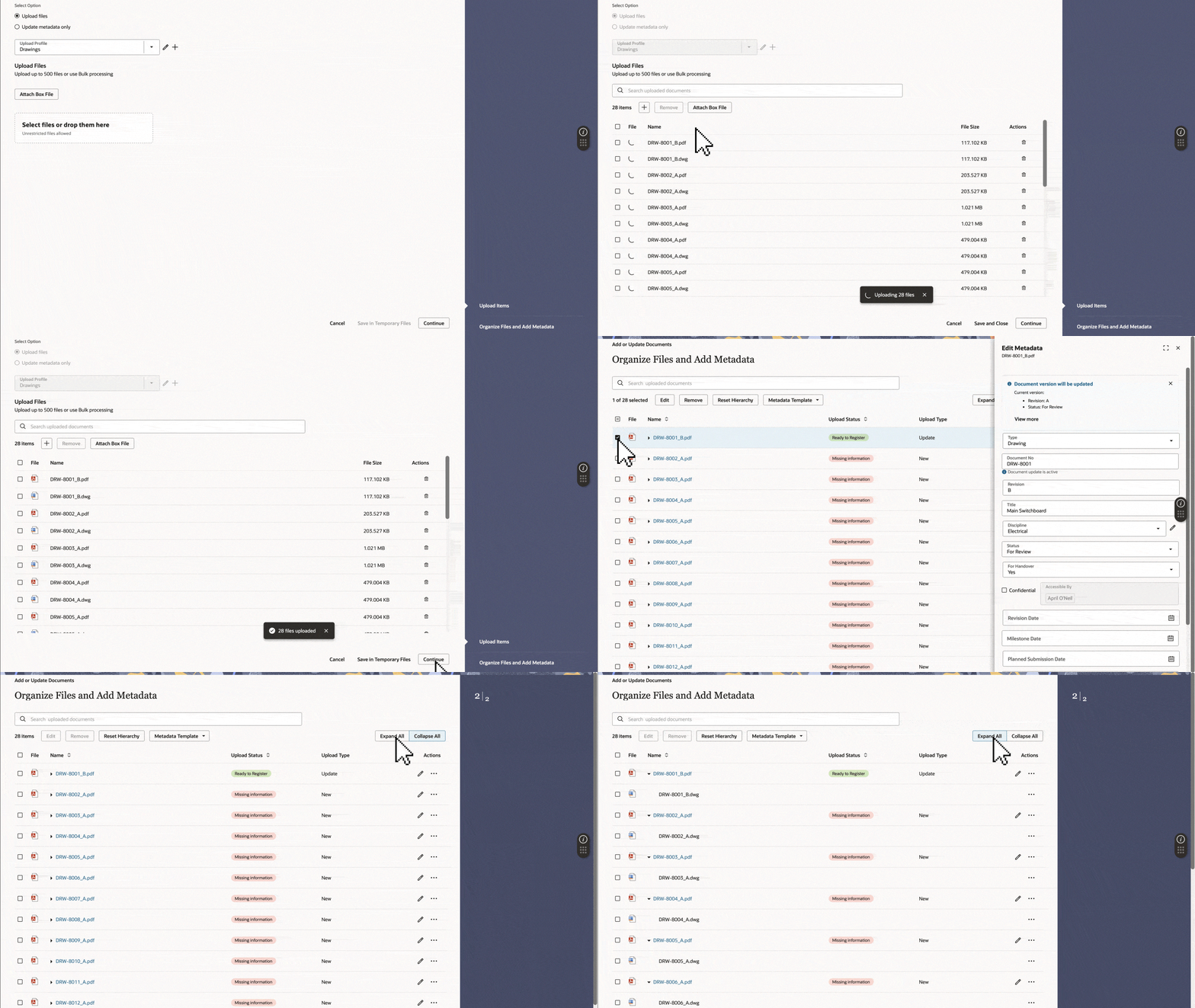
Renditions allows you to attach secondary files to a document, keeping different file formats together in a single record. For example, a drawing can have a PDF as the primary file for review, with the native CAD file attached as a secondary file.
-
This means you no longer need to register your native files as separate documents, making them easier to find and manage. Learn more about Renditions.
-
Renditions is enabled by default for new projects created from scratch and only available in the new enhanced upload. For existing projects (including templates), make sure Renditions is right for your project and update any affected API integrations before enabling it.
Work faster in the enhanced upload
Thanks to your feedback, we’ve made the enhanced upload faster and easier to use, with fewer clicks and an intuitive flow from upload to registration. We'll retire all other uploads in January 2027, so we recommend planning your transition to the new version. Learn more about the enhanced upload and its benefits.
-
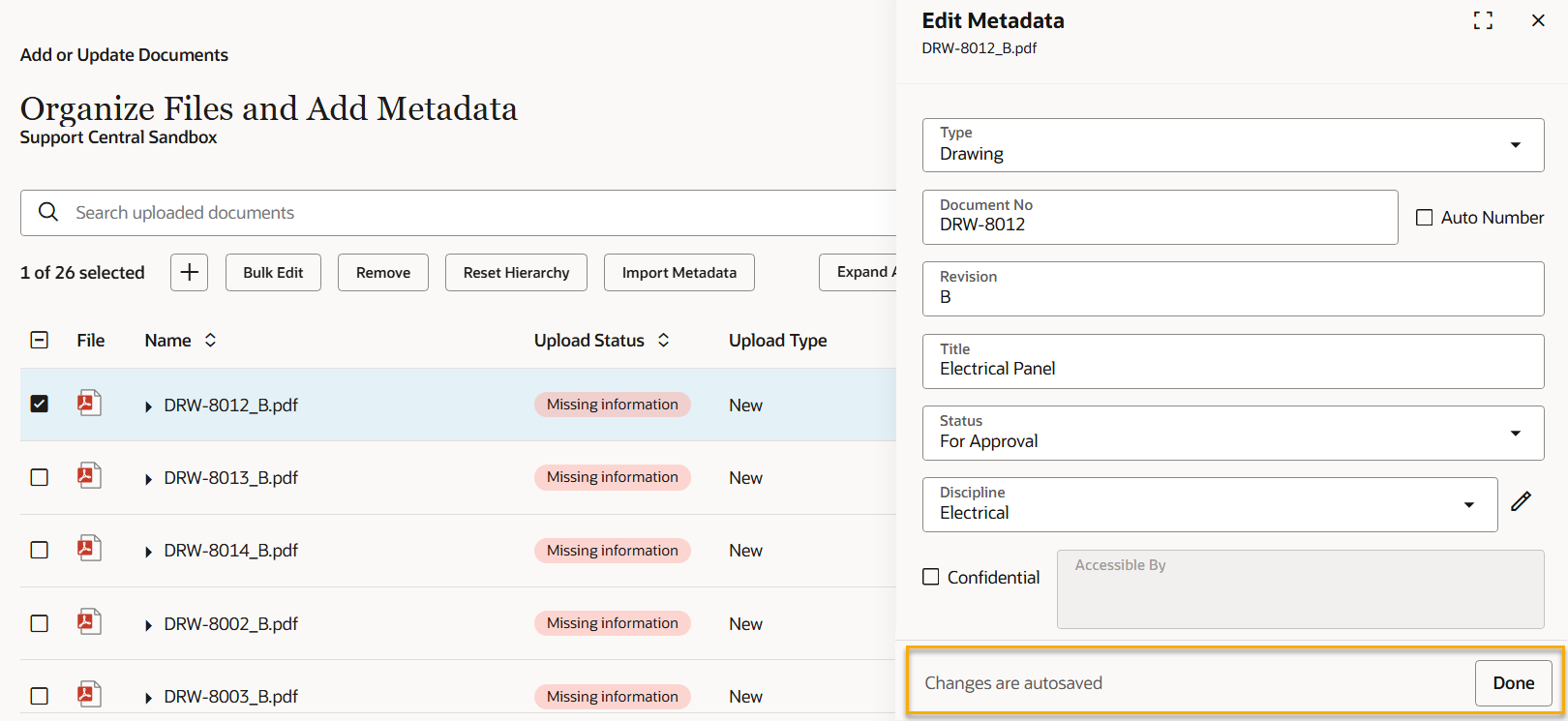
The metadata entry panel now stays put while you work. Clicking elsewhere no longer closes it accidentally. When you're finished, click the new Done button, or use the close button at the top.
-
When all documents are ready to register, the Done button changes to Register all documents. You no longer have to close the panel to find the Register button, saving a click.
-
Click anywhere on a document row to enter metadata instead of specifically clicking the filename link.
-
You'll see a Changes are autosaved message when entering metadata to confirm your work is safe, even if the panel closes.
-
After dropping your files, you'll see a progress bar so you know your files are processing.
-
After all files have uploaded, you'll be taken straight into the metadata entry screen, saving a click. If you forgot a file, you can add it directly from the metadata entry screen.
-
You'll see your name, organization and project at the top of the upload screen so you know where you're working from at a glance.
-
You can download a metadata template in one click instead of two.
-
We've removed the confusing Document Update is active message from the metadata panel and fixed a bug that required some dropdown values to be selected twice.
Improvements and fixes
A new look for transmittal history by organization
UPDATE 07-Sep: This functionality has been delayed to a future release.
Field
What's new
Export test plans to PDF
-
Create a handover-ready PDF that captures test plan progress with evidence.
-
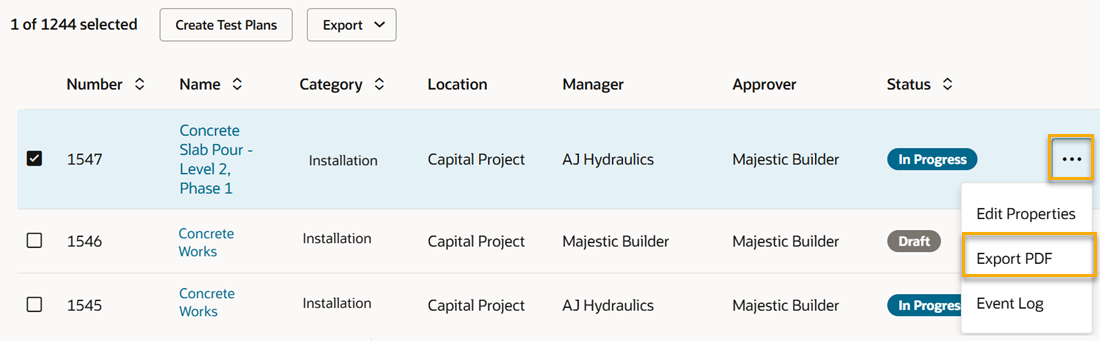
You can export each test plan individually to PDF to share with your stakeholders.
-
The PDF includes test plan details, an activity summary, activity metadata, reference documents, records, reviewer actions, and appendices for supporting evidence.
-
Choose to include photos, files, inspections, linked issues, and reference document metadata. Your selection is remembered until you next log in.
Document Processes
What's new
Compare versions during a review
-
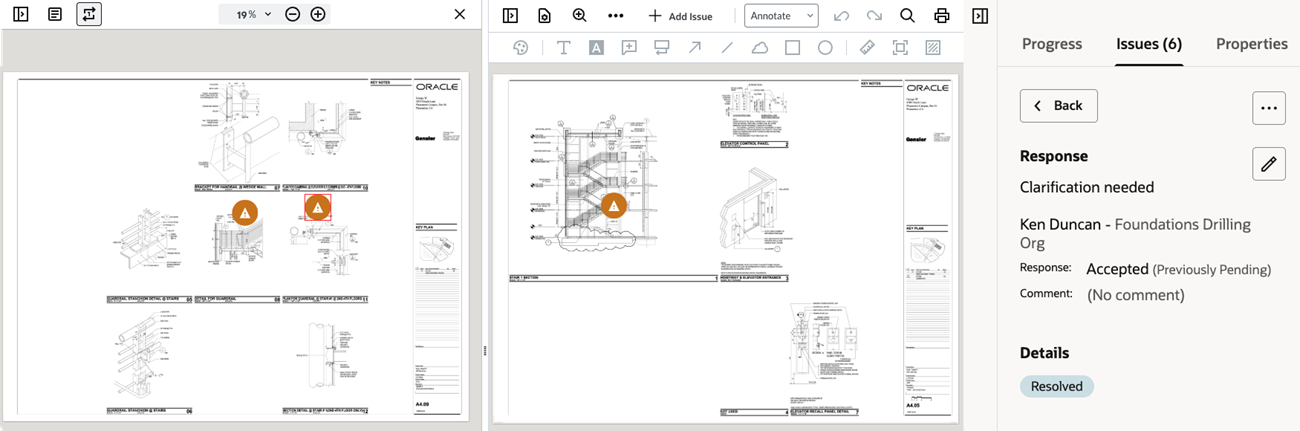
You can now view the current and previous versions of a PDF document side by side during a review.
-
This helps you quickly identify if issues raised on a previous review cycle have been addressed.
-
Select an issue from a previous review cycle to see it and its markups in context, on the previous version.
Keep stakeholders informed
-
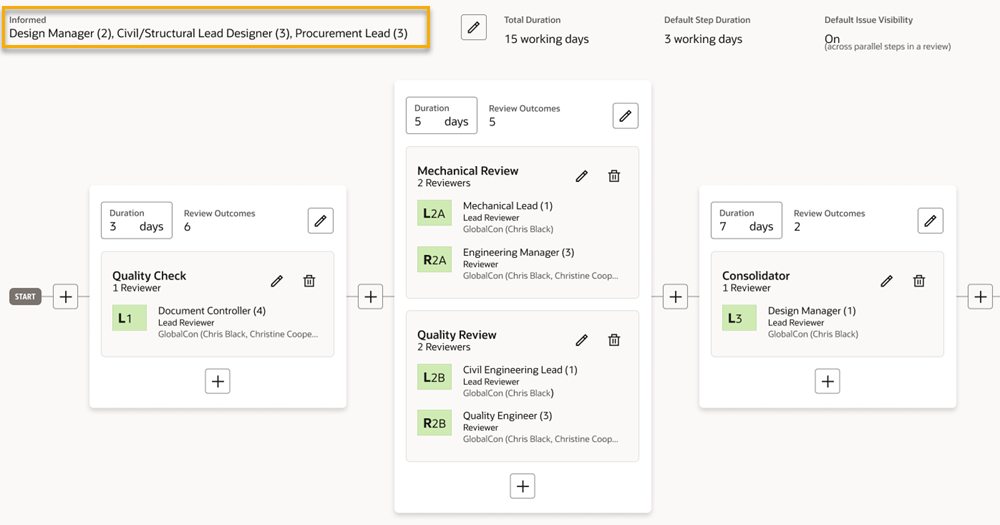
Thanks to your feedback, you can now add a group as Informed participants to a review rule.
-
Informed participants receive email notifications at key steps during the review and the final transmittal.
-
This provides a clear way to keep stakeholders informed of the review progress without them making changes.
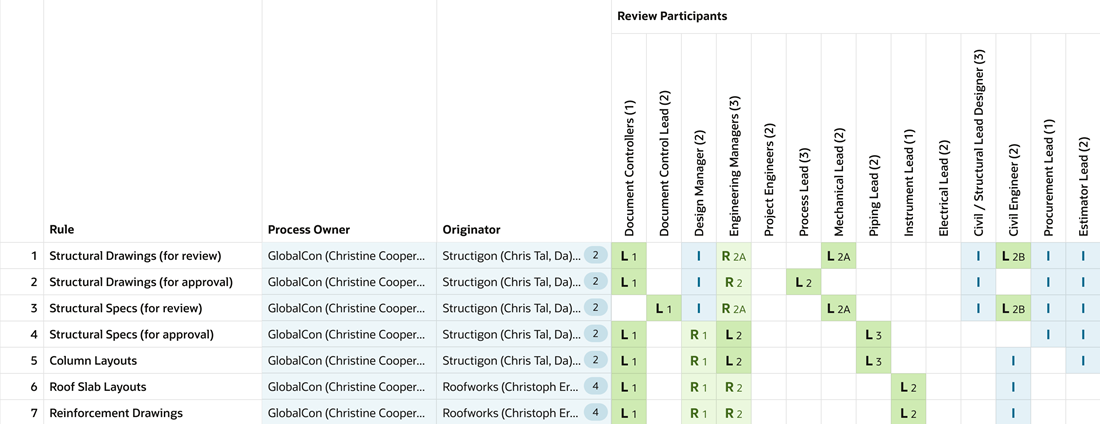
- If you're updating from the grid, you can enter the letter I to add a group as an informed participant in a rule.
Improvements and fixes
Choose when to update your Document Register
-
A new organization preference lets Org Admins decide whether documents received on a Document Processes transmittal are automatically updated in the Document Register.
-
With the preference disabled, you can check the documents are accurate before manually updating them in the register. Previously all documents were updated automatically.
-
The preference is named Update document register automatically upon receipt of Document Processes transmittals.
-
The existing preference label has also been updated to clarify that it excludes Document Processes.
Faster reviews and administration
-
You can now send up to 1,000 documents into review at once. Previously you could select up to 500 documents.
-
The Review Matrix is now included in the Project Settings Report to help you export and review the configuration. It's also included when you copy a project, for faster project setup.
Packages
What's new
Send a package hierarchy
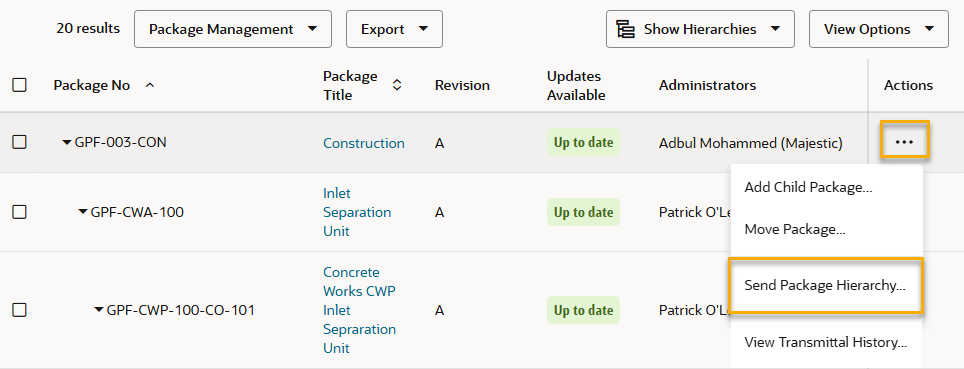
- Send a complete package hierarchy in one go. Select a package and choose Send Package Hierarchy to send it and all its descendants (up to 20 packages) without selecting each child package individually.
API
What's new
Reminder - Ensure your API integrations support 64-bit records
- In September, we'll upgrade Aconex database fields to 64-bit across all Aconex instances. If your organization integrates with Aconex APIs, you'll need to review your integrations and ensure they support 64-bit data types.
- The EA1 instance has been upgraded to 64-bit and is ready for you to test your integration(s). Learn how to review your API integrations.
Home
Improvements and fixes
Tidying old tasks
-
We're optimizing the home screen to prepare for new features arriving later this year.
-
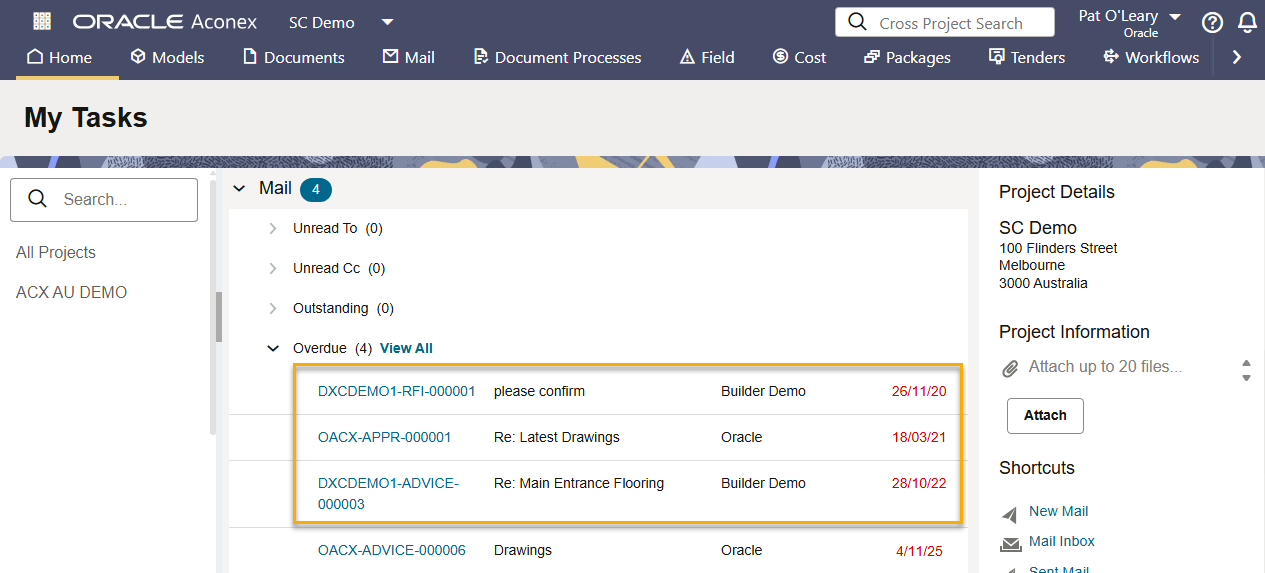
To do this, we'll no longer display tasks that were created over two years ago. The data itself will not change - it just won't be visible on your home screen. You can continue to access your older tasks directly from the appropriate module. For example, all overdue mail can still be found in your Inbox.
-
This applies to both the web and mobile app.
Mobile
Improvements and fixes
Find test plans by Approver
- You can now filter your test plan list by one or more Approvers. This helps you find test plans that need to be closed by a particular user or organization.
Cost
Improvements and fixes
Add a secondary Cost Admin
- You can now add a secondary Cost Administrator to help manage Cost configurations for your organization. This is helpful if your primary admin is away. Raise a Service Request to request the secondary admin.

We'll gradually release each update over a 30-day period starting August 29.

These updates will be made available to all instances.
Release schedule
Features are gradually rolled out to each instance over a 30-day period, starting from the indicated dates below. You may not see all updates immediately. We can’t guarantee a global rollout of features across instances within the same timeframe. Oracle Aconex Mobile is updated in the fourth week of the month.
While we endeavour to keep this information complete and accurate, we advise you to thoroughly test and confirm feature availability before implementing new processes on your project. This information is accurate at the time of publishing and is subject to change without notice. Learn more about our release process.
+ View schedule
| ASIA1: Sep 03 | EU1: Aug 29 |
| ASIA2: Sep 02 | KSA1: Sep 04 |
| AU1: Sep 10 | MEA: Sep 04 |
| AU2: Sep 02 | UK1: Sep 07 |
| CA1: Aug 30 | US1: Sep 05 |