
Support Central




June 2026
This month you'll find bulk updates for review issues, bulk exports for inspections, a faster way to track adoption across all projects, and APIs for supplementary files and package management.

This release is for:
- Reviewers who need to update issues in bulk.
- Inspectors who need to export their inspections in bulk.
- Org Admins who want to track adoption across all projects.
- Model coordinators who need to perform bulk actions across their models.
- API developers who need to get supplementary files from workflows or manage packages.
Document Processes
What's new
Update issues in bulk
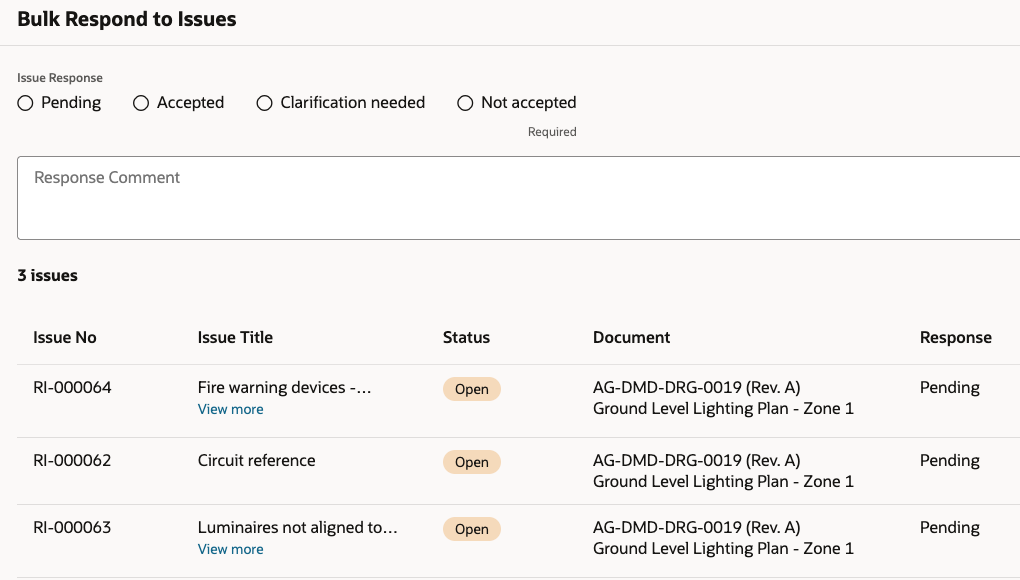
- If you've been assigned multiple issues, you can save some time and respond to them all in one go.
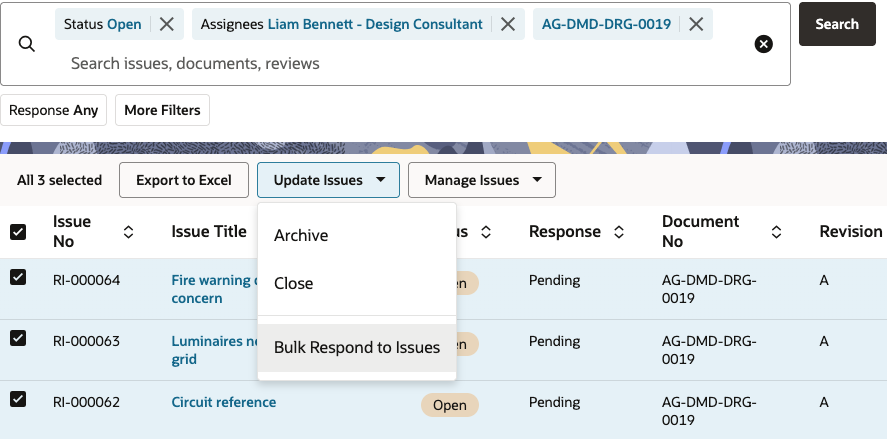
- This helps you apply the same response or comment to multiple issues.
Improvements and fixes
We fixed some bugs
- We fixed the issue that prevented you from starting a review process if you didn't have access to every document status used in the rule.
- Relabeled document fields now show the correct label when creating a review rule.
Field
What's new
Export inspections in bulk with attachments
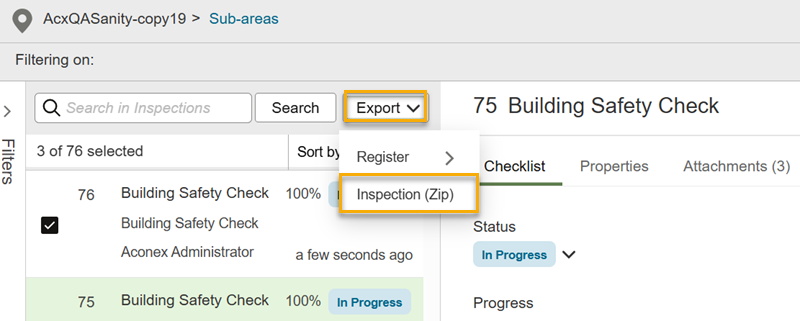
- You asked, we listened. You can now select up to 25 inspections across multiple pages and export them as separate zip files in one go. You no longer need to select and export each inspection separately, making handover faster.
- You'll receive an email when the export completes with a link to the zip files in your temporary files.
- Each zip file includes the inspection PDF, inspection-level attachments, line-item attachments, and linked issue PDFs with their attachments.
- Line-item folders are included even if they don't contain attachments or issues, so you know no content was removed. Exported PDF forms do not include line-item folders.
Create test plans in bulk
- You can now create up to 10 test plans from a single template.
- This is helpful to create similar test plans in different locations, such as concrete pours across a project.
Improvements and fixes
Enhanced attachment previews in daily reports
- You'll see new labels when previewing attachments in a daily report.
- Name has been renamed to File Name.
- Description has been renamed to File Description.
- Attachment added by has been renamed to File Added By.
- Date has been renamed to Upload Date.
- We also improved the preview rendering quality for a better viewing experience.
More reference documents
- Thanks to your feedback, you can now add up to 50 reference documents to each test plan activity.
Insights
What's new
Track adoption across all your projects
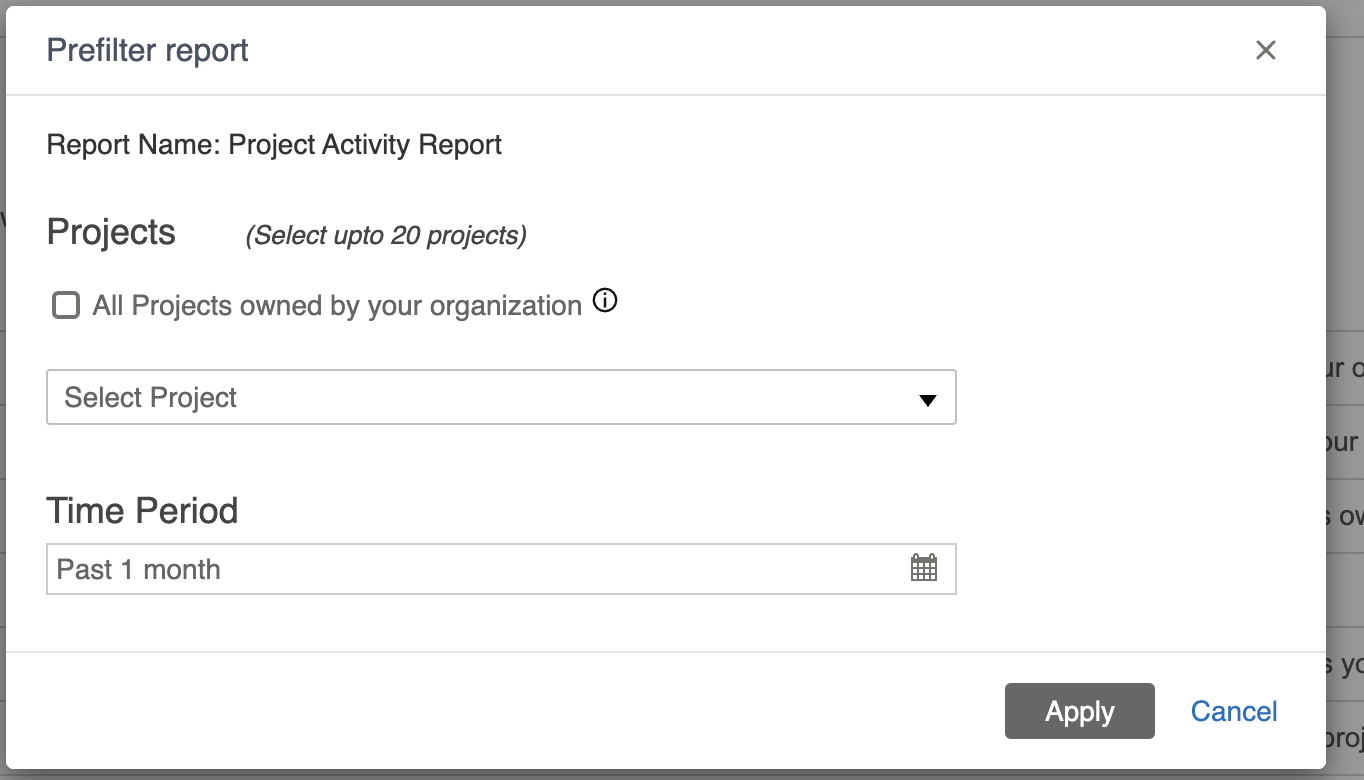
- Org Admins can now run the Project Activity Report across all projects, instead of 20 at a time. This provides a complete view of adoption trends across your portfolio.
- Select the All Projects owned by your organization option to run the report for all projects your organization owns (even those you aren't participating in).
- Archived projects are not included when selecting all projects. You can select archived projects manually.
Models
Improvements and fixes
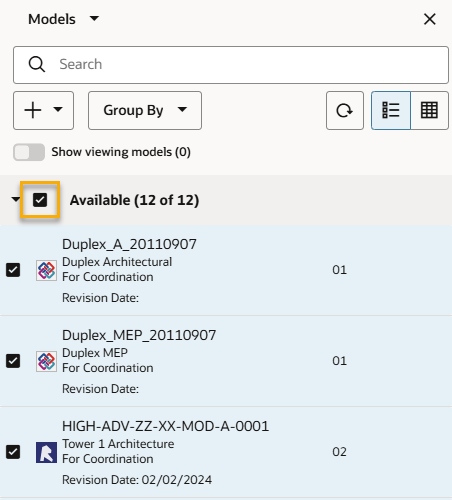
Select all models
- It's easier to perform bulk actions on your models with a new checkbox to select them all.
- You'll find the new checkbox at the top of the list.
Packages
Improvements and fixes
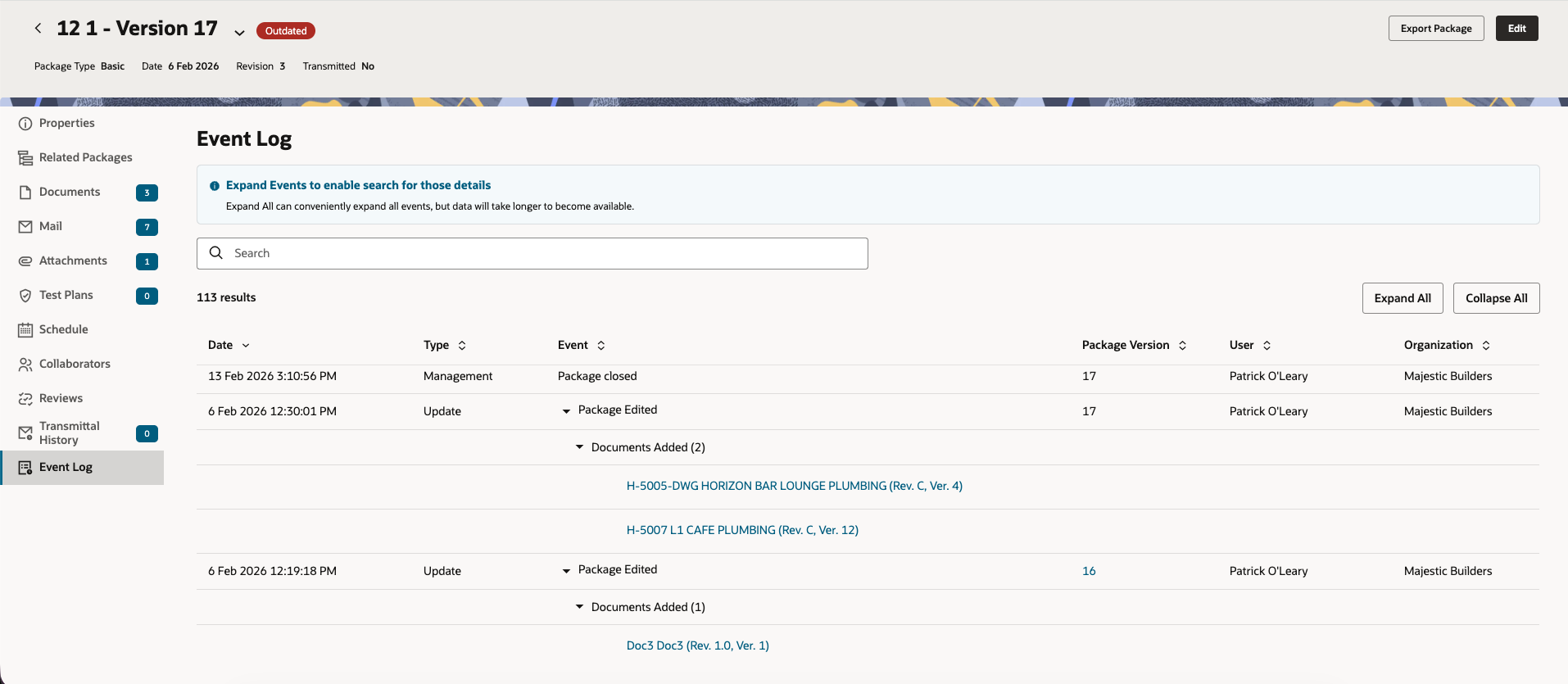
A new look for the event log
- The package event log screen has a refreshed look to help you quickly scan recent package activity.
Cost
Improvements and fixes
Consistent imports and decimal precision
- You'll now find a Description column when importing Change Event Items, helping you keep data complete and consistent.
- Activity Stream messages now display amounts using the correct decimal precision for each currency, improving the accuracy and consistency of cost change audit information.
- Configured Manual Fields also use correct decimal precision for the project's currency.
Documents
API
What's new
Reminder - Ensure your API integrations support 64-bit records
- We're preparing to upgrade Aconex database fields to 64-bit across all Aconex instances. If your organization integrates with Aconex APIs, you'll need to review your integrations and ensure they support 64-bit data types. Learn how to review your API integrations.
- Any Aconex data being managed or stored as a 32-bit Integer must be updated to a String or Long, depending on your implementation.
- We'll soon update the EA1 Aconex instance to 64-bit so it's ready for you to start testing.
- Subscribe to API News to be notified when it's ready (expected later in June 2026).
Get supplementary files from workflows
- Retrieve workflow supplementary file metadata without needing to access the app. The files can be downloaded individually or in bulk.
- This helps you collect supporting evidence together with workflow details using automated processes.
- View the Workflows API Developer Guide.
Close, reopen, or mark packages as no longer in use
- The Packages API has a new package-state endpoint allowing you to close, reopen, or mark a package as no longer in use.
Rename files on download
- The Download Document File and Download Mail Attachment APIs now support the project preference to Rename files on download to include Document Number and Revision.
- With the preference enabled, registered documents downloaded with these APIs will be renamed with the document number and revision. This matches the current behavior in the app.

We'll gradually release each update over a 30-day period starting June 27.

These updates will be made available to all instances.
Release schedule
Features are gradually rolled out to each instance over a 30-day period, starting from the indicated dates below. You may not see all updates immediately. We can’t guarantee a global rollout of features across instances within the same timeframe. Oracle Aconex Mobile is updated in the fourth week of the month.
While we endeavour to keep this information complete and accurate, we advise you to thoroughly test and confirm feature availability before implementing new processes on your project. This information is accurate at the time of publishing and is subject to change without notice. Learn more about our release process.
+ View rollout start dates
| ASIA1: Jul 02 | EU1: Jun 27 |
| ASIA2: Jul 01 | KSA1: Jul 03 |
| AU1: Jul 09 | MEA: Jul 03 |
| AU2: Jul 01 | UK1: Jul 06 |
| CA1: Jun 28 | US1: Jul 04 |