
Support Central




October 2026
This month you'll find a new home screen to manage your tasks, non-expiring passwords, Office files in workflows, more control over issue types, and faster project administration.

This release is for:
- All users who manage tasks on the Home screen.
- All users who log in with a password.
- Reviewers who asked for Office files in Workflows.
- Field Admins who manage issue types.
- Project Admins who apply project configuration changes to multiple projects.
- Cost Admins who manage reporting periods or remaining to spend.
Home
What's new
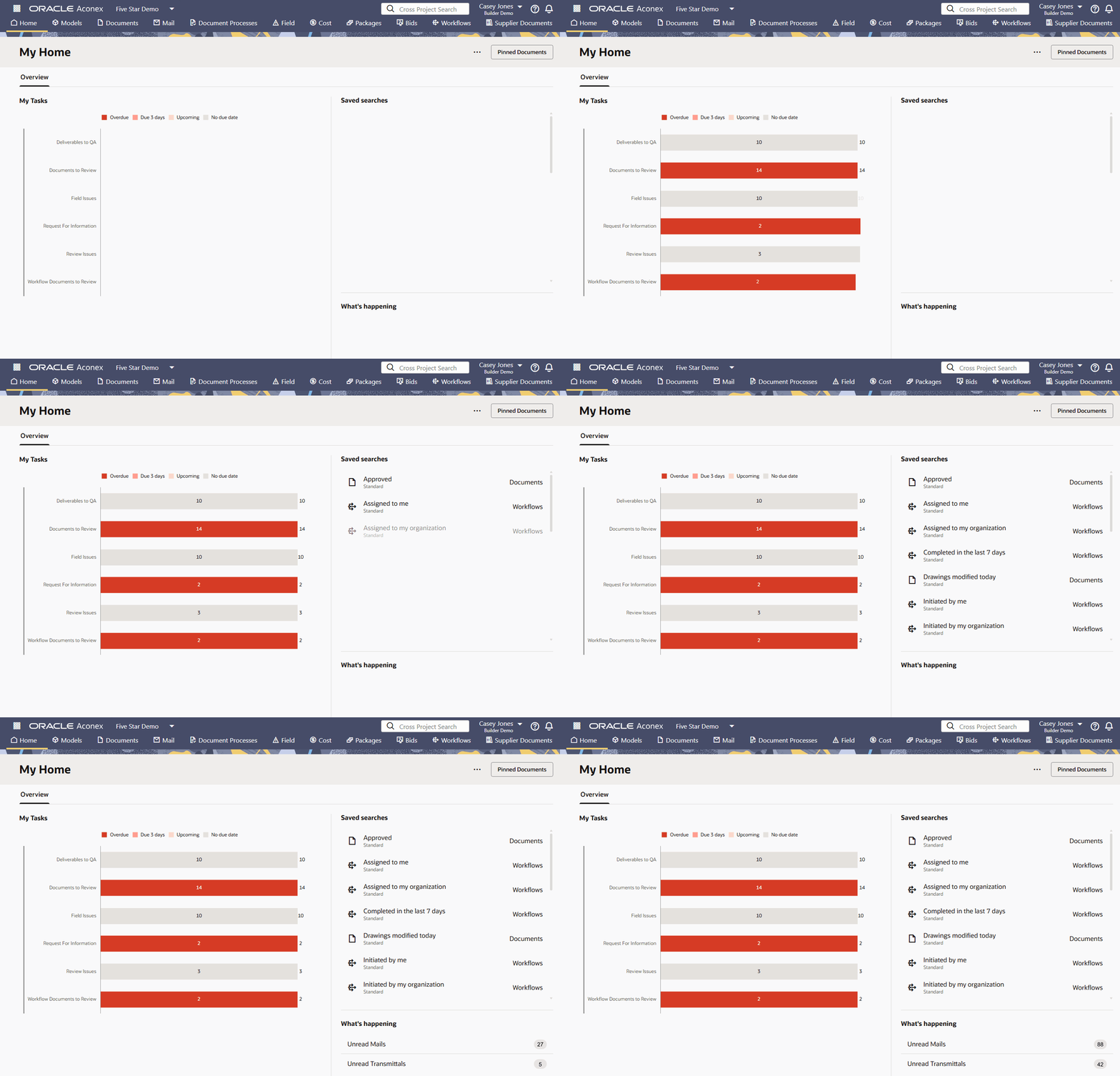
Welcome to your new Home
- Stay on top of your tasks and get work done faster with a cleaner, more intuitive Home screen.
- See what needs your attention at a glance and quickly spot what’s most urgent.
- You'll find tasks for Issues, Inspections, Test Plans, and Document Processes alongside your other Aconex tasks, for a more complete view of your work.
- Keep work moving with quick access to saved searches, unread mail, and pinned documents.
- All users will automatically move to the new Home screen. You can switch back to classic Tasks if you need to access the View all Projects screen.
- Watch the video and explore your new Home screen
Login
What's new
Reset your password... but just once more
-
Tired of changing your password every four months? We heard you.
-
After this release, you'll no longer need to change your password on a regular basis. To apply this update, we'll ask you to set a new password just once more.
-
Your new password must be at least 12 characters long, but you no longer need to include a mix of numbers, symbols, uppercase and lowercase letters. This helps you choose a secure password that you can remember.
-
If you’ve enabled two-step verification, the Trust this device option will now last 30 days instead of 7.
-
These changes won’t apply to organizations that manage their own Identity Domain, as they set their own password and two-step verification requirements.
-
We'll gradually roll out this change during November 2026.
Workflows
What's new
View Office files in Workflows
- You can now submit and view Microsoft Office files directly in the Online Viewer within a workflow.
- Supports files with the following extensions: doc/docx, xls/xlsx, ppt/pptx.
- This lets you view Word documents, Excel spreadsheets and PowerPoint presentations without opening them outside the review process.
- Note: Office files are read-only and cannot be edited or marked up within a workflow.
Viewer
Improvements and fixes
Organized viewer markups
-
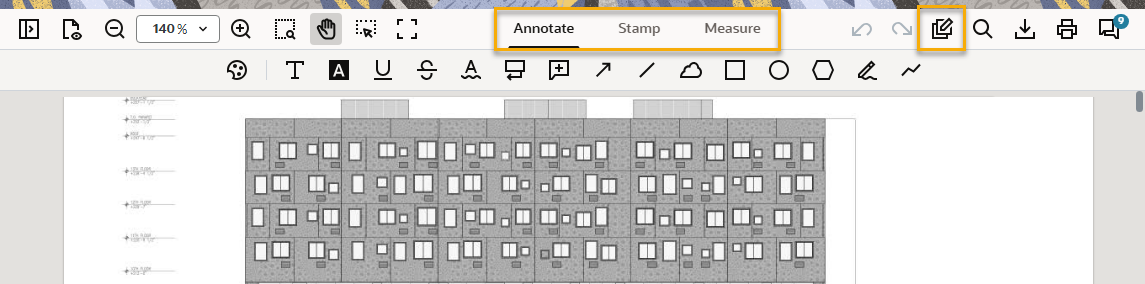
Thanks to your feedback, we've reorganized the viewer markup tools into three separate tabs, making them easier to find. This applies to the viewer in Workflows, Document Processes, and the Document Register (in Markup Mode).
-
Select the Annotate tab for text, callouts, lines, shapes, and freehand annotations.
-
Select the Stamp tab for signatures, stamps, images, and attachments, where available.
-
Select the Measure tab for distance, perimeter, and area tools.
-
-
We've also given the Bulk Annotate tool its own icon on the toolbar.
Important: You'll need to clear your browser cache for this update. We'll post a message in-app so you know when to do this. See instructions for Chrome, Firefox, and Edge.
-
Plus, while viewing a document from the Document Register:
-
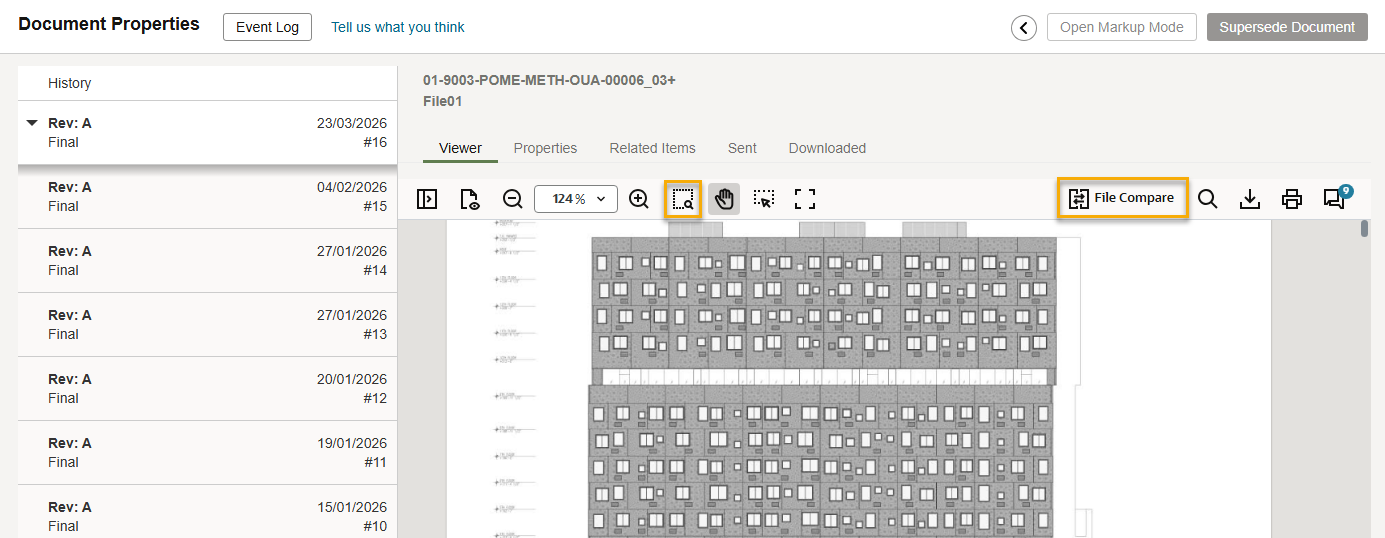
You'll find the Marquee Zoom tool beside the other zoom controls.
-
The File Compare feature is now accessible from the toolbar.
-
Setup
What's new
Apply project configuration changes to multiple projects
-
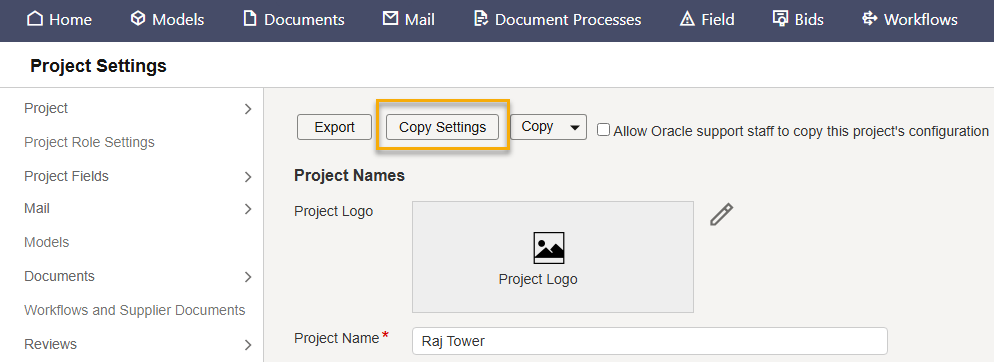
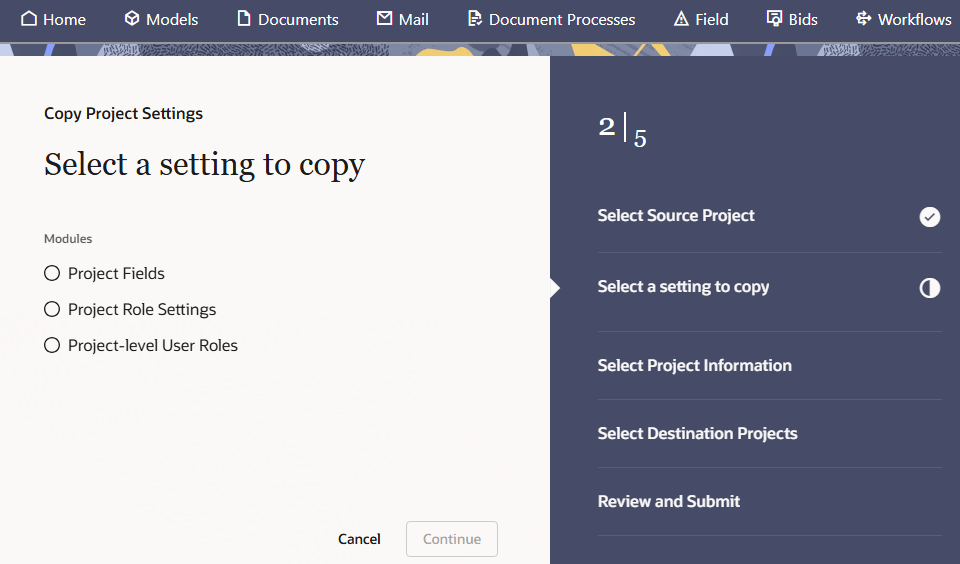
You can now copy specific project settings to multiple projects in one go. So, if you've added a new field or role, you no longer need to configure each project separately.
-
This saves time, reduces errors, and ensures processes are configured consistently across your projects.
-
With this release, you can copy Project Fields, Project Roles, and Project-level User Roles.
-
You'll need permission to Copy Project Settings.
Field
What's new
Faster Field onboarding
-
Organizations invited to a project (from September 2026) should now have the available Field features enabled for them automatically: Issues, Inspections, Punchlists, Test Plans, and Observations. You no longer need to contact Support to enable these.
-
You'll still need to add organizations you work with to collaborate with them.
Capture more issue details
-
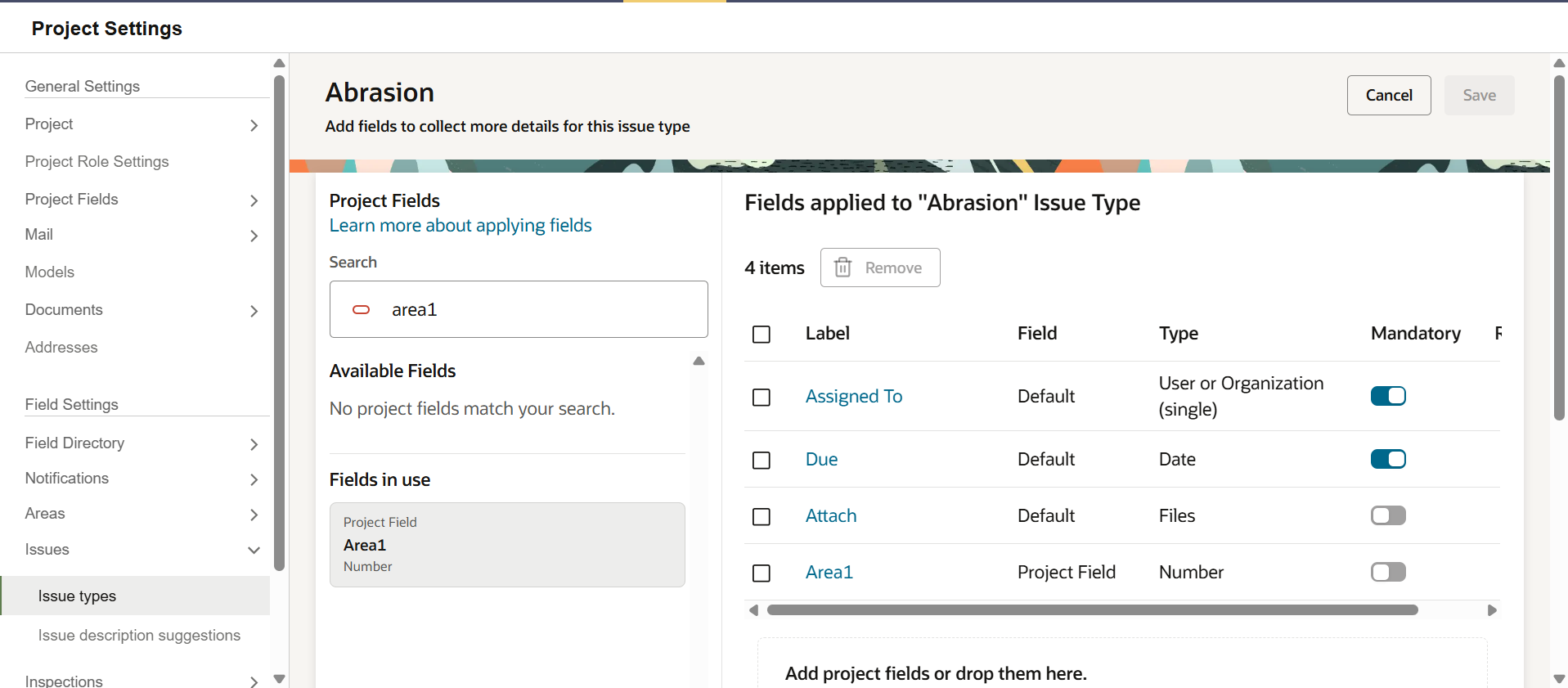
Field Admins can now make the following issue fields mandatory: Assigned To, Attachments, and Due Date.
-
This ensures you capture the right information when issues are raised on Aconex web or mobile.
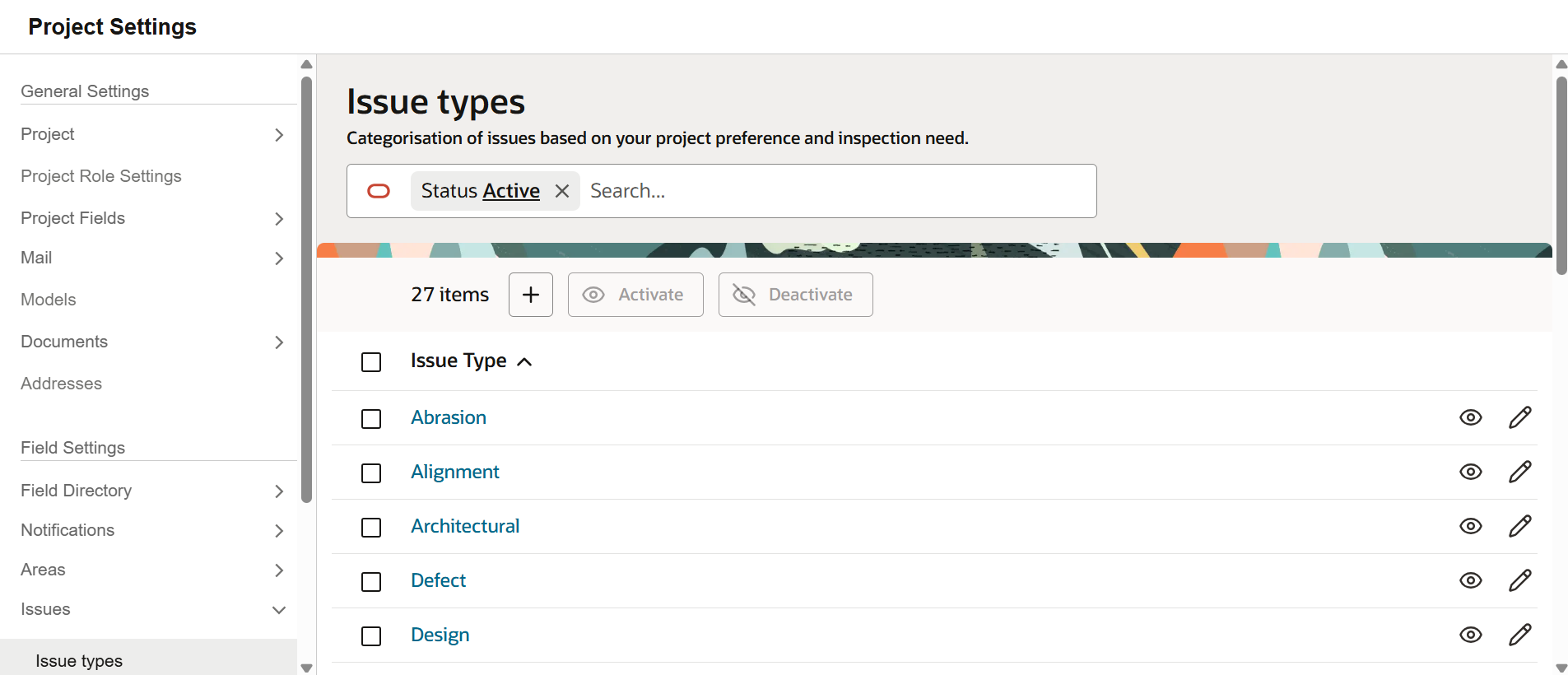
- The list of issue types also has a new look with additional options to search, filter, and deactivate issue types in bulk.
Packages
What's new
More package details at a glance
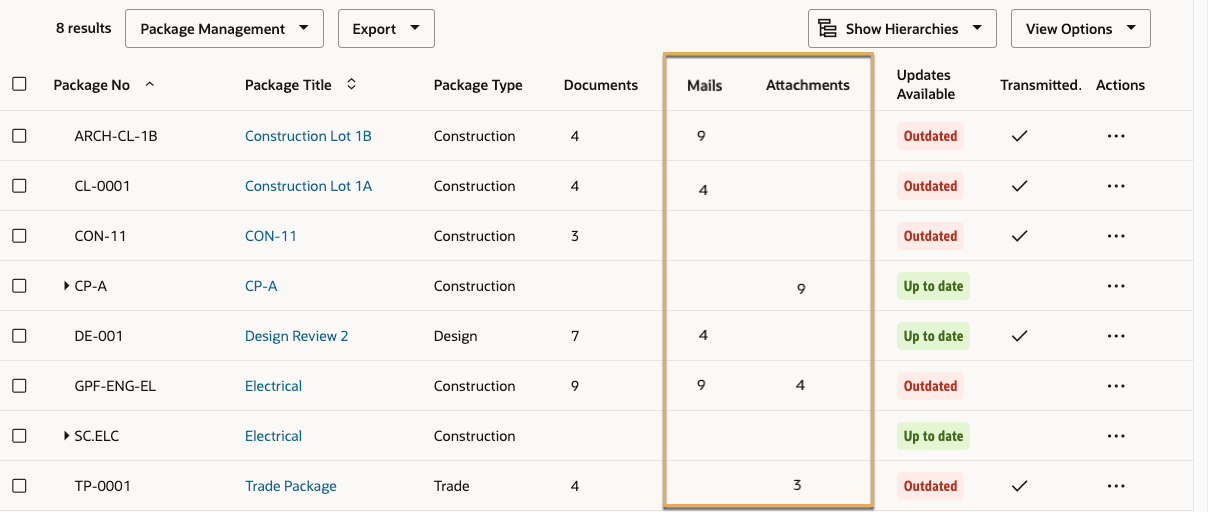
- See the number of mails and attachments in each package directly from the Package Register.
- This helps you compare package activity without opening each one.
- Add the Mails and Attachments columns to see the details and export them for further review.
Work with packages faster
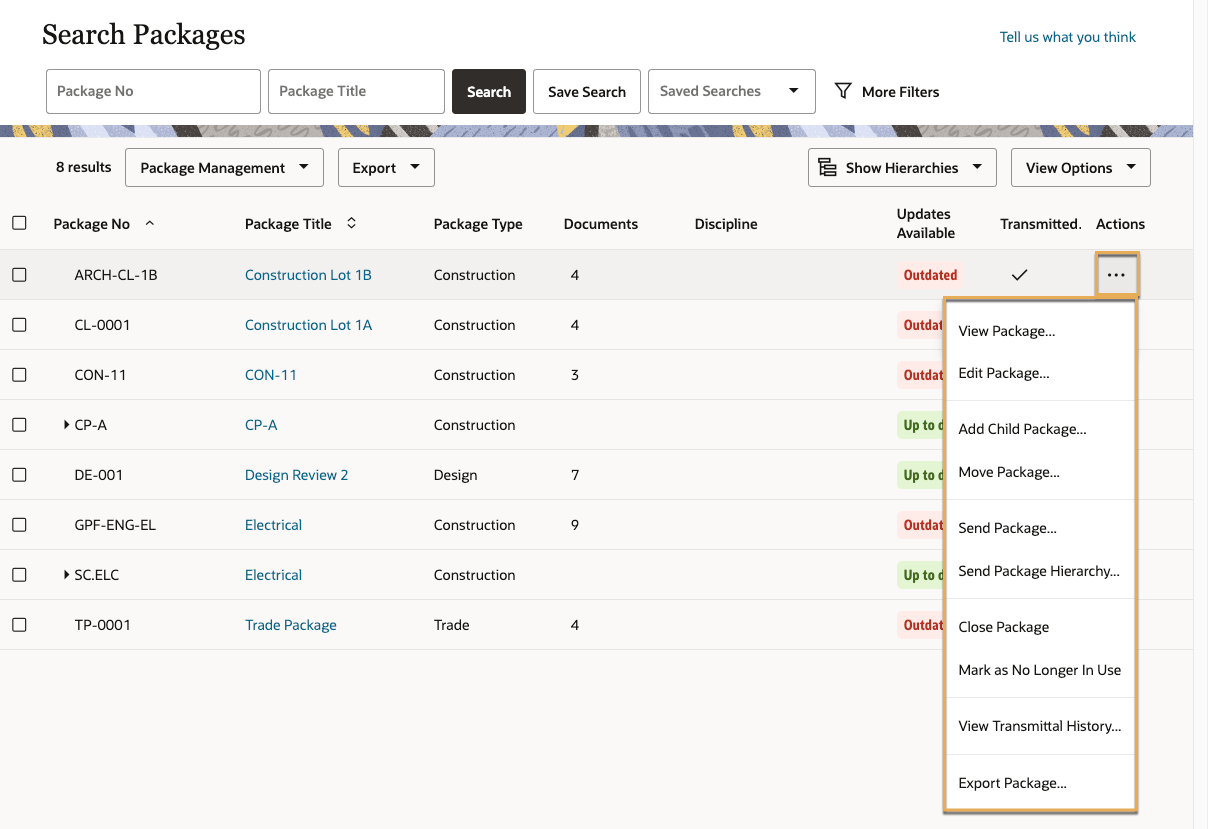
- You can now edit, send, start a review or export a package directly from the Actions menu in the Package Register. You no longer need to open the package first.
Improvements and fixes
More context in history
- View a package’s current mail and collaborators while reviewing a historical version, without switching to the latest version.
Formatted dates in reports
- Date fields in package reports are now formatted as dates instead of text. This helps you sort and filter without needing to reformat cells.
Document Processes
Improvements and fixes
Resolve bottlenecks faster
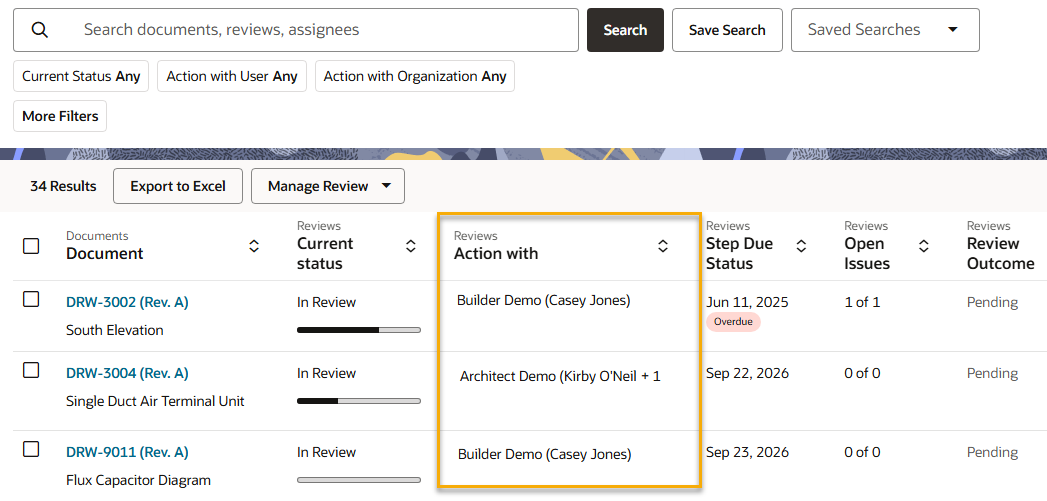
- The Action with column in the Deliverables Register now only displays Lead Reviewers instead of all reviewers.
- This helps the Process Owner identify specifically who needs to submit their review outcome.
Review more documents at once
- You can now start a review for up to 3,000 documents at once. Previously the limit was 1,000 documents.
Mobile
Improvements and fixes
Capture accurate photos
-
After taking a single photo from an issue's thumbnail or when changing its status, you'll now see a preview of the captured photo. You can then retake, cancel, or accept the photo, helping you check it before adding it to the issue. This applies to iOS and Android.
-
On Android, when capturing multiple photos, the options to retake or delete are now available from the preview instead of a separate menu. This applies when attaching photos to an issue or adding photos as records to a test plan activity.
-
On iOS the pen tool is now automatically selected after attaching a photo or file.
Cost
Improvements and fixes
Configure remaining to spend forecasting
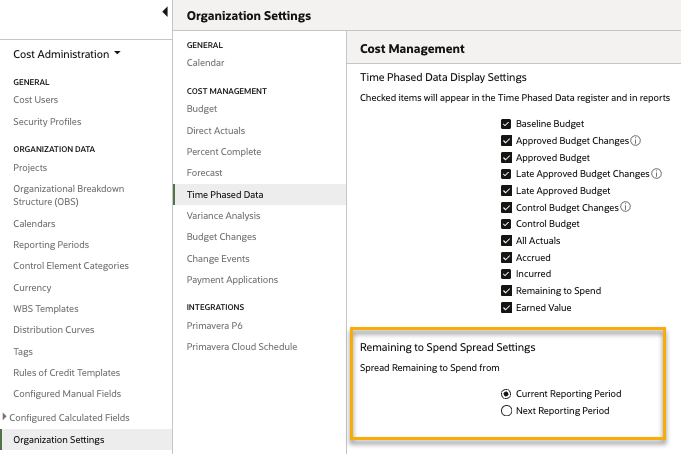
- Choose whether remaining to spend spreading begins in the current or next reporting period. Previously this started in the current period, requiring manual time-phased adjustments.
- This helps you align forecasts with internal reporting practices, reduce manual effort, and improve future-cost forecast accuracy.
Control access to reporting periods
- Cost Admins can now manage access to reporting periods separately from Cost Worksheet permissions.
- A new permission to read or update Reporting Periods is available in Security Profiles, under Cost Management.
Project totals in control elements
- The Control Elements screen now displays a Project Total row when the project root is selected in Filter by WBS.
- This helps you see project-level totals immediately, without manually summing category groups.
Insights
Improvements and fixes
More data in your reports
- The Sub-Contractor field is now available as a reporting column in the Field Safety Observations subject area. The standard Daily Observations Report has been updated with this value.
- The Tracking ID field is now available as a reporting column in the Documents subject area.
- The Template field is now available as a filter in the Workflow Steps subject area. The standard Workflow Documents Review Outcome and Workflow Documents reports now include workflow templates, allowing you to filter and track document review status by specific workflow templates.
- The Payment Application item subject area for Cost includes multiple new fields:
- Change No.
- Change Item No.
- Control Element Unit of Measure
- Pay Item Unit of Measure
- Original Contract Quantity
- Original Contract Unit Price
- Approved Changes Quantity
- Approved Changes Unit Price
- Proceed Changes Quantity
- Proceed Changes Unit Price
- Current Contract Quantity
- Current Contract Unit Price
- Requested Quantity Percent Complete
- Requested Quantity
- Requested Unit Price
- Accepted Quantity Percent Complete
- Accepted Quantity
- Accepted Unit Price
- Remaining Quantity
- To Date Quantity
- Previous Quantity
- To Date Quantity Overbilled
- Previous Quantity Overbilled
API
What's new
Ensure your API integrations support 64-bit records
- This month, we'll upgrade Aconex database fields to 64-bit across all Aconex instances. If your organization integrates with Aconex APIs, you should now have updated your integrations to support 64-bit data types. Learn more.
Improvements and fixes
Swagger links for Aconex APIs
- Swagger API documentation is now available for the following features to help you view and test API endpoints:
- Documents
- Project Fields
- Field
- Related Items
Get Cost records by date
- We've added date filters to several Cost APIs to help you retrieve new or changed records.
- The new query parameters are createdDate and lastUpdated. They accept dates in YYYY-MM-DD format.
- This reduces the amount of information you need to request to keep an updated record of your data.

We'll gradually release each update over a 30-day period starting October 17.

These updates will be made available to all instances.
Release schedule
Features are gradually rolled out to each instance over a 30-day period, starting from the indicated dates below. You may not see all updates immediately. We can’t guarantee a global rollout of features across instances within the same timeframe. Oracle Aconex Mobile is updated in the fourth week of the month.
While we endeavour to keep this information complete and accurate, we advise you to thoroughly test and confirm feature availability before implementing new processes on your project. This information is accurate at the time of publishing and is subject to change without notice. Learn more about our release process.
+ View schedule
| ASIA1: Oct 22 | EU1: Oct 17 |
| ASIA2: Oct 21 | KSA1: Oct 23 |
| AU1: Oct 29 | MEA: Oct 23 |
| AU2: Oct 21 | UK1: Oct 26 |
| CA1: Oct 18 | US1: Oct 24 |