
Support Central




September 2026
This month you'll find unit pricing in Cost, new controls for packages, faster point clouds in Models, and more.

This release is for:
- Cost Admins who manage costs with quantities and unit prices.
- Project Admins who configure packages.
- Model Coordinators who review point cloud files.
- Everyone who works with test plan activities.
- Org Admins who need to control who can flatten markups.
- All mobile app users.
Cost
What's new
Track costs with quantities and unit pricing
-
Unit pricing provides greater visibility into the quantity, unit of measure, and rate behind your project costs.
-
Once available, you can enable unit pricing across your projects. Before you enable it, make sure you review all API integrations, coordinate shared contracts, and decide how you want to manage new projects. Read our best practices article to learn more and ensure your team is prepared. If required, you can continue using lump sum amounts to manage costs after unit pricing is enabled.
-
We'll gradually make unit pricing available to organizations, starting with the September release. Availability will be introduced in stages throughout October to support a smooth transition.
-
Later this year, we'll enable unit pricing automatically for all organizations and projects. We'll communicate timings closer to the release.
Add a secondary Cost Admin
-
When you first configure Cost for your organization, you can add a secondary Cost Administrator to help manage Cost configurations. This is helpful if your primary admin is away. If you've already configured Cost, you can raise a Service Request to request the secondary admin.
Field
What's new
See test plan activity in one place
-
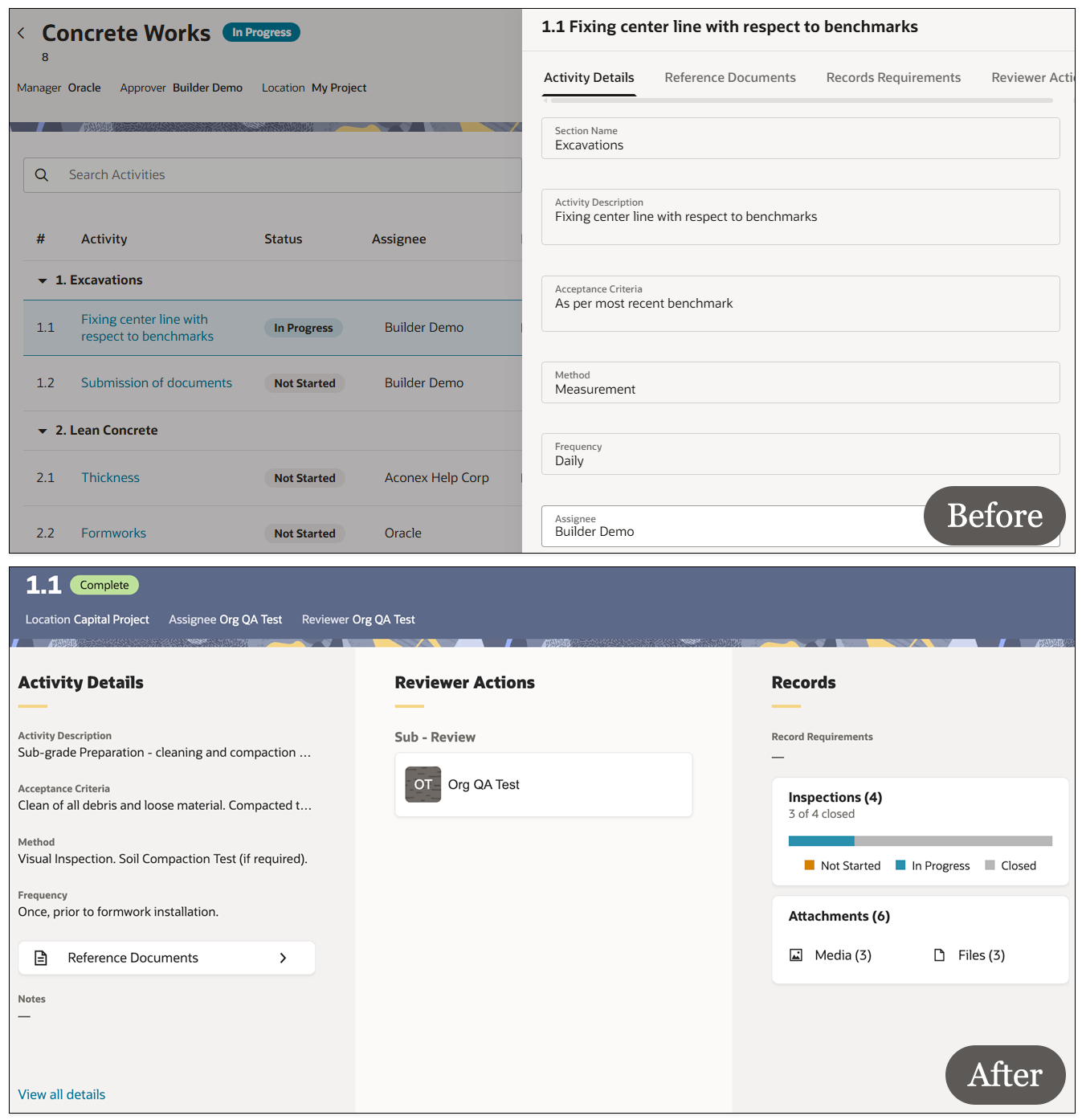
The activity screen has a refreshed look to save clicks and help you find information fast.
-
Instead of clicking separate tabs to find information, you'll now see all the details displayed on one screen.
Packages
What's new
Configure available package types for organizations
-
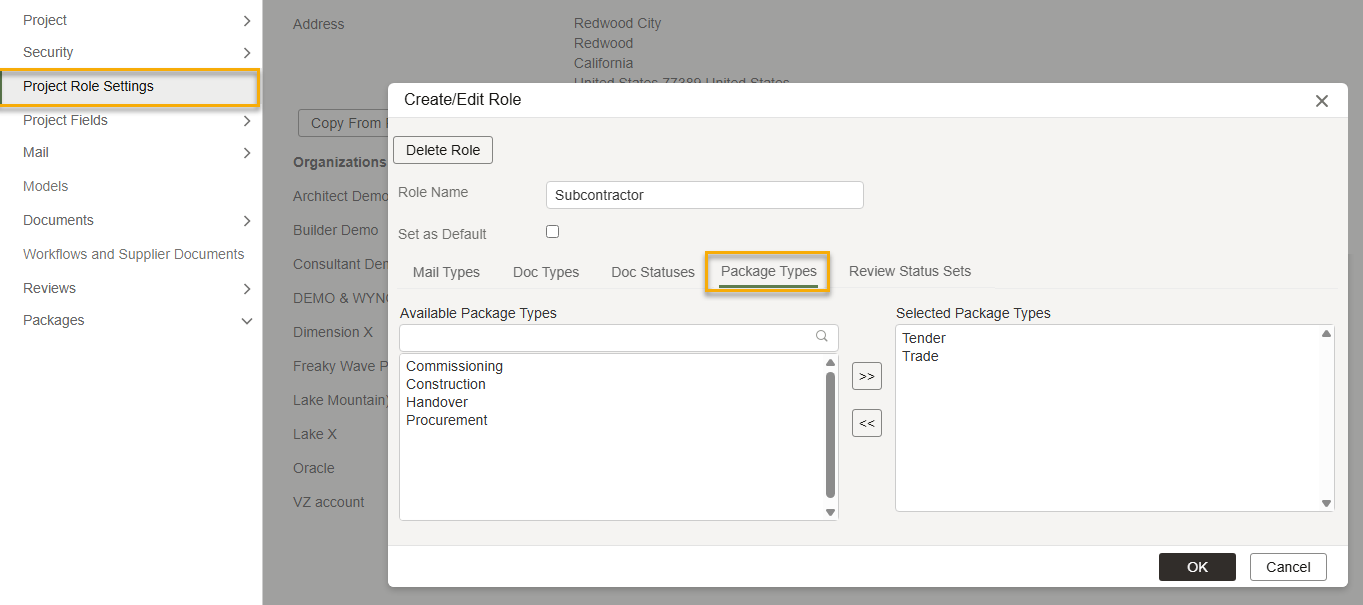
Project Admins can now choose which package types each organization can create.
-
This helps to reduce errors and ensures organizations only create the packages they need.
-
The configuration is managed through Project Roles which has been renamed from Mail/Document Role Settings to Project Role Settings.
Improvements and fixes
Restrict field selections in package types
-
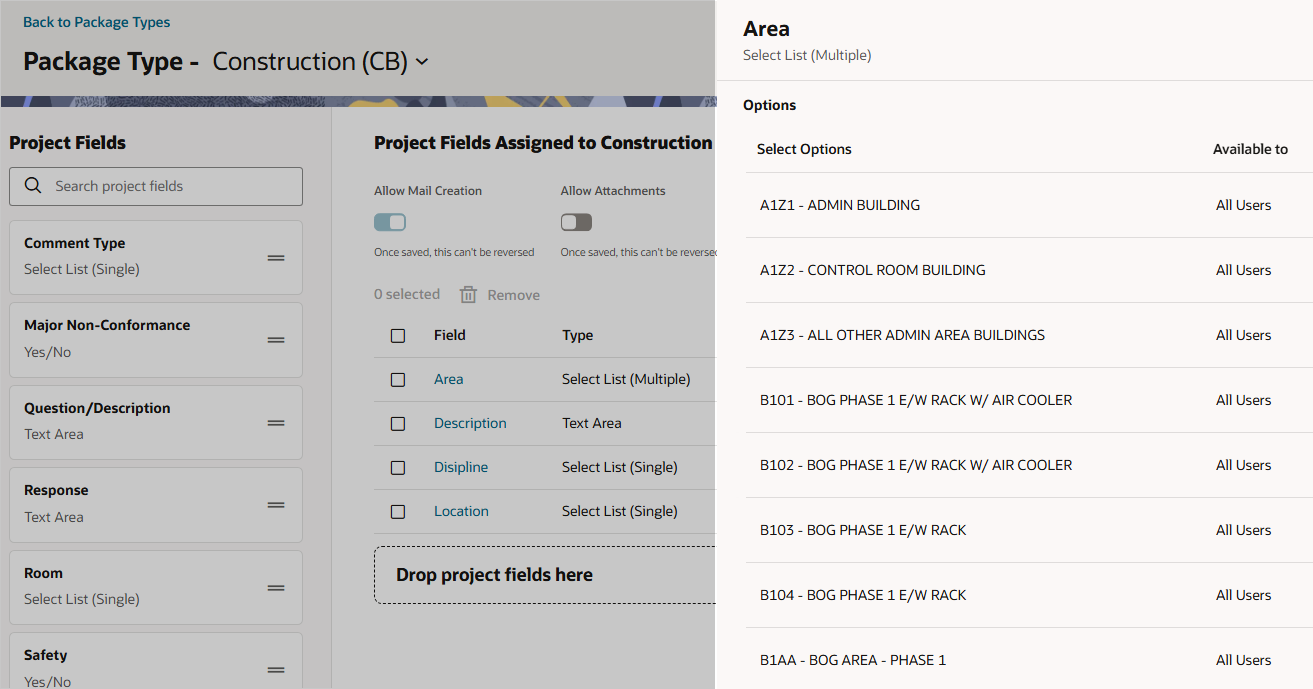
Project Admins can use project roles to control which select-list values each organization can select. You can configure these restrictions separately for each package type.
-
This works the same way as field-value permissions in mail forms, helping to reduce selection errors.
Allow package attachments to be shared
-
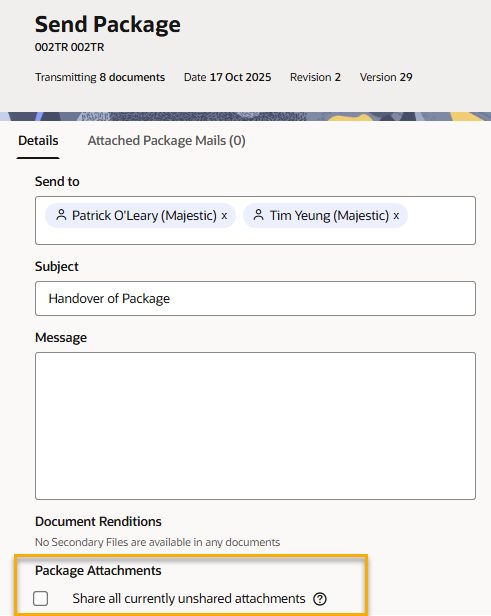
A new package setting lets Project Admins decide whether users can share attachments when sending packages.
-
When enabled for a project, users can choose to share attachments when they send a package.
-
Previously, attachments had to be shared separately after the package was sent.
Archives
What's new
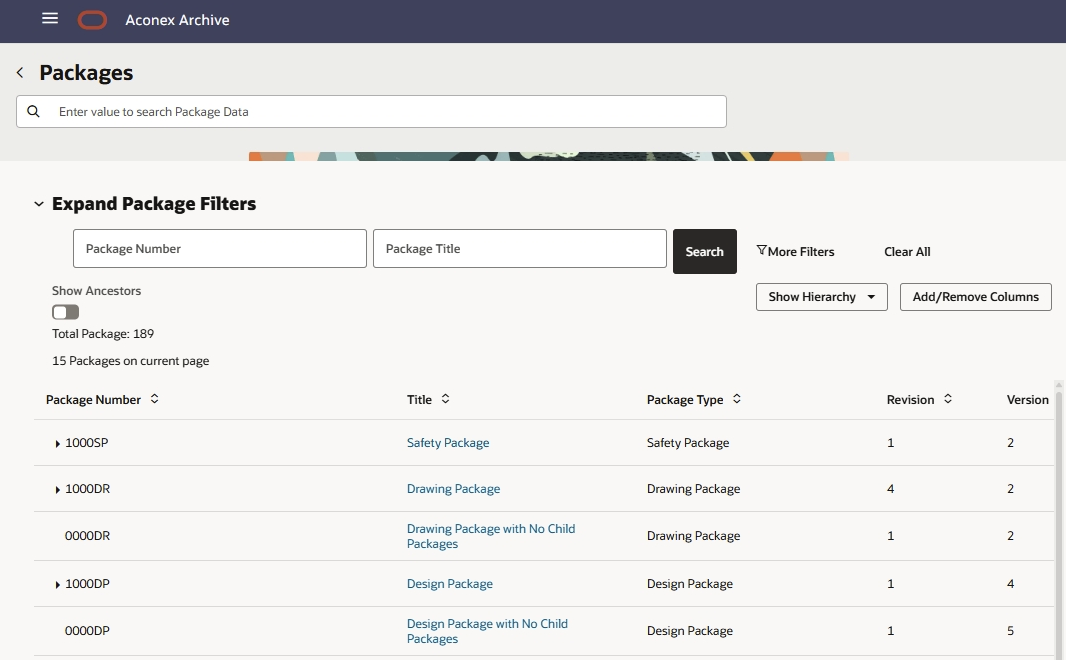
View packages in your project archive
-
Package data is now included in Project Archives and Scheduled Archives, providing a more complete record of project information.
-
Downloaded archives include package hierarchies, metadata, version history, linked documents and mail, transmittals, recipients, attachments, collaborators, and event history.
-
Note: Packages are currently available only using the archive installer. Support for multi-part downloadable archives is planned for a future release.
Models
What's new
Faster point cloud reviews
-
You can now view .LAS and .LAZ files directly in the model viewer. You no longer need to convert them to .E57 files.
-
We've also sped up the loading time for all point cloud formats. This saves time, helping you make site-validation decisions sooner.
Viewer
What's new
Decide who can flatten markups
-
Org Admins can now control who can flatten markups in their organization.
-
To make this feature available to users, grant the Flatten markups in Document Register permission to the appropriate user role.
Mobile
What's new
Update your mobile device
-
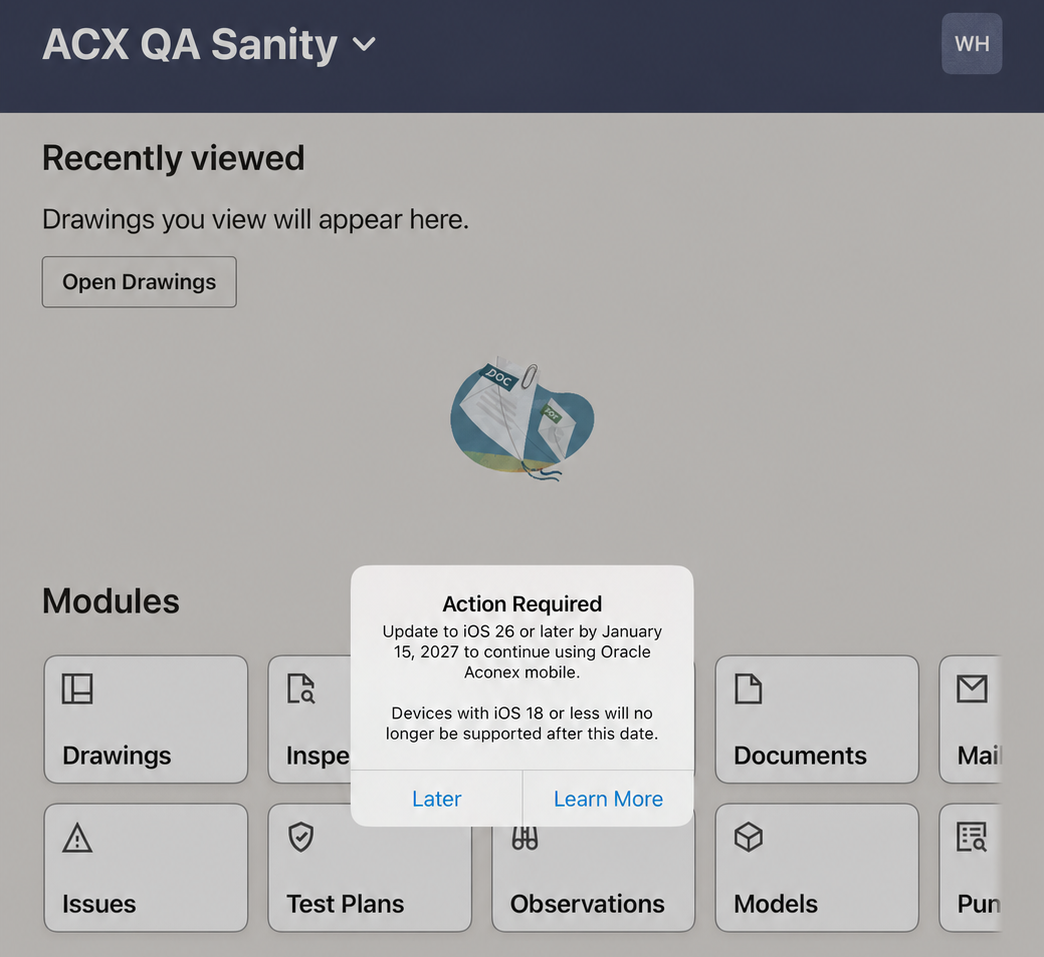
From January 2027, if you use an iPhone or iPad to access Aconex, you must update your device to iOS 26 or above to continue using the mobile app.
-
We'll begin encouraging you to update your device now before it becomes mandatory.
A new look for home and documents
-
In July we introduced an updated mobile home screen for iOS devices. We're now bringing this update to Android devices.
-
For all devices, when you first log in to the mobile app, you'll now be shown quick tips to help you get started. This is shown once per device, or if you reinstall the app.
-
Missing a task or module? You can now swipe down on the home screen to refresh your tasks and modules for the current project.
-
We've also enhanced the upload flow to help you register documents faster.
Improvements and fixes
Find overdue issues and add markup faster
-
You can now sort your issues by due date. By default, they'll be ordered oldest to newest. This helps you find issues that are overdue so they can be resolved.
-
After attaching a photo or file to an issue, the pen tool is now automatically selected so you can add markups right away.
Documents
Improvements and fixes
A new look for transmittal history reports
UPDATE 29-Oct: This functionality has been delayed to a future release.
Clearer actions for secondary files
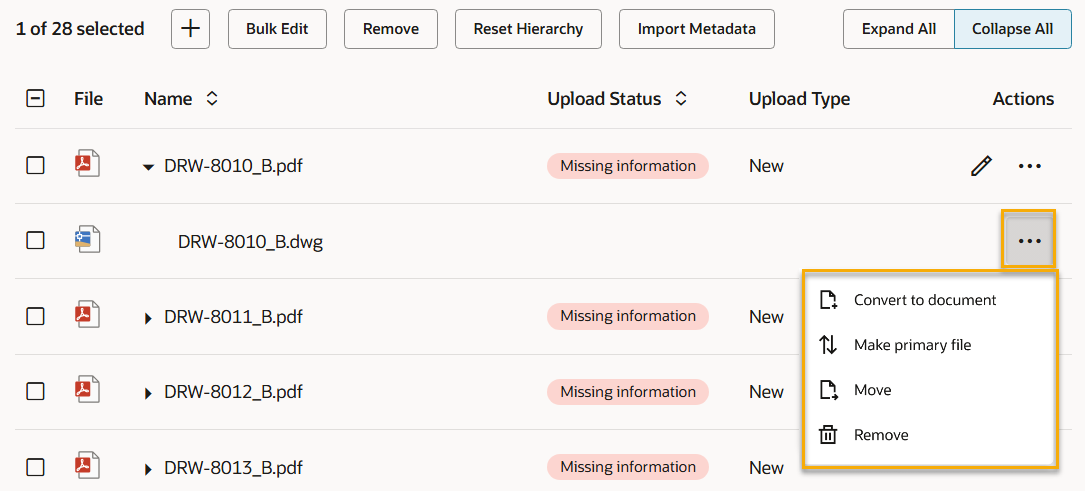
Thanks to your feedback we've updated menu labels and added clearer messaging when updating and registering secondary files.
- You asked for an option to switch a secondary file with the primary file. We've called this new option Make Primary. The previous Make Primary option has been renamed to Convert to document.
- We've renamed Change Primary to Move and updated its icon.
Faster placeholders
-
To save you a step, we'll now automatically populate the number of placeholders to create as one.
Insights
Improvements and fixes
Review changes to some advanced editor reports
-
We’re upgrading the Advanced Online Layout Editor (sometimes called BI Publisher) to strengthen the security of the reporting platform.
-
No major impact to existing reports is expected. However, the upgrade changes how some reports handle related data. A limited set of custom reports may display different results after the upgrade.
-
After the upgrade, a main subject area record may appear when supporting data is missing. For example, a report using Mail and Response Mail can show a mail even when it has no response mail. This means some of your reports may display blank rows.
-
You only need to review reports that were created using the Advanced Online Layout Editor, use a primary subject area with one or more supporting subject areas, and are intended to display records only when supporting data exists.
-
If you don't want additional blank records to appear, follow our guide to identify affected reports and update them to preserve the existing report output.
Document Processes
Improvements and fixes
Improving the matrix
-
The Default Originator field is no longer mandatory, allowing more flexibility in your Review Matrix configuration.
-
We've updated the Chinese and Japanese translations of the Assign Issues Automatically label, so it displays in the correct orientation.
Lobby
Improvements and fixes
Faster onboarding
- We’ve made it easier for new organizations to get started. When a new organization registers for Aconex, the person who completes the registration is automatically set up in Lobby. They no longer need to create a Lobby account manually.
API
What's new
Ensure your API integrations support 64-bit records
-
Thanks to your feedback we've extended the testing period for the upcoming Aconex 64-bit upgrade.
-
In October 2026, we'll upgrade Aconex database fields to 64-bit across all Aconex instances. If your organization integrates with Aconex APIs, you'll need to review your integrations and ensure they support 64-bit data types.
-
The EA1 instance has been upgraded to 64-bit and is ready for you to test your integration(s). Learn how to review your API integrations.
Migrate to OAuth for enhanced security
-
Towards the beginning of 2027 we're planning to retire all Integration IDs. This means that Basic Auth will soon no longer be accepted for API access.
-
From November 2026, you'll no longer be able to create new Integration IDs. Existing Integration IDs will continue to work until they are retired in early 2027.
-
We're providing early notice so you can start planning to migrate to OAuth to avoid additional effort later.
-
If you're not already subscribed to receive updates, we encourage you to subscribe to API News for important information regarding Basic Auth retirement.

We'll gradually release each update over a 30-day period starting September 19.

These updates will be made available to all instances.
Release schedule
Features are gradually rolled out to each instance over a 30-day period, starting from the indicated dates below. You may not see all updates immediately. We can’t guarantee a global rollout of features across instances within the same timeframe. Oracle Aconex Mobile is updated in the fourth week of the month.
While we endeavour to keep this information complete and accurate, we advise you to thoroughly test and confirm feature availability before implementing new processes on your project. This information is accurate at the time of publishing and is subject to change without notice. Learn more about our release process.
+ View schedule
| ASIA1: Sep 24 | EU1: Sep 19 |
| ASIA2: Sep 23 | KSA1: Sep 25 |
| AU1: Oct 01 | MEA: Sep 25 |
| AU2: Sep 23 | UK1: Sep 28 |
| CA1: Sep 20 | US1: Sep 26 |