
Support Central




February 2026
This month you'll find a new way to manage document reviews and coordinate comments, an integrated ITP workflow to mitigate risk and ensure quality work, an easy way to track safety and reduce hazards, and reality capture in Models.

This release is for:
- Project teams who manage deliverables and need an easier way to track and manage reviewer comments.
- Quality managers who use ITPs to deliver high-quality projects efficiently and safely.
- Model coordinators who want to view point cloud files together with their models.
- Site managers who track safety to reduce hazards and injuries on the jobsite.
- Document controllers who need to export large reports.
- Reviewers who asked to automatically flatten markups after a workflow.
- Package admins who send high volumes of packages.
- Mail approvers with lots of mail to approve.
Document Processes
What's new
Streamlined reviews with powerful comment management
- Document Processes helps you manage document reviews and track comments across organizations, in real time.
- Start reviews across multiple disciplines in a single action. Documents are automatically routed to reviewers based on each document's metadata.
- A built in QA step ensures the document is checked before reviewers can begin their review.
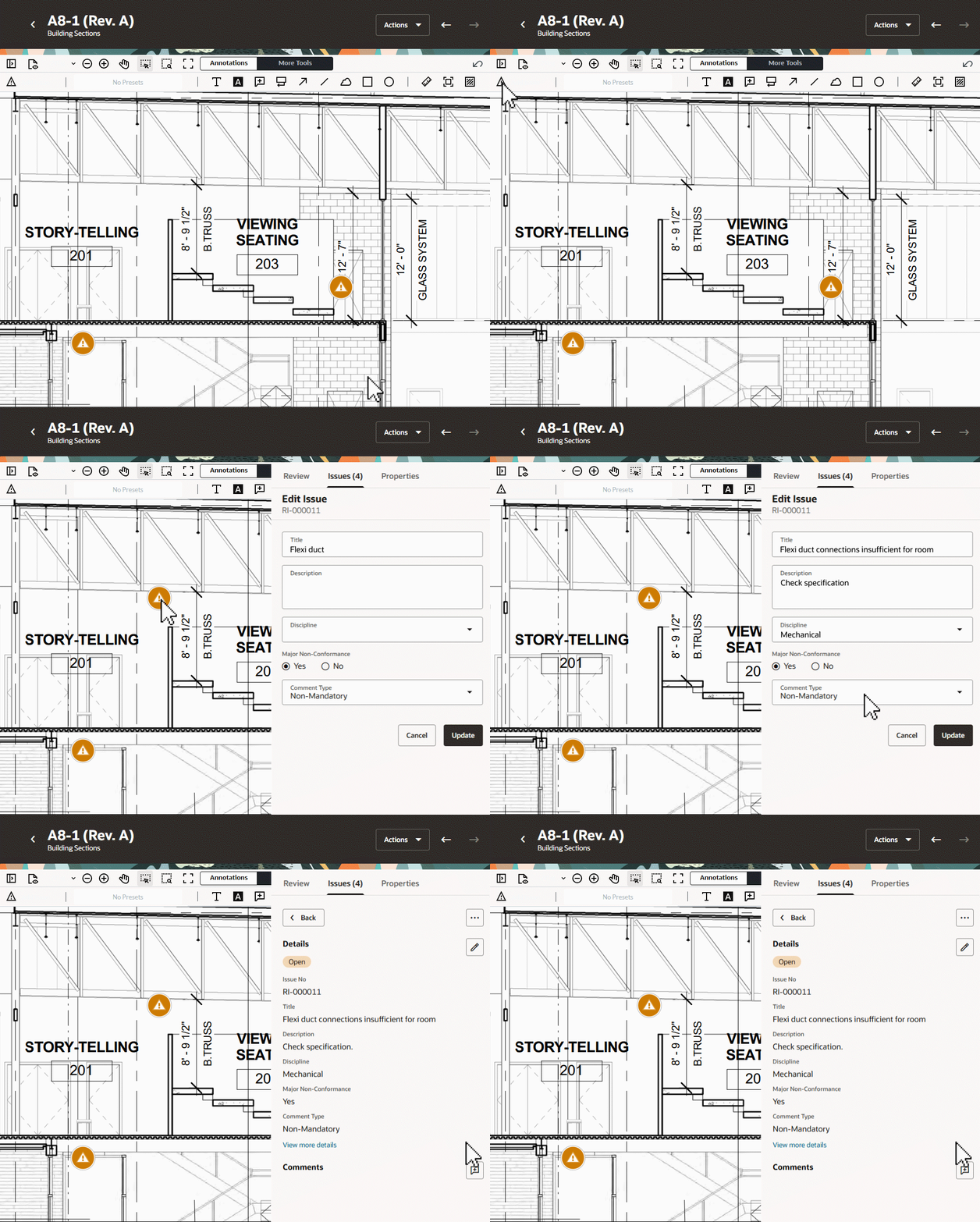
- Reviewers can pin review issues to drawings to add their comments and markups. They can also reply to comments from other reviewers.
- A dedicated register for comment tracking allows organizations to track, collaborate, and resolve review issues.
- Using the Review Matrix, see your review rules at a glance and perform bulk updates in a few clicks.
- All document metadata and project fields are included as searchable fields to help you track reviews easily.
- With Document Processes metadata also available in Packages, you can view the progress of each deliverable in the context of the package, along with review outcomes and issues.
- Learn more about Document Processes
Note: Document Processes is disabled on all projects by default. A Project Admin can enable it from Module Management.
Improvements and fixes
Choose your view in the Review Matrix
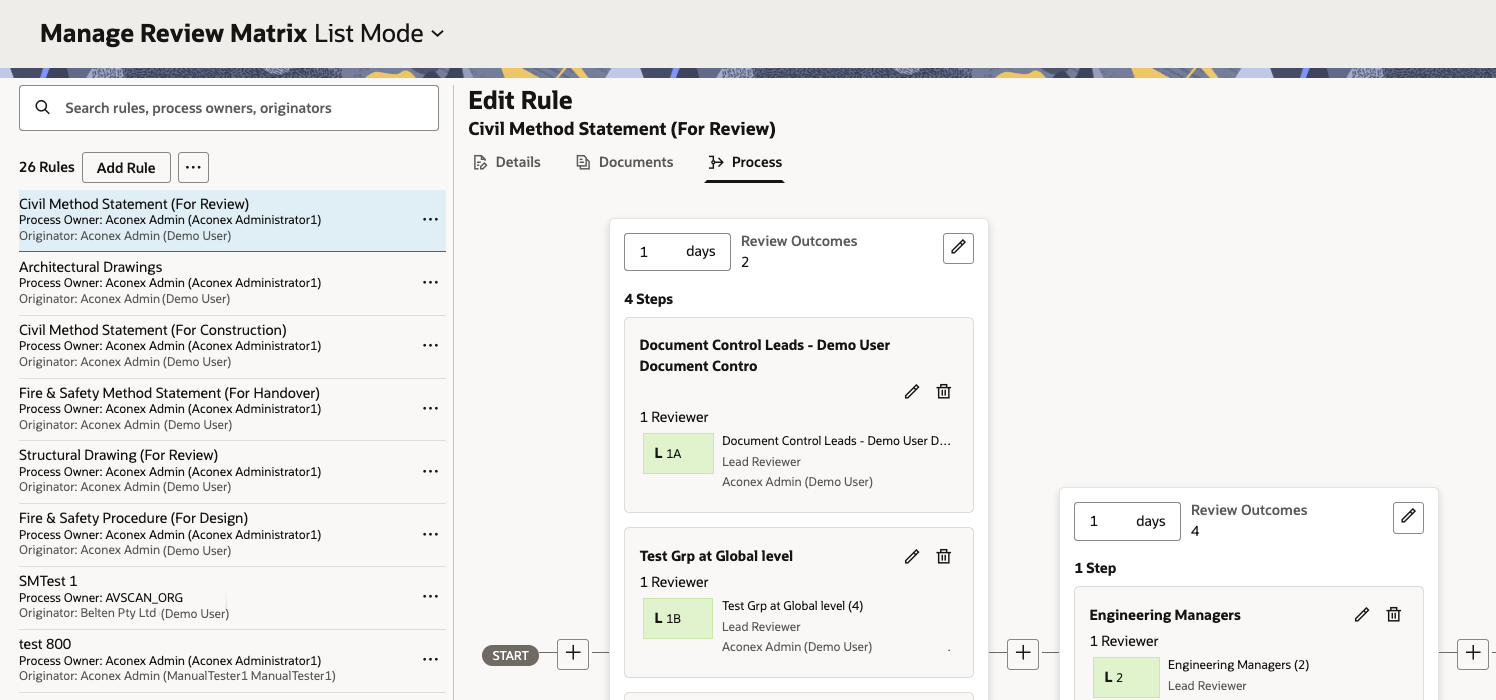
- By default, the Review Matrix will now display your rules as a visual flow. This makes it easier for users new to Document Processes to understand the flow for each rule.
- Advanced users who are more familiar with the grid layout can switch to the grid view with a click, where it's easy to update rules in bulk.
Attach files to review issues
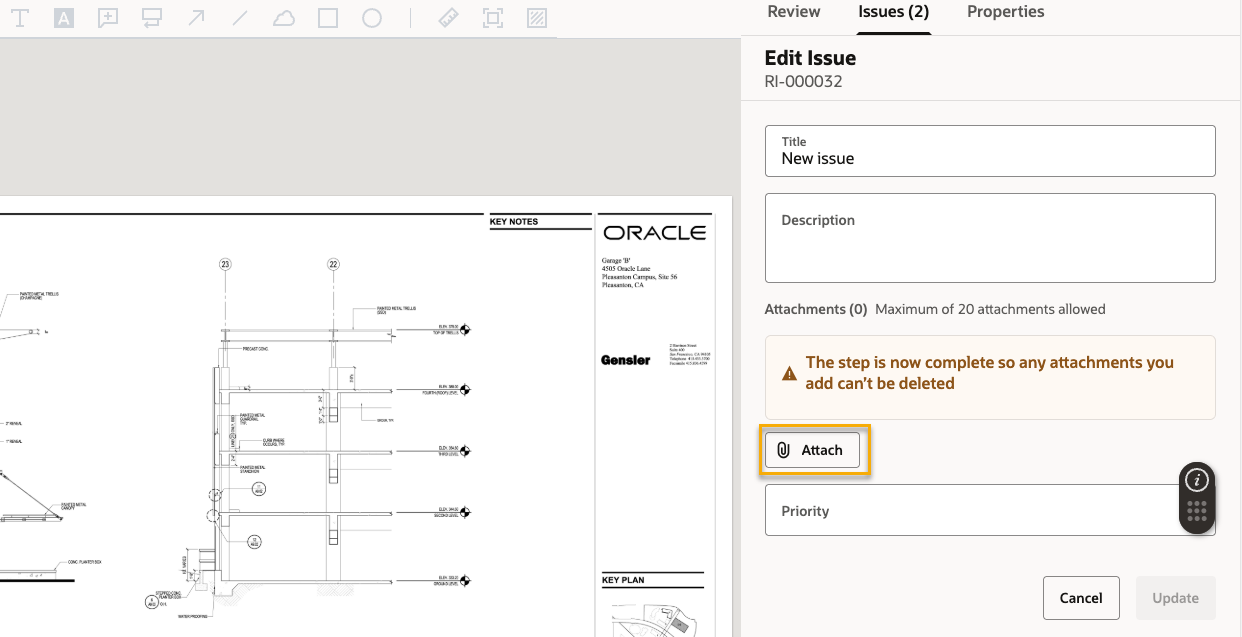
- You can now attach up to 20 files when raising an issue during a review.
- This helps you provide additional information to other reviewers about the issue.
Review a document from a transmittal
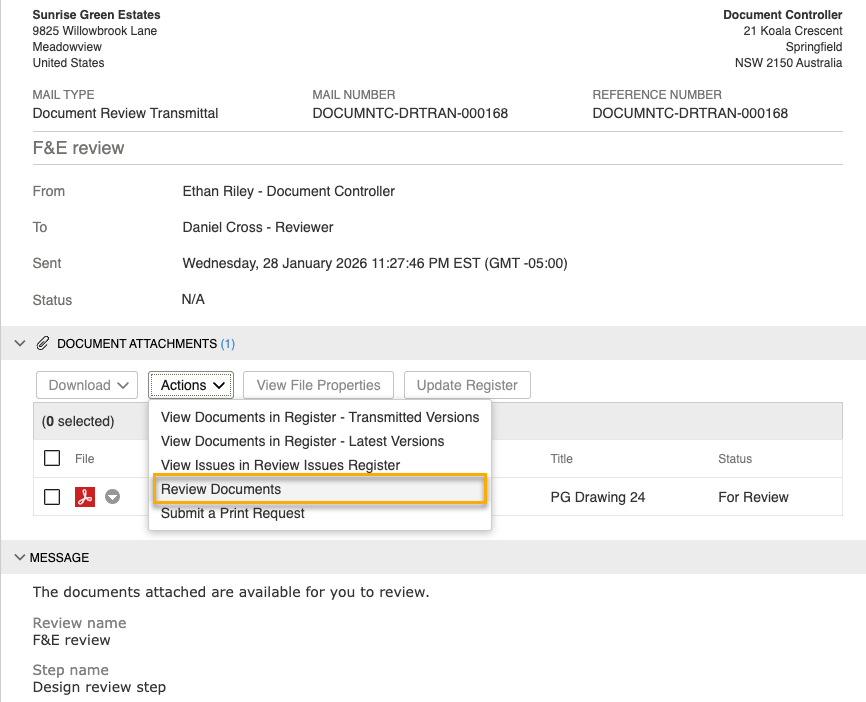
- You can now click through to a review step from a transmittal.
- This saves you time from having to manually lookup the review step.
Save a rule to draft
- If you've started creating a rule but not ready to make it live, you can now save it as a draft.
- This means you no longer have to start over if you don't yet have all the required information to complete the rule details.
Field
What's new
Deliver high-quality projects without costly mistakes
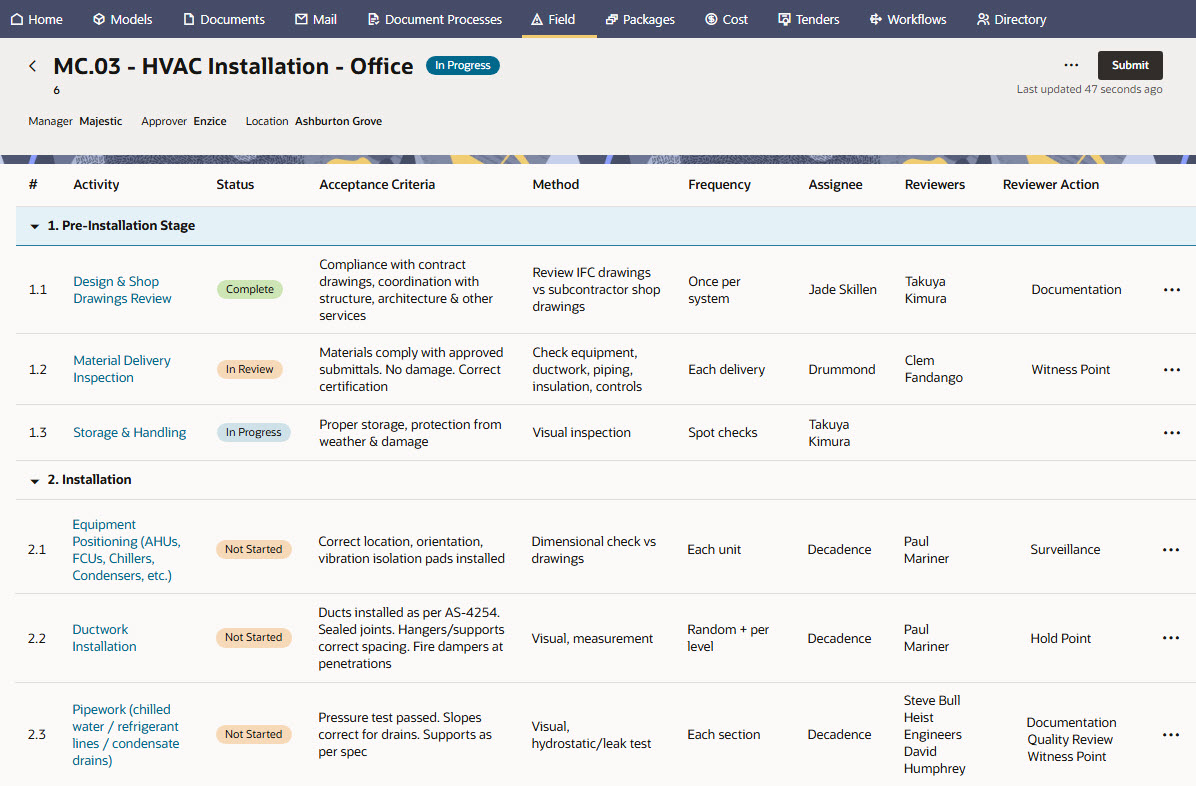
- Test Plans is the new feature in Field to help you manage Inspection and Test Plans (ITPs) on your project.
- Identify work to be inspected or tested, by whom, and at what stage or frequency.
- Ensure all organizations on the project understand the expectations of a piece of work and their responsibilities.
- Ensure work meets the required standards and evidence is well documented.
- Monitor progress for each piece of work. See who is holding up progress, and take the necessary corrective action.
- Mitigate risk and ensure quality work is being done, saving time and money.
- Also available on Oracle Aconex Mobile, so you can work with Test Plans on the go.
- Learn more about Test Plans
Track test plans from packages
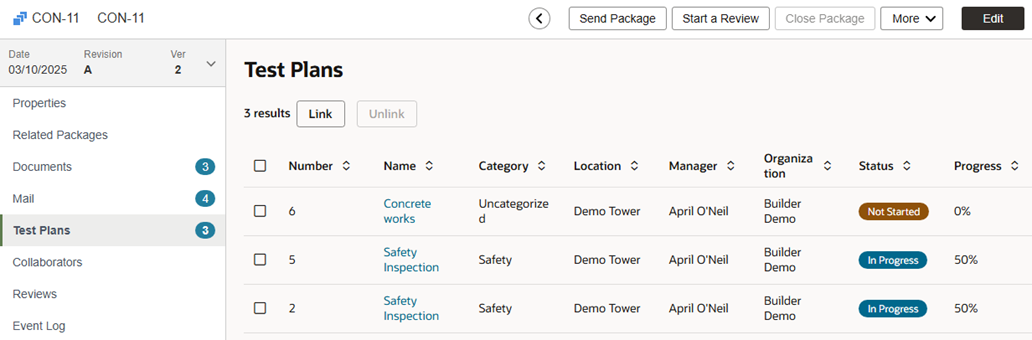
- Projects enabled with Test Plans can now seamlessly track and work with ITPs from their packages.
- Link and unlink specific test plans to each package.
- See the status of each linked test plan within the context of the package.
- Quickly navigate between test plan details and the package information.
- Include test plans when you export the package.
- Users with permission can access and update test plan activities directly from the package.
Track safety and reduce risk on the jobsite
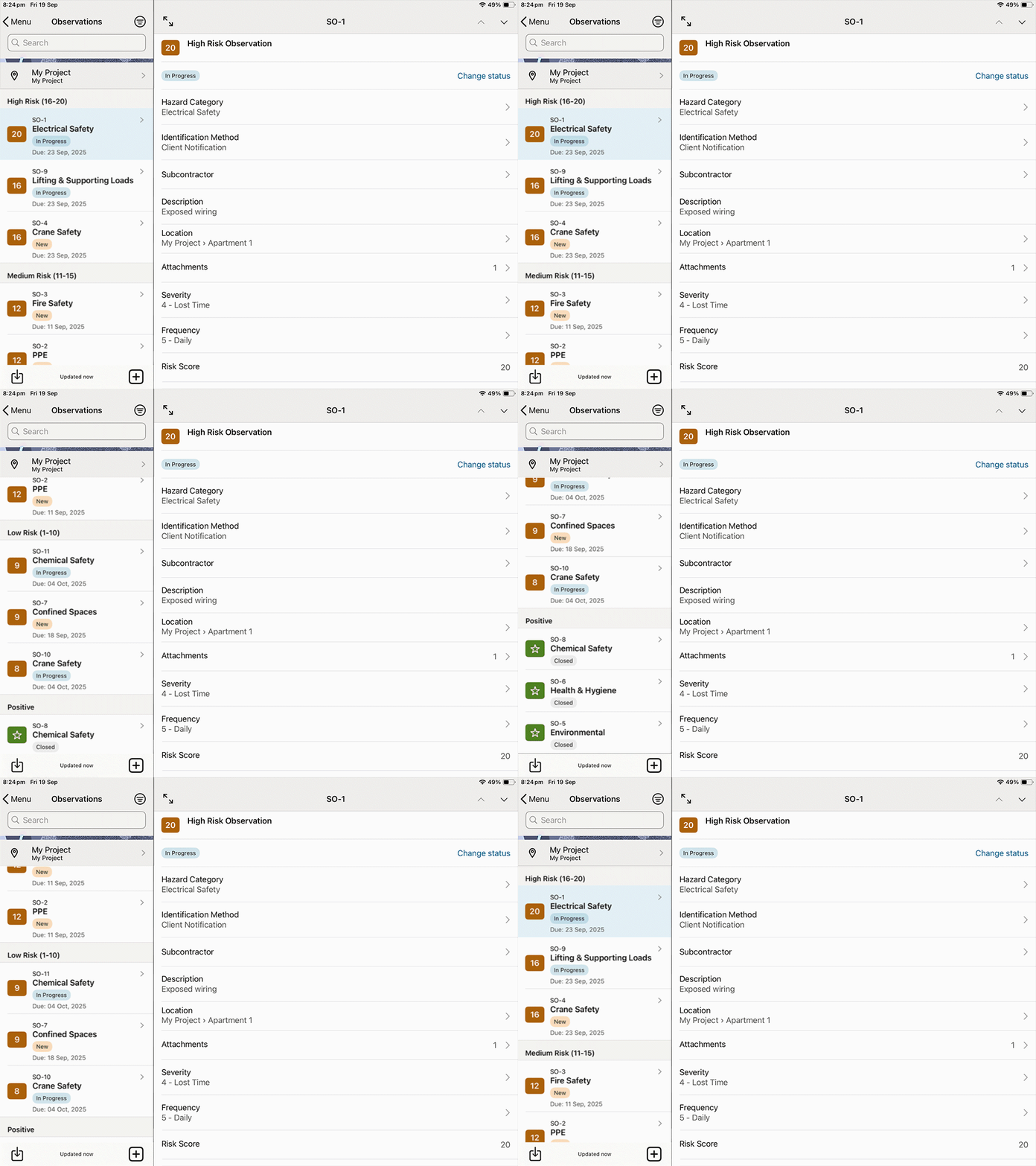
- Observations is a new feature in Field to help you reduce hazards and injuries on your jobsite, while maintaining a permanent record of safety.
- Capture risks during routine safety inspections, or at any time a hazard is identified.
- Capture positive observations to document good safety practices.
- Export your observations to PDF for further analysis.
- Also available in Oracle Aconex Mobile so you can work with Observations on the go.
Improvements and fixes
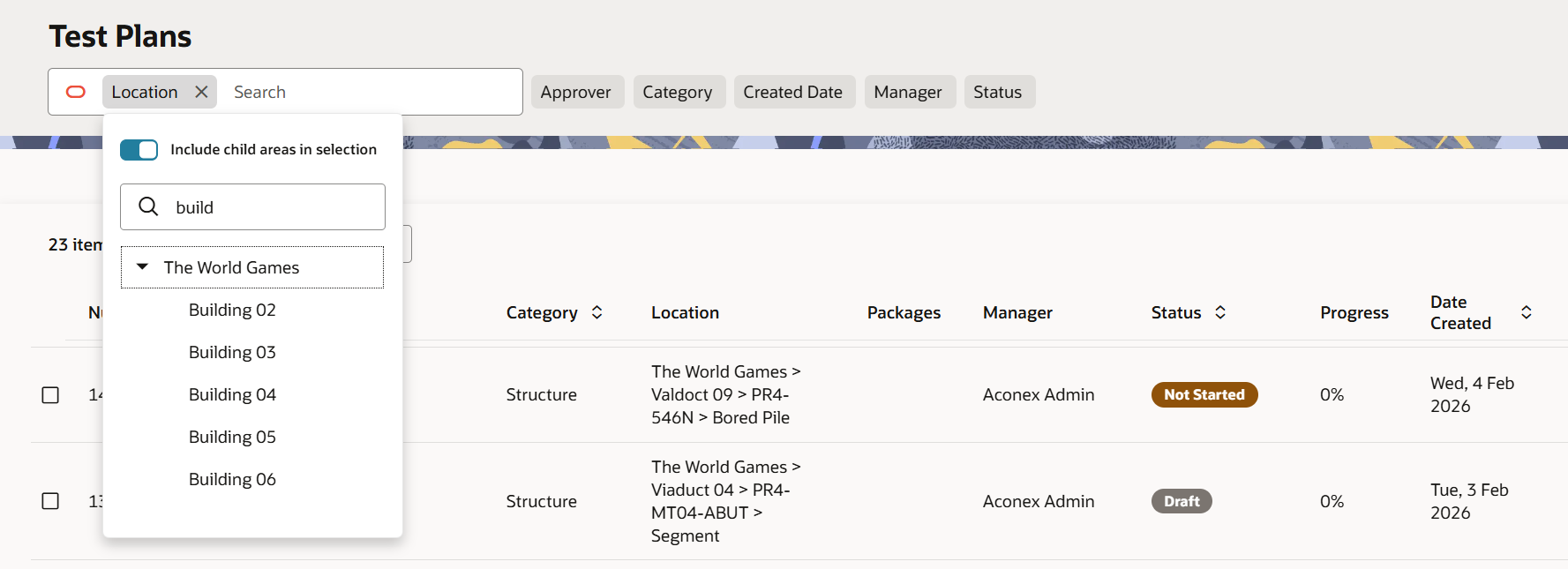
Find test plans by location
- Your list of test plans can now be filtered by an area (and its subareas).
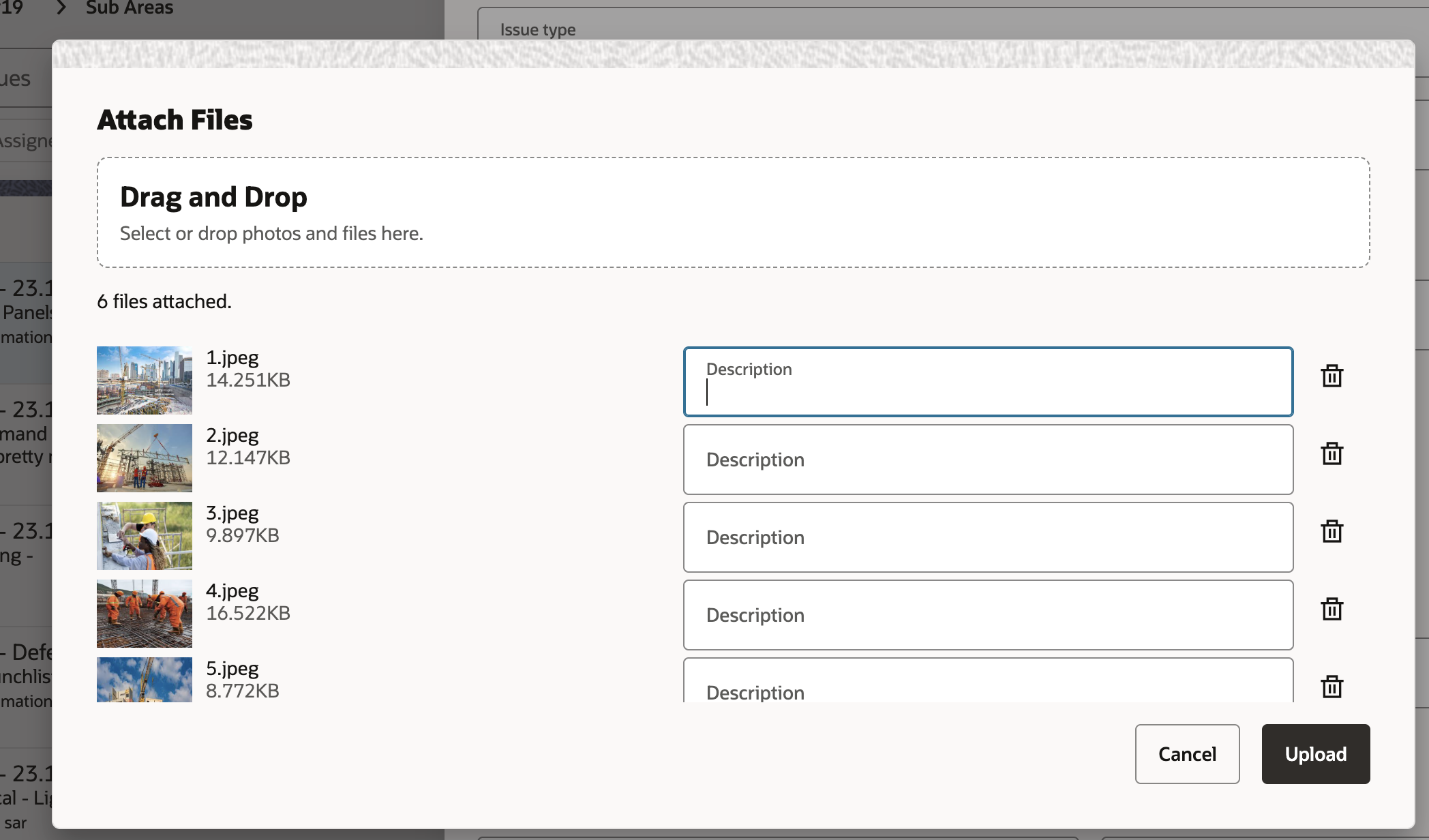
Add descriptions to any issue attachments
- You can now add a description to any files (including images) you attach to an issue.
- We've also updated the label from Comment to Description to clarify its purpose.
Enhance your issues report
- Issues exported to PDF now provide up to 25 high resolution images to help you see important details.
- We've also updated the layout of the report to align with the issue details you see on screen. This makes the report easier to read.
Models
What's new
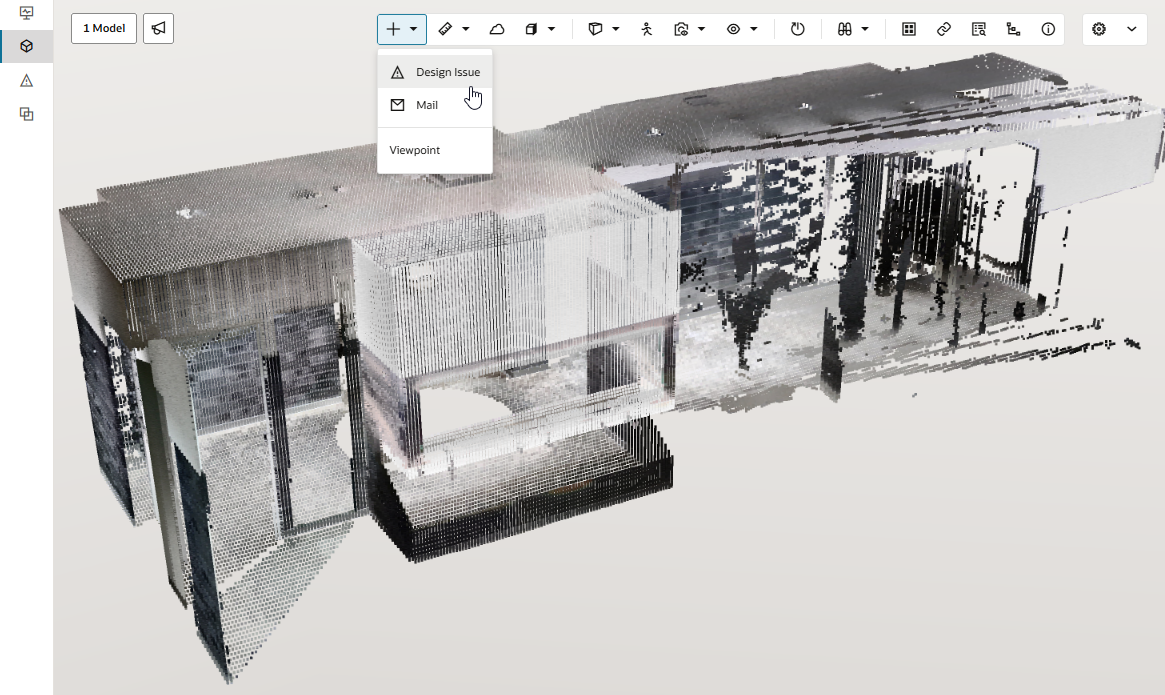
Coordinate reality capture alongside your 3D models
- Explore .e57 point cloud files to compare the design with actual site conditions during a design validation process.
- Use the existing alignment tool to line up the point cloud data with the model, helping you to identify defects or clashes.
- Learn more about point cloud
Improvements and fixes
Faster models
- We've made improvements to help your models load even faster and reduce the chance of the page becoming unresponsive.
- When opening a model from the Document Register, the snapshot of the model now displays correctly.
Documents
Improvements and fixes
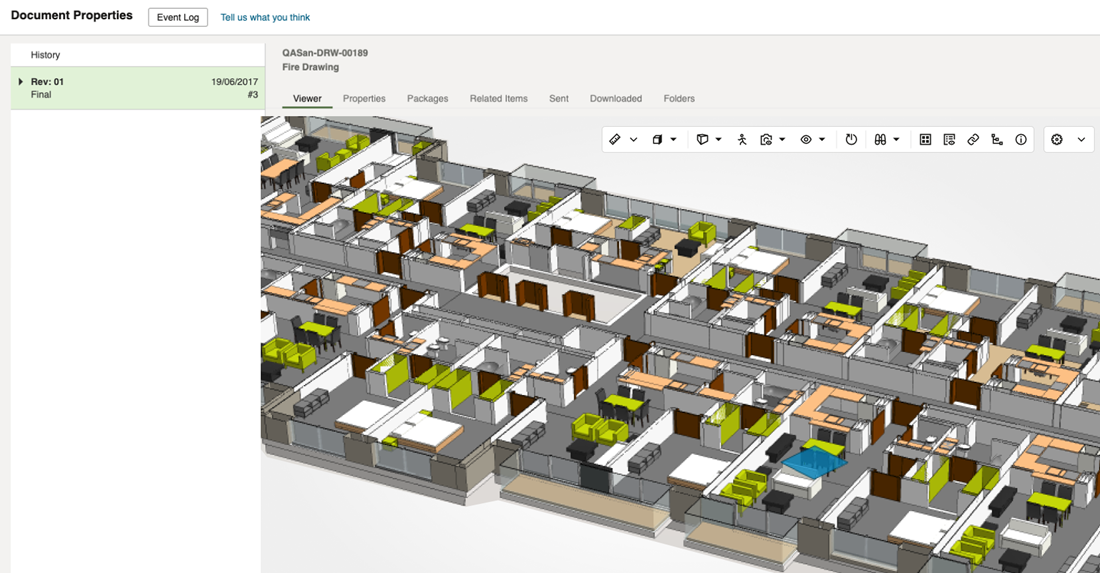
View models from the Document Register
- After uploading a model to the Document Register, you and your team can view it immediately without going into the Models module. This allows you to view a specific version of a model.
Export larger data sets
- We've increased the amount of data you can export in Excel from 50K to a maximum of 100K rows.
- This applies to reports for Documents, Mail, Supplier Documents, and Workflows.
Improvements to the new Bulk Processing
- You'll now see an in-app notification if your bulk processing job fails so you can correct the problem and restart the job.
- We'll now check your project's document fields are locked before you can start a job.
Note: Classic Bulk Processing will soon be retired. We recommend you start using the new Bulk Processing today and let us know what you think in-app.
What's new
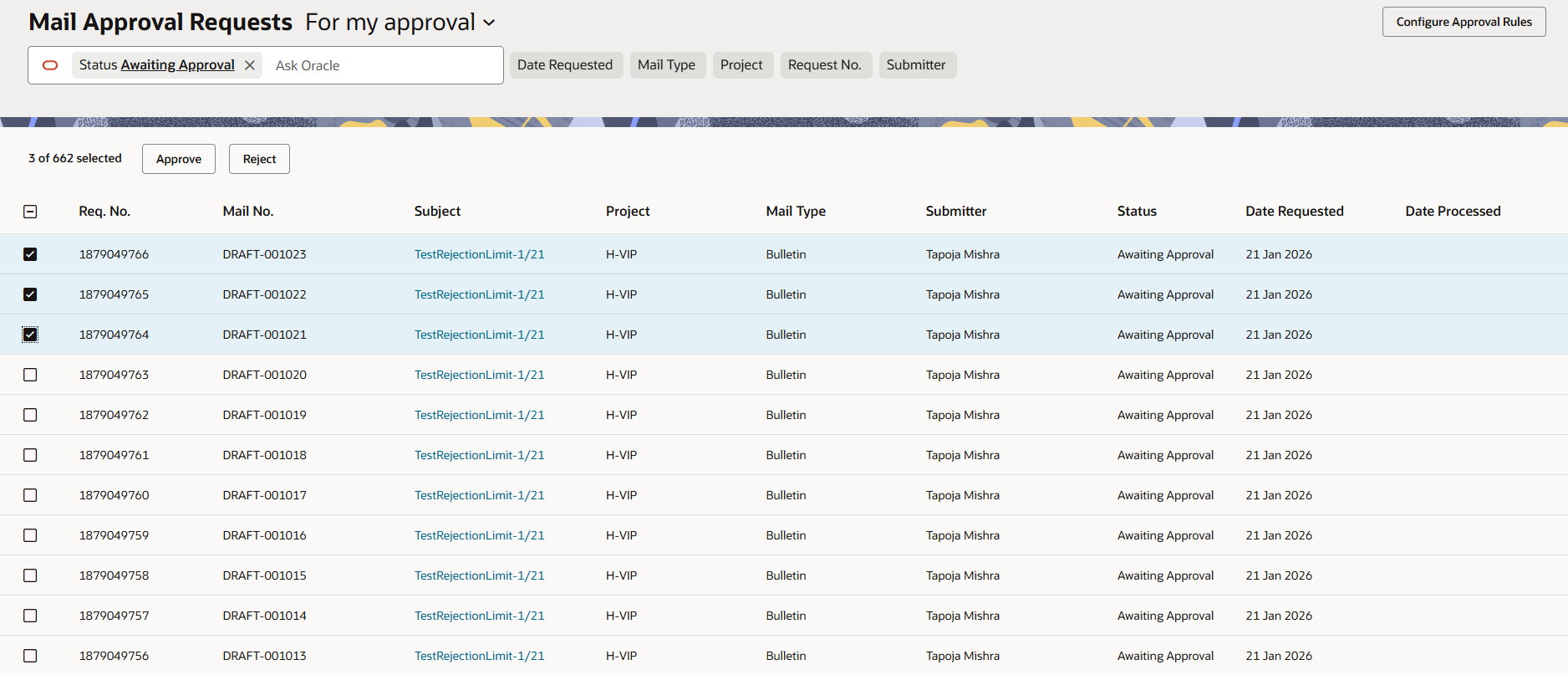
Bulk mail approvals
- Thanks to your feedback, you can now approve or reject up to 10 mail approvals at once.
- We've also given the Mail Approvals screen a modern design to make it easier to find and manage your approvals.
Note: This update will initially be available to the CA1 instance, with plans to rollout to other instances over the coming weeks.
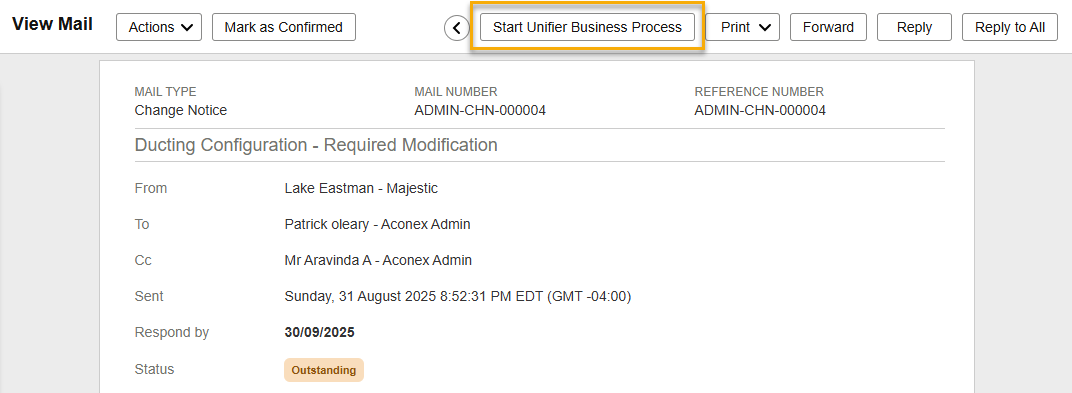
Create a business process in Unifier
If you manage your project in both Aconex and Primavera Unifier, we've saved you some time.
Note: This feature is currently only available to projects on the KSA1 instance. We'll continue to develop the feature based on feedback and announce availability for other Aconex instances at a later date.
- Sometimes correspondence in Aconex requires a business process, such as a Change Request to be created in Unifier.
- To save time and reduce errors, you can now start the business process automatically from an Aconex mail, including all details and attachments.
- You can start a business process from any mail that your organization has sent or received.
- You'll need to have the Start Unifier Business Process permission granted to your user role to perform this action.
- Your project in Aconex and Unifier (Multi-tenant) must be linked in the Lobby.
- Learn more about creating a business process in Unifier
Viewer
What's new
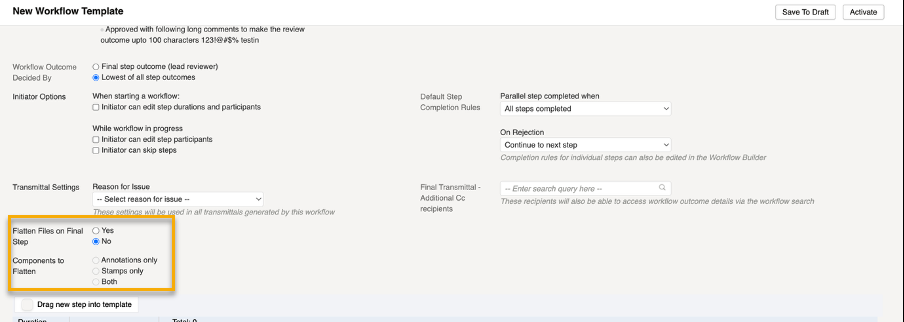
Automated flattening of markups
- Thanks to your feedback you can now configure workflow templates to automatically flatten annotations and/or stamps at the end of a review.
- This means you no longer have to manually flatten markups for each document.
- By default, flattening is disabled for each workflow template, allowing you to specify which templates to enable it on.
Note: This update will initially be available to the CA1 and EU1 instances, with plans to rollout to other instances over the coming weeks.
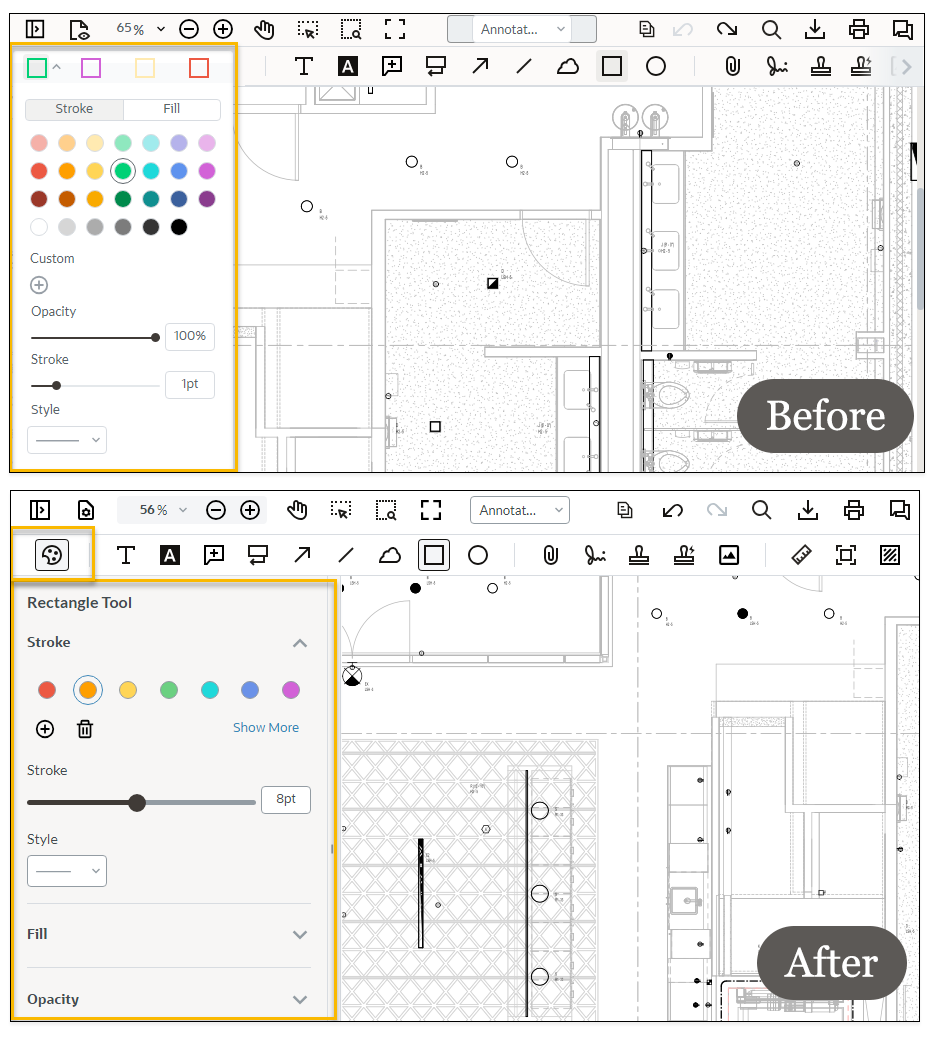
Changes to markup styles and presets
- The viewer now allows you to display and save one preset per markup tool. Previously, presets displayed four different options by default.
- You'll also see a new Style button to apply stroke, color and lines to your markups. The style panel has a visual update, and the line tool has some additional styling options.
Packages
What's new
Send more packages in one go
Package users, we've heard you - now you can send up to 20 packages in one go. This reduces the amount of time required to send large amounts of packages.
Improvements and fixes
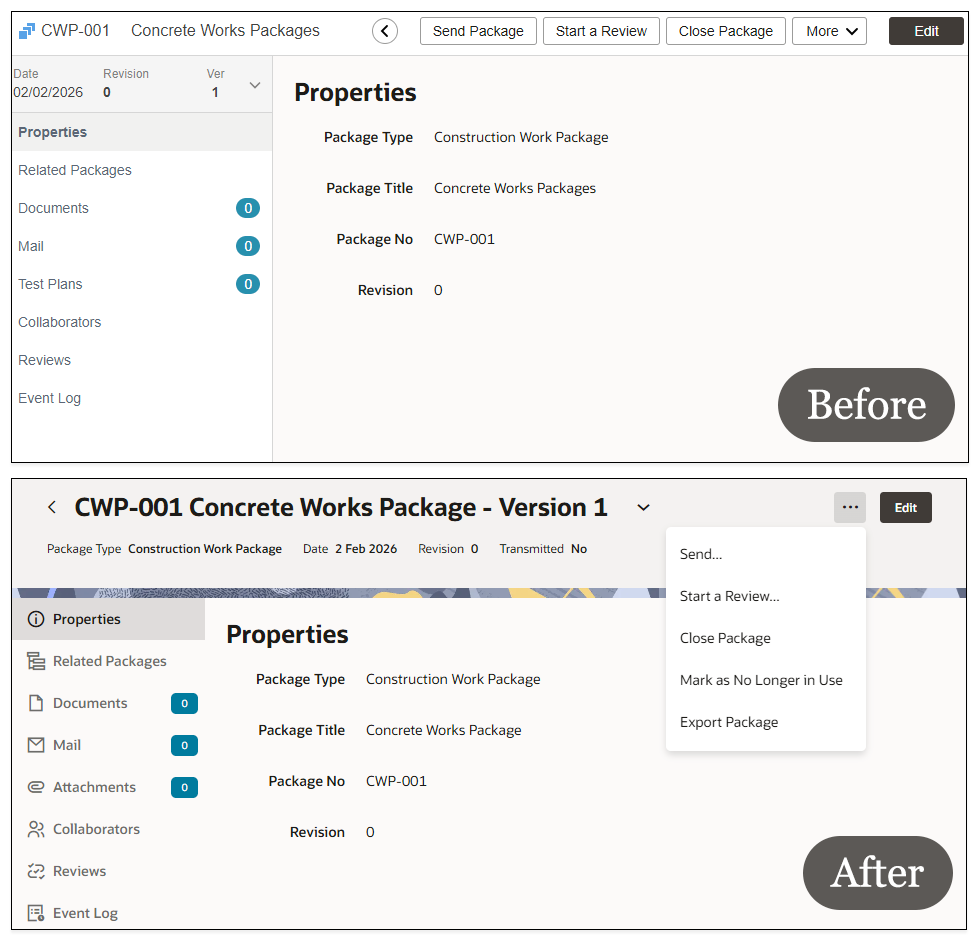
A new-look for package details
- As we continue to work towards providing a consistent design across the platform, we've given the package view an updated design.
- The options on the top menu such as send package, or start review, can now be found under the three dots menu on the top right.
- You can switch to different versions of the package by selecting the down arrow next to the version number at the top of the package view.
- You'll see new icons and fonts for each section of the package, making it easy to find the detail you need.
- We've also given the package review screen an improved design to match.
Mobile
What's new
Keeping your app updated
- We'll no longer support older versions of the Oracle Aconex mobile app.
- If your app is one version behind, you'll be prompted to update to the latest version.
- If your app is more than two versions behind, you'll be unable to use the app and must update to the latest version. An alert will appear for you to take action.
- We encourage you to keep it updated, giving you access to the latest features, improvements and performance enhancements.
- You can find out which version you're on from the home or settings screen of the app.
Improvements and fixes
Filter issues captured by other users
- The Captured By filter now allows you to find Field issues captured by multiple different users. This provides flexibility to help you find the issues you need to work on.
Cost
Improvements and fixes
Improvements for Cost
- We've introduced a new sorting order in the Cost Worksheet to make it easier to read. When sorting by code, or any configured field, the items are now organized by: Parent WBS, Control Accounts within WBS, Work Packages within Control Accounts, and Progress Packages within Work Packages.
- Printable and custom reports now include the Cost and Budget Days fields for change events and change event items, helping your see more detail in your reports.
- We've made it easier to identify if a budget transfer is a debit or credit. The Budget Transfer column has now been renamed to Budget Transfer From and we've introduced a new column Budget Transfer To. A new Net Budget Transfer column calculates the sum of these.
- Organizations with superscripts or subscripts in their name can now be be enabled in Cost
We fixed some bugs
- The activity stream now includes all updates made through PATCH API requests, ensuring a complete audit trail.
- Manual fields are now correctly captured when creating change event items using POST API requests.
- We fixed a bug in the P6 integration where some date fields were missing.
Insights
Improvements and fixes
More data in your reports
- In field inspections reports, you can now report and filter on the inspection due date.
- Workflow step reports can now be filtered by the assigned organization. This filter is also available in standard workflow reports.
- If your document report exceeds 50K rows it will be ordered by the most 50K recent documents, ensuring you see the latest document data.
- You can now run printable reports in Cost from a shared workspace.
Manage reports shared with all project users
- If a report is shared with all project users, it can now be edited or deleted by any user in the organization that created it. This ensures the report can still be managed in the event the user who created it leaves the project or organization.
Lobby
Improvements and fixes
Switch to the Lobby from Aconex
- You lets us know the button to switch to the Lobby wasn't clear, so we've fixed that.
- In the application switcher we've renamed the View all Projects button to Open Lobby.
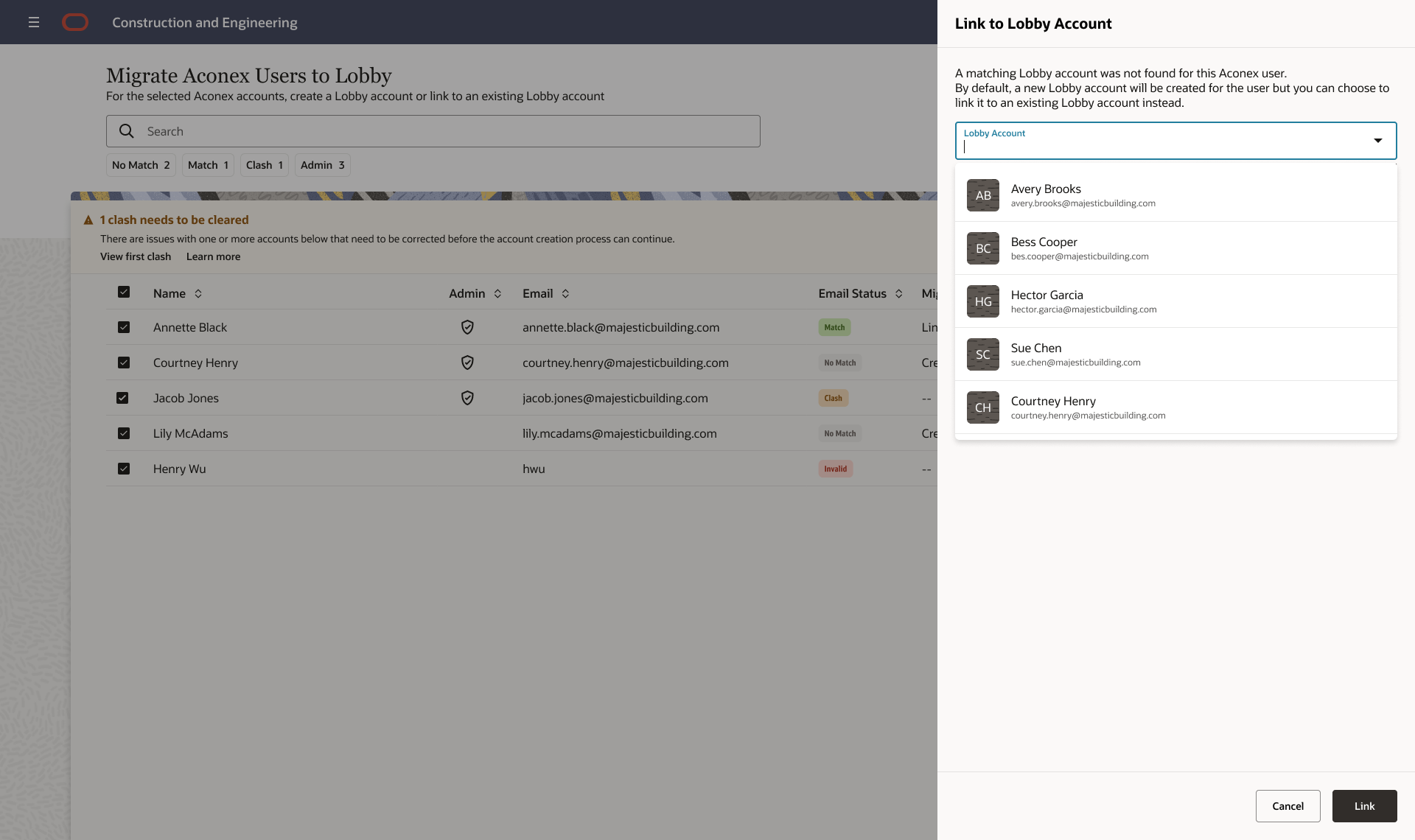
Link a new Lobby user to an existing Aconex account
- Lobby Admins can save some time and link an Aconex account when creating new Lobby accounts.
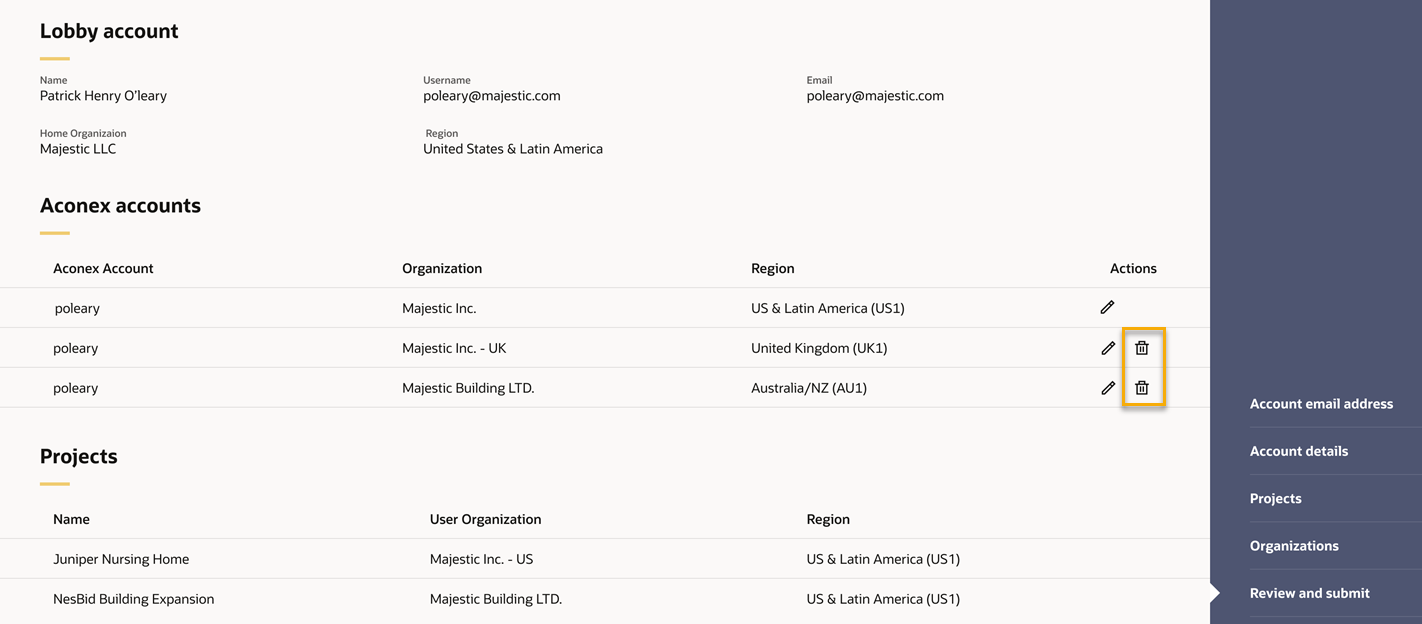
Remove Aconex accounts when creating new Lobby users
- When creating new user accounts, the review step now provides an option remove Aconex accounts that were incorrectly added or are not required to be linked for the new user.
API
What's new
A new API for retrieving mail and project fields
- You can now request your mail data including project fields in a single call. You no longer have to make separate calls to achieve this.
- The new API is POST /api/projects/{projectid}/mail/search.
- View Mail API Documentation
Generate a new OAuth client secret
- Lobby admins can generate a new client secret for their OAuth Clients. You no longer need to contact support for this.

We'll gradually release each update over a 30-day period starting February 21.

These updates will be made available to all instances except where indicated.
Release schedule
Features are gradually rolled out to each instance over a 30-day period, starting from the indicated dates below. You may not see all updates immediately. We can’t guarantee a global rollout of features across instances within the same timeframe. Oracle Aconex Mobile is updated in the fourth week of the month.
While we endeavour to keep this information complete and accurate, we advise you to thoroughly test and confirm feature availability before implementing new processes on your project. This information is accurate at the time of publishing and is subject to change without notice. Learn more about our release process
+ View schedule
| ASIA1: Feb 26 | EU1: Feb 21 |
| ASIA2: Feb 25 | KSA1: Feb 27 |
| AU1: Mar 05 | MEA: Feb 27 |
| AU2: Feb 25 | UK1: Mar 02 |
| CA1: Feb 22 | US1: Feb 28 |