The Roundup featuring releases April through June 2026
Welcome to the August 2026 Roundup. In this issue, we revisit releases April through June 2026, and highlight some features you may have missed.
Keep filenames consistent and configure upload templates
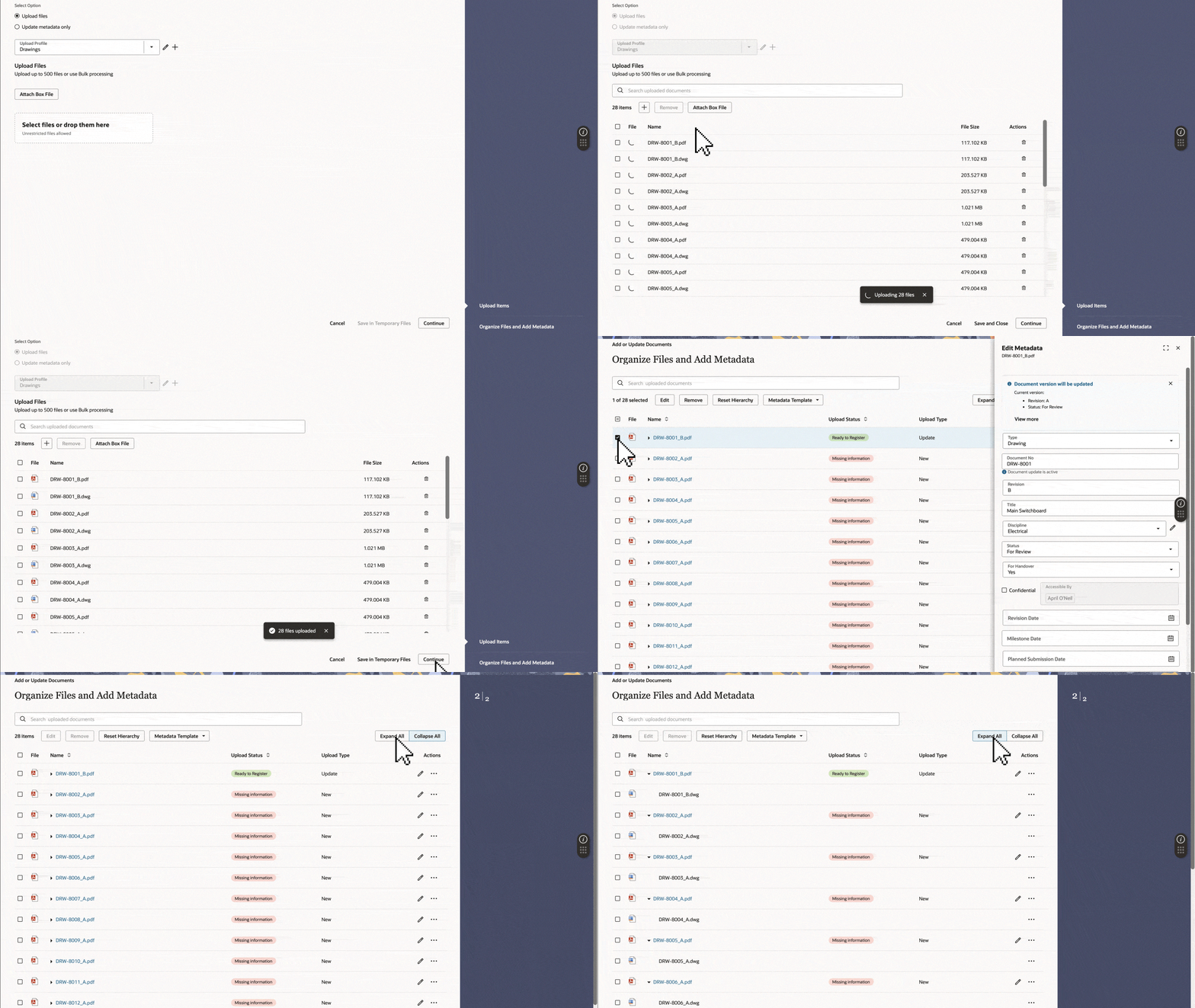
The new enhanced upload introduces a modern, intuitive flow for uploading, with flexible upload templates. It also lays the foundation for the upcoming Renditions feature, which will let you register multiple file types under a single document record.
Project Admins can configure a project-wide naming convention for all registered or updated files. This helps reduce manual renaming, keeps file names consistent across the project, and saves time.
Upload templates can be used in any available upload flow. For example, a template download from Bulk Processing can also be used in the Update Metadata Only flow. Project Admins can also choose whether their project uses single-sheet or multi-sheet metadata templates.
Save time by responding to multiple issues in one action. This helps you apply the same response or comment across related issues.
Project Admins can now choose which issue fields are mandatory, ensuring reviewers provide all the information needed when raising issues.
When creating a review rule, you can configure aReason for Issue to be included in the transmittal. This gives Process Owners clear context on why the review was initiated and aligns the experience in Workflows.
Save time by creating up to 10 test plans from a single template. This is helpful for repetitive work, such as concrete pours across multiple project locations. You can also select multiple locations when filtering your test plans.
When creating or editing a test plan template, you can assign a participant role to users in other organizations. This provides flexibility and reduces manual adjustments after a test plan is created.
A new Ready to Submit status makes it easy to identify completed test plans. Once all activities are finished, the status updates automatically, so you know it's ready for submission.
The Project Activity Report helps you track adoption trends across your project portfolio. Set a custom date range to track adoption over longer periods or specific project phases.
Select up to 25 inspections across multiple pages and export them as separate zip files in one go, making handover faster.
We've added a Current Contract field to Contract Change Items in Cost to help you see the current contracted value without needing to switch between grids.
This month you'll find custom stamps in Workflows, an easier way to find test plans ready to submit, read-only access to tender invitations, and flexible dates in the project activity report.
This month you'll find a file naming preference for uploads, mandatory issue fields for reviews, project field hierarchies for packages, and an easy way to find your Org Admin.
This month you'll find bulk updates for review issues, bulk exports for inspections, a faster way to track adoption across all projects, and APIs for supplementary files and package management.